---
title: スタンドアローンJSF2.2+PrimeFaces入門メモ
tags: ["JSF", "Java", "PrimeFaces"]
categories: ["Programming", "Java", "JavaServerFaces", "PrimeFaces"]
date: 2014-05-22T22:12:20Z
updated: 2014-05-22T22:12:20Z
---

フルスタックJava EEじゃなくてJSFだけ使いたいぜってときのメモ。
というかPrimeFacesを単品で使いたいんです。フロントエンド構築用にJavaScript MV*フレームワークの代替にしたいんです。

### mavenで雛形プロジェクトを作る

    $ mvn -B archetype:generate -DgroupId=com.mycompany.app -DartifactId=hello-jsf -Dversion=1.0.0 -DarchetypeArtifactId=maven-archetype-webapp
    
### JSF(mojarra)のdependencyを追加

pom.xmlに以下のように修正します。折角なのでコピペできるように全文貼っておきます。

    <project xmlns="http://maven.apache.org/POM/4.0.0" xmlns:xsi="http://www.w3.org/2001/XMLSchema-instance"
             xsi:schemaLocation="http://maven.apache.org/POM/4.0.0 http://maven.apache.org/maven-v4_0_0.xsd">
        <modelVersion>4.0.0</modelVersion>
        <groupId>com.mycompany.app</groupId>
        <artifactId>hello-jsf</artifactId>
        <packaging>war</packaging>
        <version>1.0.0</version>
        <name>hello-jsf Maven Webapp</name>
        <url>http://maven.apache.org</url>
        <dependencies>
            <!-- ここからMojarra -->
            <dependency>
                <groupId>com.sun.faces</groupId>
                <artifactId>jsf-api</artifactId>
                <version>2.2.6</version>
            </dependency>
            <dependency>
                <groupId>com.sun.faces</groupId>
                <artifactId>jsf-impl</artifactId>
                <version>2.2.6</version>
            </dependency>
            <!-- ここまでMojarra -->
            <dependency>
                <groupId>junit</groupId>
                <artifactId>junit</artifactId>
                <!-- 無駄にJUnitのバージョンを変えておく -->
                <version>4.11</version>
                <scope>test</scope>
            </dependency>
        </dependencies>
        <build>
            <finalName>hello-jsf</finalName>
        </build>
    </project>
    
### web.xmlを修正する
`mvn archetype:generate`で吐かれるweb.xmlはゴミなので、以下に置換します。

    <?xml version="1.0" encoding="UTF-8"?>
    <web-app version="3.0" xmlns="http://java.sun.com/xml/ns/javaee"
             xmlns:xsi="http://www.w3.org/2001/XMLSchema-instance"
             xsi:schemaLocation="http://java.sun.com/xml/ns/javaee
      http://java.sun.com/xml/ns/javaee/web-app_3_0.xsd">
    
        <display-name>JSF Web Application</display-name>
    
        <!-- Welcome -->
        <welcome-file-list>
            <welcome-file>index.xhtml</welcome-file>
        </welcome-file-list>
    
        <!-- JSF Servlet -->
        <servlet>
            <servlet-name>Faces Servlet</servlet-name>
            <servlet-class>javax.faces.webapp.FacesServlet</servlet-class>
            <load-on-startup>1</load-on-startup>
        </servlet>
    
        <servlet-mapping>
            <servlet-name>Faces Servlet</servlet-name>
            <url-pattern>*.xhtml</url-pattern>
        </servlet-mapping>
    
    </web-app>

### Facelets作成
 
 src/main/webapp/index.xhtmlを作成します。
 
 IntelliJ IDEAを使う場合はwebappsで右クリックして「JSF/Facelets」をクリック。「Kind」を"Facelets file"にする。
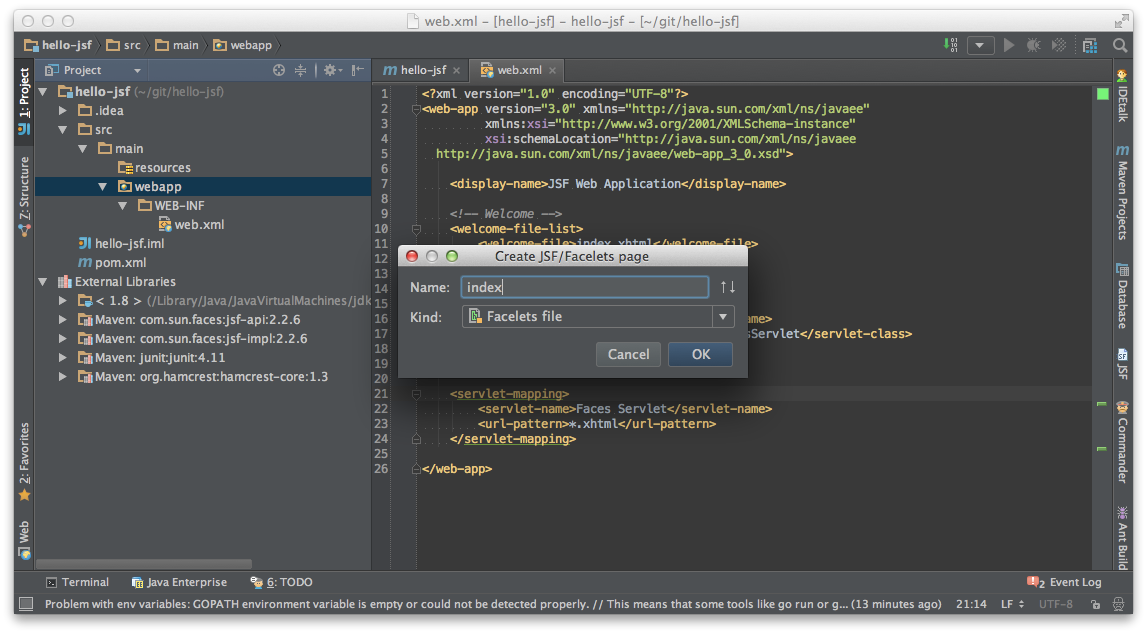
    
![image](https://qiita-image-store.s3.amazonaws.com/0/1852/33696f45-273c-0bc6-5b03-dcba9519c14e.png)

中身はこんな感じ（IDEAが出力したもの）

    <?xml version="1.0" encoding="UTF-8"?>
    <!DOCTYPE html
            PUBLIC "-//W3C//DTD XHTML 1.0 Transitional//EN"
            "http://www.w3.org/TR/xhtml1/DTD/xhtml1-transitional.dtd">
    
    <html xmlns="http://www.w3.org/1999/xhtml"
          xmlns:h="http://java.sun.com/jsf/html">
    
    <h:head>
        <title>Simple JSF Facelets page</title>
    </h:head>
    
    <h:body>
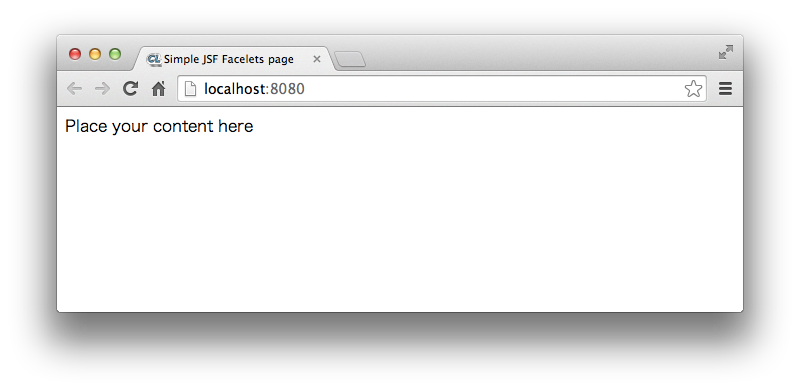
        Place your content here
    </h:body>
    
    </html>
`mvn archetype:generate`で吐かれたindex.jspは捨ててください。

### デプロイ
JSFしか扱っていないのでAPサーバーはなんでもいいっす。ドラ猫でおk。

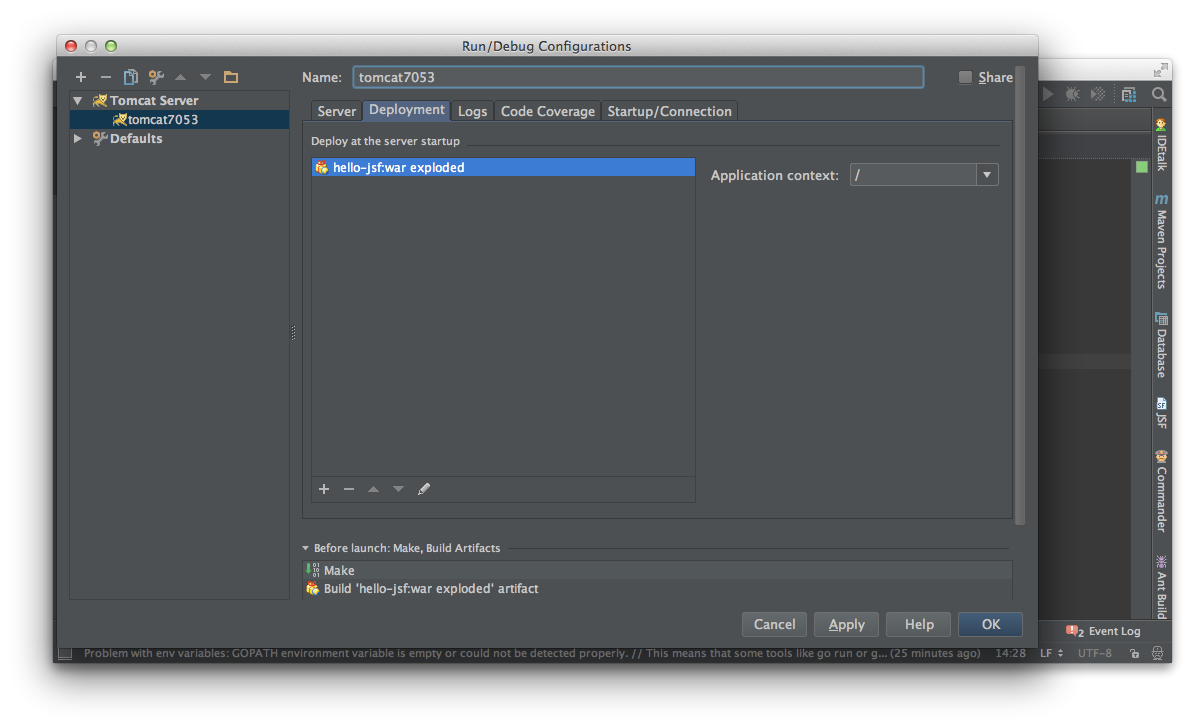
くそ丁寧にIDEAでのTomcat設定方法を貼っておきます。

![image](https://qiita-image-store.s3.amazonaws.com/0/1852/5156b73e-39a3-3ba7-ddcb-99dae5f1ef98.png)

![image](https://qiita-image-store.s3.amazonaws.com/0/1852/72a70cb6-cc04-a1cc-f79a-d6185a938b03.png)

起動しましょう。

![image](https://qiita-image-store.s3.amazonaws.com/0/1852/3e6e2480-3a3e-8e22-0068-eba8dd89a273.png)

さくっと動きました！

![image](https://qiita-image-store.s3.amazonaws.com/0/1852/56841e6d-9918-c06e-812f-fa0906d1d1fb.png)

### エコーアプリ作成

#### Managed Bean作成
CDIとか使いません。だまって`javax.faces`パッケージのアノテーションを使います。

僕にとってJSFはクライアントサイドフレームワークであり、JavaScriptの代替なので複雑にしたくないからです。

    import javax.faces.bean.ManagedBean;
    import javax.faces.bean.RequestScoped;
    import java.io.Serializable;
    
    @ManagedBean
    @RequestScoped
    public class HelloBean implements Serializable {
        private String name;
    
        private String output;
    
        public void setName(String name) {
            this.name = name;
        }
    
        public String getName() {
            return name;
        }
    
        public void greet() {
            output = "Hello " + name;
        }
    
        public String getOutput() {
            return output;
        }
    }

#### Facelets修正

    <?xml version="1.0" encoding="UTF-8"?>
    <!DOCTYPE html
            PUBLIC "-//W3C//DTD XHTML 1.0 Transitional//EN"
            "http://www.w3.org/TR/xhtml1/DTD/xhtml1-transitional.dtd">
    
    <html xmlns="http://www.w3.org/1999/xhtml"
          xmlns:h="http://java.sun.com/jsf/html">
    
    <h:head>
        <title>Simple JSF Facelets page</title>
    </h:head>
    
    <h:body>
        <h:form id="hello">
            <h:inputText value="#{helloBean.name}"/>
            <h:commandButton value="say" action="#{helloBean.greet()}"/>
            <br/>
            <h:outputText value="#{helloBean.output}"/>
        </h:form>
    </h:body>
    
    </html>
    
 redeployします。↓な感じのアプリができます。
 
![image](https://qiita-image-store.s3.amazonaws.com/0/1852/287095e6-6ee7-c80d-1f00-ebae6880b9e0.png)
 
#### 素のHTMLっぽくする
 JSF2.2からjsf属性が使えるようになったので、専用タグ使わなくてもHTMLで記述できるようになりました。こっちだとWebブラウザで直接XHML開けていいですね。こっちの場合も`#{}`内の補完が効きます。
 
    <?xml version="1.0" encoding="UTF-8"?>
    <!DOCTYPE html
            PUBLIC "-//W3C//DTD XHTML 1.0 Transitional//EN"
            "http://www.w3.org/TR/xhtml1/DTD/xhtml1-transitional.dtd">
    
    <html xmlns="http://www.w3.org/1999/xhtml"
          xmlns:jsf="http://xmlns.jcp.org/jsf">
    
    <head>
        <title>Simple JSF Facelets page</title>
    </head>
    
    <body>
    <form jsf:id="hello">
        <input type="text" jsf:value="#{helloBean.name}"/>
        <input type="submit" value="say" jsf:action="#{helloBean.greet()}"/>
        <br/>
        #{helloBean.output}
    </form>
    </body>
    
    </html>
    
    
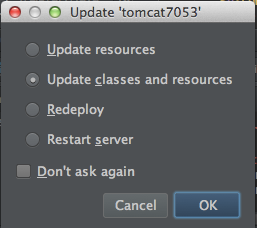
ちなみにXHTMLの変更は

![image](https://qiita-image-store.s3.amazonaws.com/0/1852/082ed42d-1233-5d36-ea58-317ce8b63b33.png)

で反映してます。

### Prime Facesを導入。

ここまで前置き。僕が本当に使いたいのは[PrimeFaces](http://www.primefaces.org/)です。
この豊富なコンポーネント群を使って、このブログの管理画面をBackbone.jsゴリゴリからJavaで書き換えたいのです。


#### pom.xml修正
pom.xmlに

    <dependency>
        <groupId>org.primefaces</groupId>
        <artifactId>primefaces</artifactId>
        <version>5.0</version>
    </dependency>

を追加します。

全文はっておきます。

    <project xmlns="http://maven.apache.org/POM/4.0.0" xmlns:xsi="http://www.w3.org/2001/XMLSchema-instance"
             xsi:schemaLocation="http://maven.apache.org/POM/4.0.0 http://maven.apache.org/maven-v4_0_0.xsd">
        <modelVersion>4.0.0</modelVersion>
        <groupId>com.mycompany.app</groupId>
        <artifactId>hello-jsf</artifactId>
        <packaging>war</packaging>
        <version>1.0.0</version>
        <name>hello-jsf Maven Webapp</name>
        <url>http://maven.apache.org</url>
        <dependencies>
            <!-- ここからMojarra -->
            <dependency>
                <groupId>com.sun.faces</groupId>
                <artifactId>jsf-api</artifactId>
                <version>2.2.6</version>
            </dependency>
            <dependency>
                <groupId>com.sun.faces</groupId>
                <artifactId>jsf-impl</artifactId>
                <version>2.2.6</version>
            </dependency>
            <!-- ここまでMojarra -->
            <!-- ここからPrimeFaces -->
            <dependency>
                <groupId>org.primefaces</groupId>
                <artifactId>primefaces</artifactId>
                <version>5.0</version>
            </dependency>
            <!-- ここまでPrimeFaces -->
            <dependency>
                <groupId>junit</groupId>
                <artifactId>junit</artifactId>
                <!-- 無駄にJUnitのバージョンを変えておく -->
                <version>4.11</version>
                <scope>test</scope>
            </dependency>
        </dependencies>
        <build>
            <finalName>hello-jsf</finalName>
        </build>
    </project>
    
 ライブラリを追加したらredeployが必要。   
 
#### Facelets修正
さっきのXHTMLを公式ページの[Getting Started](http://www.primefaces.org/gettingStarted)のサンプルで上書きしちゃいます。

    <html xmlns="http://www.w3.org/1999/xhtml"
          xmlns:h="http://java.sun.com/jsf/html"
          xmlns:p="http://primefaces.org/ui">
    
    <h:head>
    
    </h:head>
    
    <h:body>
        <p:spinner/>
    </h:body>
    </html>

![image](https://qiita-image-store.s3.amazonaws.com/0/1852/cf21f34d-6a4f-d88d-4ae8-2f6771ac7be8.png)
 
 できた！
 
 ----
 
 今日はここまで。
 
 次はJavaScript MV*フレームワークのようにJSFからREST APIにアクセスします。
 JAX-RS Client APIを使いたいところですが、依存関係がすっきりしなくなるし使いにくいので、[Retrofit](/#/entries/260)使います。
 
 そして[組み込みjar](/#/entries/261)にして、RESTサーバーとして独立したサービスを作りたいと思います。
  
併せて読みたい

<iframe src="http://www.slideshare.net/slideshow/embed_code/34819921" width="427" height="356" frameborder="0" marginwidth="0" marginheight="0" scrolling="no" style="border:1px solid #CCC; border-width:1px 1px 0; margin-bottom:5px; max-width: 100%;" allowfullscreen> </iframe> <div style="margin-bottom:5px"> <strong> <a href="https://www.slideshare.net/makingx/introduction-of-categolj2-jjugccc" title="Introduction of CategoLJ2 #jjug_ccc" target="_blank">Introduction of CategoLJ2 #jjug_ccc</a> </strong> from <strong><a href="http://www.slideshare.net/makingx" target="_blank">makingx</a></strong> </div>

<a href="http://www.amazon.co.jp/Beginning-Java-EE-Apress/dp/143024626X%3FSubscriptionId%3DAKIAJ7Y2FDFBWLT5HCQA%26tag%3Dikam-22%26linkCode%3Dsp1%26camp%3D2025%26creative%3D165953%26creativeASIN%3D143024626X"><img src="http://ecx.images-amazon.com/images/I/51jPjhneLhL._SL160_.jpg" title="Beginning Java EE 7 (Beginning Apress)"></a>