---
title: Spring Bootで最速Servlet開発環境構築 springboot
tags: ["Java", "Servlet", "Spring", "Spring Boot"]
categories: ["Programming", "Java", "org", "springframework", "boot"]
date: 2014-09-13T21:56:49Z
updated: 2014-09-13T21:56:49Z
---

最速かどうかはわからないがw

Spring Bootを使って、Servlet開発環境を作りたいときの設定例。Spring Bootは別にSpring MVC使わなくても良い。

pom.xmlの例

    <?xml version="1.0" encoding="UTF-8"?>
    <project xmlns="http://maven.apache.org/POM/4.0.0" xmlns:xsi="http://www.w3.org/2001/XMLSchema-instance"
             xsi:schemaLocation="http://maven.apache.org/POM/4.0.0 http://maven.apache.org/xsd/maven-4.0.0.xsd">
        <modelVersion>4.0.0</modelVersion>
    
        <groupId>com.example</groupId>
        <artifactId>servlet-sample</artifactId>
        <version>0.0.1-SNAPSHOT</version>
        <packaging>jar</packaging>
    
        <parent>
            <groupId>org.springframework.boot</groupId>
            <artifactId>spring-boot-starter-parent</artifactId>
            <version>1.1.6.RELEASE</version>
            <relativePath/>
            <!-- lookup parent from repository -->
        </parent>
    
        <dependencies>
            <dependency>
                <groupId>org.springframework.boot</groupId>
                <artifactId>spring-boot-starter</artifactId>
            </dependency>
            <dependency>
                <groupId>org.springframework</groupId>
                <artifactId>spring-web</artifactId>
            </dependency>
            <!-- Spring MVCを使う場合はspring-webを削除して以下を設定 -->
            <!--<dependency>-->
                <!--<groupId>org.springframework.boot</groupId>-->
                <!--<artifactId>spring-boot-starter-web</artifactId>-->
                <!--<exclusions>-->
                    <!--<exclusion>-->
                        <!--<groupId>org.springframework.boot</groupId>-->
                        <!--<artifactId>spring-boot-starter-tomcat</artifactId>-->
                    <!--</exclusion>-->
                <!--</exclusions>-->
            <!--</dependency>-->
            <dependency>
                <groupId>org.springframework.boot</groupId>
                <artifactId>spring-boot-starter-jetty</artifactId>
            </dependency>
            <dependency>
                <groupId>org.springframework.boot</groupId>
                <artifactId>spring-boot-starter-test</artifactId>
                <scope>test</scope>
            </dependency>
        </dependencies>
    
        <properties>
            <project.build.sourceEncoding>UTF-8</project.build.sourceEncoding>
            <start-class>com.example.Application</start-class>
            <java.version>1.8</java.version>
        </properties>
    
        <build>
            <plugins>
                <plugin>
                    <groupId>org.springframework.boot</groupId>
                    <artifactId>spring-boot-maven-plugin</artifactId>
                    <dependencies>
                        <dependency>
                            <groupId>org.springframework</groupId>
                            <artifactId>springloaded</artifactId>
                            <version>1.2.0.RELEASE</version>
                        </dependency>
                    </dependencies>
                </plugin>
            </plugins>
        </build>
    
    </project>

適当なServletを作って

    package com.example;
    
    import javax.servlet.ServletException;
    import javax.servlet.http.HttpServlet;
    import javax.servlet.http.HttpServletRequest;
    import javax.servlet.http.HttpServletResponse;
    import java.io.IOException;
    import java.io.PrintWriter;
    
    public class FooServlet extends HttpServlet {
        @Override
        protected void doGet(HttpServletRequest req, HttpServletResponse resp) throws ServletException, IOException {
            PrintWriter writer = resp.getWriter();
            writer.println(“Hello World!”);
            writer.flush();
        }
    }

サーブレットの定義は`@Configuration`がついたクラスに`@Bean`をつけて定義する。`ServletRegistrationBean`を使うとweb.xmlに近い定義ができる。

    package com.example;
    
    import org.springframework.boot.SpringApplication;
    import org.springframework.boot.autoconfigure.EnableAutoConfiguration;
    import org.springframework.boot.context.embedded.ServletRegistrationBean;
    import org.springframework.context.annotation.Bean;
    import org.springframework.context.annotation.ComponentScan;
    import org.springframework.context.annotation.Configuration;
    
    @Configuration
    @ComponentScan
    @EnableAutoConfiguration
    public class Application {
    
        public static void main(String[] args) {
            SpringApplication.run(Application.class, args);
        }
    
        @Bean
        ServletRegistrationBean statsServlet() {
            return new ServletRegistrationBean(new FooServlet(), "/foo");
        }
    }

必要なファイルはたったこれだけ。
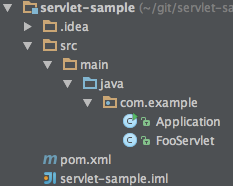
![image](https://qiita-image-store.s3.amazonaws.com/0/1852/facd8f49-9272-dedd-b279-b0d7b86d0be2.png)

Servletに`@Component`をつけておけばコンポーネントスキャンされるので、いちいち定義しなくてもよい。今回はServletっぽく、Spring要素をなくしてみた。


あとは`Application`クラスを実行するだけ。または`mvm spring-boot:run`でOK。2秒くらいで起動する。
SpringのDIももちろん使えるのでちょっとした開発(でSpring MVCを使いたくない場合)に良いかも。JerseyとかMojarraも使えるよ。

ちなみに起動時間(MBA 11-inch, Mid 2011)は

* Tomcat + Spring MVCありの場合の起動 `Started Application in 4.629 seconds (JVM running for 5.181)`
* Jetty + Spring MVCありの場合の起動 `Started Application in 3.791 seconds (JVM running for 4.559)`
* Jetty + Spring MVCなしの場合の起動 `Started Application in 2.253 seconds (JVM running for 3.008)`

でSpring MVC抜くと大分はやくなる。。。(^ ^;)

サンプルは
<a href="api/v1/files/a66be26f-a2a0-48a0-a455-77005433e218/servlet-sample.zip">こちら</a>。
