---
title: Tanzu Application Platform 1.1 (Full Profile) をAKSにインストールしAzure ADと連携するメモ - Self Signed編
tags: ["Kubernetes", "Cartographer", "AKS", "Tanzu", "TAP", "Knative", "Azure", "Backstage"]
categories: ["Dev", "CaaS", "Kubernetes", "TAP"]
date: 2022-07-11T08:42:55Z
updated: 2022-07-11T17:04:12Z
---
[Tanzu Application Platform 1.1](https://docs.vmware.com/en/Tanzu-Application-Platform/1.1/tap//GUID-overview.html) をAKSにインストールします。
本記事ではTAPをInstallし、"Hello World"なアプリケーションをソースコードからデプロイする機能("Source to URL")を試します。
コンテナレジストリにはACRを使用し、RBACをAzure ADと連携します。
また、Self Signedな証明書でHTTPSを有効にします。
Let's Encrypt (HTTP01 Challenge)を使用したい場合は[こちら](/entries/705)を参照してください。
**目次**
### 必要なCLI
以下のCLIは事前にインストール済みとします。
* [kubectl](https://kubernetes.io/docs/tasks/tools/)
* [az](https://docs.microsoft.com/en-us/cli/azure/install-azure-cli)
* [pivnet](https://github.com/pivotal-cf/pivnet-cli)
### リソースグループ作成
```
az group create --name tap-rg --location japaneast
```
### ACRインスタンスの作成
今回はACRのadminアカウントを使用します。
```
ACR_NAME=tap${RANDOM}
az acr create --resource-group tap-rg \
--name ${ACR_NAME} --sku standard \
--admin-enabled true
```
```
ACR_SERVER=${ACR_NAME}.azurecr.io
ACR_USERNAME=${ACR_NAME}
ACR_PASSWORD=$(az acr credential show --name ${ACR_NAME} --resource-group tap-rg --query 'passwords[0].value' --output tsv)
docker login ${ACR_SERVER} -u ${ACR_USERNAME} -p ${ACR_PASSWORD}
```
### AKSクラスタの作成
AKSクラスタにはstandard_f4s_v2 (4 vCPU, 8GB Memory)のWorker Nodeを使用し、cluster-autoscalerを有効にしておきます。またAzure ADとの連携を有効にします。
```
az aks create \
--resource-group tap-rg \
--name tap-sandbox \
--node-count 3 \
--enable-cluster-autoscaler \
--min-count 3 \
--max-count 10 \
--node-vm-size standard_f4s_v2 \
--load-balancer-sku standard \
--zones 1 2 3 \
--generate-ssh-keys \
--attach-acr ${ACR_NAME} \
--enable-aad
```
TAPのインストールはadminアカウントで行います。
```
az aks get-credentials --resource-group tap-rg --name tap-sandbox --admin --overwrite-existing
```
### Tanzu CLIのインストール
```
# For Mac
pivnet download-product-files --product-slug='tanzu-application-platform' --release-version='1.1.2' --product-file-id=1228424
# For Linux
pivnet download-product-files --product-slug='tanzu-application-platform' --release-version='1.1.2' --product-file-id=1228427
# For Windows
pivnet download-product-files --product-slug='tanzu-application-platform' --release-version='1.1.2' --product-file-id=1228428
```
```
tar xvf tanzu-framework-*-amd64.tar
install cli/core/v0.11.6/tanzu-core-*_amd64 /usr/local/bin/tanzu
```
```
$ tanzu version
version: v0.11.6
buildDate: 2022-05-20
sha: 90440e2b
```
プラグインのインストール
```
export TANZU_CLI_NO_INIT=true
tanzu plugin install --local cli all
```
### EULAのAccept
https://docs.vmware.com/en/VMware-Tanzu-Application-Platform/1.1/tap/GUID-install-tanzu-cli.html#accept-the-end-user-license-agreements-0
以下のEULAを全てAcceptしてください。
 ### Cluster Essentials for VMware Tanzuのインストール
```
pivnet login --api-token=
```
TAPのインストールに必要なKapp ControllerとSecretgen Controllerをデプロイするために [Cluster Essentials for VMware Tanzu](https://network.tanzu.vmware.com/products/tanzu-cluster-essentials/#/releases/1077299) をインストールします。
```
# Mac
pivnet download-product-files --product-slug='tanzu-cluster-essentials' --release-version='1.1.0' --product-file-id=1191985
# Linux
pivnet download-product-files --product-slug='tanzu-cluster-essentials' --release-version='1.1.0' --product-file-id=1191987
# Windows
pivnet download-product-files --product-slug='tanzu-cluster-essentials' --release-version='1.1.0' --product-file-id=1191983
```
```yaml
TANZUNET_USERNAME=...
TANZUNET_PASSWORD=...
mkdir tanzu-cluster-essentials
tar xzvf tanzu-cluster-essentials-*-amd64-1.1.0.tgz -C tanzu-cluster-essentials
export INSTALL_BUNDLE=registry.tanzu.vmware.com/tanzu-cluster-essentials/cluster-essentials-bundle:1.1.0
export INSTALL_REGISTRY_HOSTNAME=registry.tanzu.vmware.com
export INSTALL_REGISTRY_USERNAME=${TANZUNET_USERNAME}
export INSTALL_REGISTRY_PASSWORD=${TANZUNET_PASSWORD}
cd tanzu-cluster-essentials
./install.sh --yes
cd ..
```
### Tanzu Application Platformのインストール
#### TAP用Package Repositoryの登録
```
TANZUNET_USERNAME=...
TANZUNET_PASSWORD=...
kubectl create ns tap-install
tanzu secret registry add tap-registry \
--username "${TANZUNET_USERNAME}" \
--password "${TANZUNET_PASSWORD}" \
--server registry.tanzu.vmware.com \
--export-to-all-namespaces \
--yes \
--namespace tap-install
tanzu package repository add tanzu-tap-repository \
--url registry.tanzu.vmware.com/tanzu-application-platform/tap-packages:1.1.2 \
--namespace tap-install
```
```
$ tanzu package available list --namespace tap-install
- Retrieving available packages...
NAME DISPLAY-NAME SHORT-DESCRIPTION LATEST-VERSION
accelerator.apps.tanzu.vmware.com Application Accelerator for VMware Tanzu Used to create new projects and configurations. 1.1.2
api-portal.tanzu.vmware.com API portal A unified user interface to enable search, discovery and try-out of API endpoints at ease. 1.0.21
backend.appliveview.tanzu.vmware.com Application Live View for VMware Tanzu App for monitoring and troubleshooting running apps 1.1.2
build.appliveview.tanzu.vmware.com Application Live View Conventions for VMware Tanzu Application Live View convention server 1.0.2
buildservice.tanzu.vmware.com Tanzu Build Service Tanzu Build Service enables the building and automation of containerized software workflows securely and at scale. 1.5.2
cartographer.tanzu.vmware.com Cartographer Kubernetes native Supply Chain Choreographer. 0.3.0
cnrs.tanzu.vmware.com Cloud Native Runtimes Cloud Native Runtimes is a serverless runtime based on Knative 1.2.1
connector.appliveview.tanzu.vmware.com Application Live View Connector for VMware Tanzu App for discovering and registering running apps 1.1.2
controller.conventions.apps.tanzu.vmware.com Convention Service for VMware Tanzu Convention Service enables app operators to consistently apply desired runtime configurations to fleets of workloads. 0.6.3
controller.source.apps.tanzu.vmware.com Tanzu Source Controller Tanzu Source Controller enables workload create/update from source code. 0.3.3
conventions.appliveview.tanzu.vmware.com Application Live View Conventions for VMware Tanzu Application Live View convention server 1.1.2
developer-conventions.tanzu.vmware.com Tanzu App Platform Developer Conventions Developer Conventions 0.6.0
fluxcd.source.controller.tanzu.vmware.com Flux Source Controller The source-controller is a Kubernetes operator, specialised in artifacts acquisition from external sources such as Git, Helm repositories and S3 buckets. 0.16.4
grype.scanning.apps.tanzu.vmware.com Grype for Supply Chain Security Tools - Scan Default scan templates using Anchore Grype 1.1.2
image-policy-webhook.signing.apps.tanzu.vmware.com Image Policy Webhook Image Policy Webhook enables defining of a policy to restrict unsigned container images. 1.1.2
learningcenter.tanzu.vmware.com Learning Center for Tanzu Application Platform Guided technical workshops 0.2.1
metadata-store.apps.tanzu.vmware.com Supply Chain Security Tools - Store Post SBoMs and query for image, package, and vulnerability metadata. 1.1.3
ootb-delivery-basic.tanzu.vmware.com Tanzu App Platform Out of The Box Delivery Basic Out of The Box Delivery Basic. 0.7.1
ootb-supply-chain-basic.tanzu.vmware.com Tanzu App Platform Out of The Box Supply Chain Basic Out of The Box Supply Chain Basic. 0.7.1
ootb-supply-chain-testing-scanning.tanzu.vmware.com Tanzu App Platform Out of The Box Supply Chain with Testing and Scanning Out of The Box Supply Chain with Testing and Scanning. 0.7.1
ootb-supply-chain-testing.tanzu.vmware.com Tanzu App Platform Out of The Box Supply Chain with Testing Out of The Box Supply Chain with Testing. 0.7.1
ootb-templates.tanzu.vmware.com Tanzu App Platform Out of The Box Templates Out of The Box Templates. 0.7.1
run.appliveview.tanzu.vmware.com Application Live View for VMware Tanzu App for monitoring and troubleshooting running apps 1.0.3
scanning.apps.tanzu.vmware.com Supply Chain Security Tools - Scan Scan for vulnerabilities and enforce policies directly within Kubernetes native Supply Chains. 1.1.2
service-bindings.labs.vmware.com Service Bindings for Kubernetes Service Bindings for Kubernetes implements the Service Binding Specification. 0.7.1
services-toolkit.tanzu.vmware.com Services Toolkit The Services Toolkit enables the management, lifecycle, discoverability and connectivity of Service Resources (databases, message queues, DNS records, etc.). 0.6.0
spring-boot-conventions.tanzu.vmware.com Tanzu Spring Boot Conventions Server Default Spring Boot convention server. 0.4.0
tap-auth.tanzu.vmware.com Default roles for Tanzu Application Platform Default roles for Tanzu Application Platform 1.0.1
tap-gui.tanzu.vmware.com Tanzu Application Platform GUI web app graphical user interface for Tanzu Application Platform 1.1.3
tap-telemetry.tanzu.vmware.com Telemetry Collector for Tanzu Application Platform Tanzu Application Plaform Telemetry 0.1.4
tap.tanzu.vmware.com Tanzu Application Platform Package to install a set of TAP components to get you started based on your use case. 1.1.2
tekton.tanzu.vmware.com Tekton Pipelines Tekton Pipelines is a framework for creating CI/CD systems. 0.33.5
workshops.learningcenter.tanzu.vmware.com Workshop Building Tutorial Workshop Building Tutorial 0.2.1
```
#### Full Profileのインストール
TAPをインストールするための`tap-values.yml`を作成します。
`cnrs.domain_name`には仮のドメインを指定します。あとでenvoyのExternal IPが設定されてから変更します。
Learning Centerは使用しないため、またgrypeは個別にインストールした方良いため([こちらの記事](https://ik.am/entries/698)参照)、 これらのパッケージは`excluded_packages`除外します。
また、Cloud Native RuntimesはKnative Servingしか使わないので、それ以外のリソースを削除するoverlayを設定します。
```yaml
cat < tap-values.yml
profile: full
ceip_policy_disclosed: true
cnrs:
domain_name: tap.example.com
domain_template: "{{.Name}}-{{.Namespace}}.{{.Domain}}"
default_tls_secret: tanzu-system-ingress/cnrs-default-tls
buildservice:
kp_default_repository: ${ACR_SERVER}/build-service
kp_default_repository_username: ${ACR_USERNAME}
kp_default_repository_password: ${ACR_PASSWORD}
tanzunet_username: ${TANZUNET_USERNAME}
tanzunet_password: ${TANZUNET_PASSWORD}
descriptor_name: full
supply_chain: basic
ootb_supply_chain_basic:
registry:
server: ${ACR_SERVER}
repository: supply-chain
contour:
infrastructure_provider: azure
envoy:
service:
type: LoadBalancer
externalTrafficPolicy: Local
annotations: {}
tap_gui:
ingressEnabled: true
ingressDomain: tap.example.com
service_type: ClusterIP
tls:
secretName: cnrs-default-tls
namespace: tanzu-system-ingress
app_config:
app:
baseUrl: https://tap-gui.tap.example.com
backend:
baseUrl: https://tap-gui.tap.example.com
cors:
origin: https://tap-gui.tap.example.com
catalog:
locations:
- type: url
target: https://github.com/sample-accelerators/tanzu-java-web-app/blob/main/catalog/catalog-info.yaml
- type: url
target: https://github.com/sample-accelerators/spring-petclinic/blob/accelerator/catalog/catalog-info.yaml
- type: url
target: https://github.com/tanzu-japan/spring-music/blob/tanzu/catalog/catalog-info.yaml
accelerator:
domain: tap.example.com
ingress:
include: true
enable_tls: true
tls:
secret_name: cnrs-default-tls
namespace: tanzu-system-ingress
server:
service_type: ClusterIP
metadata_store:
app_service_type: ClusterIP
ingress_enabled: "true"
ingress_domain: tap.example.com
package_overlays:
- name: cnrs
secrets:
- name: cnrs-default-tls
- name: cnrs-slim
- name: metadata-store
secrets:
- name: metadata-store-ingress-tls
excluded_packages:
- grype.scanning.apps.tanzu.vmware.com
- learningcenter.tanzu.vmware.com
- workshops.learningcenter.tanzu.vmware.com
EOF
```
> ℹ️ LoadBalacerに関する[annotations](https://docs.microsoft.com/en-us/azure/aks/load-balancer-standard#additional-customizations-via-kubernetes-annotations)は`contour.envoy.service.annotations`に指定可能です。
Cloud Native Runtimesで使用するデフォルトのTLS証明書を用意するための次の定義をoverlayで作成します。以下のドキュメントを参考にしました。
* https://docs.vmware.com/en/Cloud-Native-Runtimes-for-VMware-Tanzu/1.1/tanzu-cloud-native-runtimes-1-1/GUID-external_dns.html
* https://knative.dev/docs/serving/using-a-tls-cert/#manually-adding-a-tls-certificate
```yaml
cat < cnrs-default-tls.yml
#@ load("@ytt:data", "data")
#@ load("@ytt:overlay", "overlay")
#@ namespace = data.values.ingress.external.namespace
---
apiVersion: cert-manager.io/v1
kind: Issuer
metadata:
name: cnrs-selfsigned-issuer
namespace: #@ namespace
spec:
selfSigned: { }
---
apiVersion: cert-manager.io/v1
kind: Certificate
metadata:
name: cnrs-ca
namespace: #@ namespace
spec:
commonName: cnrs-ca
isCA: true
issuerRef:
kind: Issuer
name: cnrs-selfsigned-issuer
secretName: cnrs-ca
---
apiVersion: cert-manager.io/v1
kind: Issuer
metadata:
name: cnrs-ca-issuer
namespace: #@ namespace
spec:
ca:
secretName: cnrs-ca
---
apiVersion: cert-manager.io/v1
kind: Certificate
metadata:
name: cnrs-default-tls
namespace: #@ namespace
spec:
dnsNames:
- #@ "*.{}".format(data.values.domain_name)
issuerRef:
kind: Issuer
name: cnrs-ca-issuer
secretName: cnrs-default-tls
---
apiVersion: projectcontour.io/v1
kind: TLSCertificateDelegation
metadata:
name: contour-delegation
namespace: #@ namespace
spec:
delegations:
- secretName: cnrs-default-tls
targetNamespaces:
- "*"
#@overlay/match by=overlay.subset({"metadata":{"name":"config-network"}, "kind": "ConfigMap"})
---
data:
#@overlay/match missing_ok=True
default-external-scheme: https
EOF
```
Cloud Native RuntimesからKnative Serving以外のリソースを削除するoverlayを作成します。
```yaml
cat < cnrs-slim.yml
#@ load("@ytt:overlay", "overlay")
#@overlay/match by=overlay.subset({"metadata":{"namespace":"knative-eventing"}}), expects="1+"
#@overlay/remove
---
#@overlay/match by=overlay.subset({"metadata":{"namespace":"knative-sources"}}), expects="1+"
#@overlay/remove
---
#@overlay/match by=overlay.subset({"metadata":{"namespace":"triggermesh"}}), expects="1+"
#@overlay/remove
---
#@overlay/match by=overlay.subset({"metadata":{"namespace":"vmware-sources"}}), expects="1+"
#@overlay/remove
---
EOF
```
Metadata StoreにCloud Native RuntimesのデフォルトのTLS証明書を使うoverlayを作成します。
```yaml
cat < metadata-store-ingress-tls.yml
#@ load("@ytt:overlay", "overlay")
#@overlay/match by=overlay.subset({"metadata":{"name":"metadata-store-ingress"}, "kind": "HTTPProxy"})
---
spec:
virtualhost:
tls:
secretName: tanzu-system-ingress/cnrs-default-tls
#@overlay/match by=overlay.subset({"metadata":{"name":"ingress-cert"}, "kind": "Certificate"})
#@overlay/remove
---
EOF
```
overlayファイルをSecretとして作成します。
```
kubectl -n tap-install create secret generic cnrs-default-tls \
-o yaml \
--dry-run=client \
--from-file=cnrs-default-tls.yml \
| kubectl apply -f-
kubectl -n tap-install create secret generic cnrs-slim \
-o yaml \
--dry-run=client \
--from-file=cnrs-slim.yml \
| kubectl apply -f-
kubectl -n tap-install create secret generic metadata-store-ingress-tls \
-o yaml \
--dry-run=client \
--from-file=metadata-store-ingress-tls.yml \
| kubectl apply -f-
```
TAPをインストールします。
```
tanzu package install tap -p tap.tanzu.vmware.com -v 1.1.2 --values-file tap-values.yml -n tap-install --poll-timeout 60m
```
インストールの進捗は次のコマンドで確認します。
```
watch kubectl get node,app,pod -A -owide
```
`tanzu package install`の方は途中で次のようなエラーが出るかもしれませんが、待っていれば `Reconcile succeeded` になるのでwatchで確認してください。
```
Error: resource reconciliation failed: kapp: Error: waiting on reconcile packageinstall/metadata-store (packaging.carvel.dev/v1alpha1) namespace: tap-install:
Finished unsuccessfully (Reconcile failed: (message: Error (see .status.usefulErrorMessage for details))). Reconcile failed: Error (see .status.usefulErrorMessage for details)
Error: exit status 1
```
全てのappが `Reconcile succeeded` になるまで待ちます。20分くらいかかります。
```
$ kubectl get app -n tap-install
NAME DESCRIPTION SINCE-DEPLOY AGE
accelerator Reconcile succeeded 4m28s 12m
api-portal Reconcile succeeded 3m5s 14m
appliveview Reconcile succeeded 80s 12m
appliveview-connector Reconcile succeeded 2m32s 14m
appliveview-conventions Reconcile succeeded 57s 12m
buildservice Reconcile succeeded 14m 14m
cartographer Reconcile succeeded 2m16s 12m
cert-manager Reconcile succeeded 2m43s 14m
cnrs Reconcile succeeded 4m27s 12m
contour Reconcile succeeded 63s 12m
conventions-controller Reconcile succeeded 106s 12m
developer-conventions Reconcile succeeded 70s 12m
fluxcd-source-controller Reconcile succeeded 3m6s 14m
image-policy-webhook Reconcile succeeded 83s 12m
metadata-store Reconcile succeeded 4m19s 12m
ootb-delivery-basic Reconcile succeeded 56s 12m
ootb-supply-chain-basic Reconcile succeeded 60s 12m
ootb-templates Reconcile succeeded 2m11s 12m
scanning Reconcile succeeded 2m 14m
service-bindings Reconcile succeeded 3m58s 14m
services-toolkit Reconcile succeeded 3m35s 14m
source-controller Reconcile succeeded 3m34s 14m
spring-boot-conventions Reconcile succeeded 40s 12m
tap Reconcile succeeded 4m36s 14m
tap-auth Reconcile succeeded 4m7s 14m
tap-gui Reconcile succeeded 4m29s 12m
tap-telemetry Reconcile succeeded 3m59s 14m
tekton-pipelines Reconcile succeeded 3m35s 14m
```
インストールされたパッケージは次の通りです。
```
$ kubectl get packageinstall -n tap-install
NAME PACKAGE NAME PACKAGE VERSION DESCRIPTION AGE
accelerator accelerator.apps.tanzu.vmware.com 1.1.2 Reconcile succeeded 12m
api-portal api-portal.tanzu.vmware.com 1.0.21 Reconcile succeeded 14m
appliveview backend.appliveview.tanzu.vmware.com 1.1.2 Reconcile succeeded 12m
appliveview-connector connector.appliveview.tanzu.vmware.com 1.1.2 Reconcile succeeded 14m
appliveview-conventions conventions.appliveview.tanzu.vmware.com 1.1.2 Reconcile succeeded 12m
buildservice buildservice.tanzu.vmware.com 1.5.2 Reconcile succeeded 14m
cartographer cartographer.tanzu.vmware.com 0.3.0 Reconcile succeeded 13m
cert-manager cert-manager.tanzu.vmware.com 1.5.3+tap.2 Reconcile succeeded 14m
cnrs cnrs.tanzu.vmware.com 1.2.1 Reconcile succeeded 12m
contour contour.tanzu.vmware.com 1.18.2+tap.2 Reconcile succeeded 13m
conventions-controller controller.conventions.apps.tanzu.vmware.com 0.6.3 Reconcile succeeded 13m
developer-conventions developer-conventions.tanzu.vmware.com 0.6.0 Reconcile succeeded 12m
fluxcd-source-controller fluxcd.source.controller.tanzu.vmware.com 0.16.4 Reconcile succeeded 14m
image-policy-webhook image-policy-webhook.signing.apps.tanzu.vmware.com 1.1.2 Reconcile succeeded 13m
metadata-store metadata-store.apps.tanzu.vmware.com 1.1.3 Reconcile succeeded 13m
ootb-delivery-basic ootb-delivery-basic.tanzu.vmware.com 0.7.1 Reconcile succeeded 12m
ootb-supply-chain-basic ootb-supply-chain-basic.tanzu.vmware.com 0.7.1 Reconcile succeeded 12m
ootb-templates ootb-templates.tanzu.vmware.com 0.7.1 Reconcile succeeded 12m
scanning scanning.apps.tanzu.vmware.com 1.1.2 Reconcile succeeded 14m
service-bindings service-bindings.labs.vmware.com 0.7.1 Reconcile succeeded 14m
services-toolkit services-toolkit.tanzu.vmware.com 0.6.0 Reconcile succeeded 14m
source-controller controller.source.apps.tanzu.vmware.com 0.3.3 Reconcile succeeded 14m
spring-boot-conventions spring-boot-conventions.tanzu.vmware.com 0.4.0 Reconcile succeeded 12m
tap tap.tanzu.vmware.com 1.1.2 Reconcile succeeded 14m
tap-auth tap-auth.tanzu.vmware.com 1.0.1 Reconcile succeeded 14m
tap-gui tap-gui.tanzu.vmware.com 1.1.3 Reconcile succeeded 12m
tap-telemetry tap-telemetry.tanzu.vmware.com 0.1.4 Reconcile succeeded 14m
tekton-pipelines tekton.tanzu.vmware.com 0.33.5 Reconcile succeeded 14m
```
デプロイされたPodは次の通りです。
```
$ kubectl get pod -A
NAMESPACE NAME READY STATUS RESTARTS AGE
accelerator-system acc-engine-55fbbf8886-pkd4w 1/1 Running 0 12m
accelerator-system acc-server-5cb88fdb58-dmkhd 1/1 Running 0 12m
accelerator-system accelerator-controller-manager-795575b6f-6897b 1/1 Running 0 12m
api-portal api-portal-server-55669494d8-dm9kv 1/1 Running 0 14m
app-live-view-connector application-live-view-connector-87pfl 1/1 Running 0 14m
app-live-view-connector application-live-view-connector-ftlvt 1/1 Running 0 14m
app-live-view-connector application-live-view-connector-ppdvp 1/1 Running 0 14m
app-live-view-conventions appliveview-webhook-65fc48fb7-b8qn4 1/1 Running 0 12m
app-live-view application-live-view-server-56757f9b8c-62754 1/1 Running 0 12m
build-service build-pod-image-fetcher-dtnmd 5/5 Running 0 14m
build-service build-pod-image-fetcher-jcqzr 5/5 Running 0 14m
build-service build-pod-image-fetcher-tkgck 5/5 Running 0 14m
build-service dependency-updater-controller-7d59b5bb6c-pwn9h 1/1 Running 0 14m
build-service secret-syncer-controller-7d798f5975-w779r 1/1 Running 0 14m
build-service smart-warmer-image-fetcher-8pbbq 4/4 Running 0 7m40s
build-service smart-warmer-image-fetcher-rh7qp 4/4 Running 0 7m37s
build-service smart-warmer-image-fetcher-tjw5b 4/4 Running 0 7m41s
build-service warmer-controller-5c855dbdb-jlcwl 1/1 Running 0 14m
cartographer-system cartographer-controller-8f5dd7d9f-7bfqb 1/1 Running 0 13m
cert-injection-webhook cert-injection-webhook-5cbd95664b-zvr8w 1/1 Running 0 14m
cert-manager cert-manager-56bfb5969d-75xfp 1/1 Running 0 14m
cert-manager cert-manager-cainjector-874bd9746-7htzp 1/1 Running 0 14m
cert-manager cert-manager-webhook-76f9f9f4f7-5mshp 1/1 Running 0 14m
conventions-system conventions-controller-manager-5cf9c87b8c-4skmr 1/1 Running 0 13m
developer-conventions webhook-d5769577c-pk4sz 1/1 Running 0 12m
flux-system source-controller-5ffd559bb5-tqlsl 1/1 Running 0 14m
image-policy-system image-policy-controller-manager-6845d7cc7b-jdjsg 2/2 Running 0 13m
kapp-controller kapp-controller-858748bb69-6qtlm 1/1 Running 0 17m
knative-serving activator-c57bfb9fd-8ffwr 1/1 Running 0 11m
knative-serving activator-c57bfb9fd-mm4c6 1/1 Running 0 11m
knative-serving activator-c57bfb9fd-nx4hd 1/1 Running 0 11m
knative-serving autoscaler-9f959bcf5-sggnf 1/1 Running 0 11m
knative-serving autoscaler-hpa-664f698bdf-xzbnq 1/1 Running 0 11m
knative-serving controller-6d444f9b7-6nkbc 1/1 Running 0 11m
knative-serving domain-mapping-5c5cfdf595-6gzrq 1/1 Running 0 11m
knative-serving domainmapping-webhook-77d4cdd99-zg2dg 1/1 Running 0 11m
knative-serving net-certmanager-controller-6c4f7cc7cf-n422f 1/1 Running 0 11m
knative-serving net-certmanager-webhook-569bcd69b-hf6ss 1/1 Running 0 11m
knative-serving net-contour-controller-85bd6b6856-m9cfs 1/1 Running 0 11m
knative-serving webhook-59f9b4f6f4-8tlvm 1/1 Running 0 11m
knative-serving webhook-59f9b4f6f4-djvp6 1/1 Running 0 11m
kpack kpack-controller-68c7b4749d-vcnqd 1/1 Running 0 14m
kpack kpack-webhook-655cd9b6b7-hwct4 1/1 Running 0 14m
kube-system azure-ip-masq-agent-45nmc 1/1 Running 0 20m
kube-system azure-ip-masq-agent-7frxm 1/1 Running 0 20m
kube-system azure-ip-masq-agent-v9jfq 1/1 Running 0 20m
kube-system cloud-node-manager-m7htt 1/1 Running 0 20m
kube-system cloud-node-manager-qg8xd 1/1 Running 0 20m
kube-system cloud-node-manager-z5vmh 1/1 Running 0 20m
kube-system coredns-autoscaler-7d56cd888-bjqn8 1/1 Running 0 21m
kube-system coredns-dc97c5f55-j6sxr 1/1 Running 0 21m
kube-system coredns-dc97c5f55-rg5j7 1/1 Running 0 19m
kube-system csi-azuredisk-node-ckxcz 3/3 Running 0 20m
kube-system csi-azuredisk-node-sslgm 3/3 Running 0 20m
kube-system csi-azuredisk-node-wq6nd 3/3 Running 0 20m
kube-system csi-azurefile-node-2hl5r 3/3 Running 0 20m
kube-system csi-azurefile-node-6q7xn 3/3 Running 0 20m
kube-system csi-azurefile-node-vc92r 3/3 Running 0 20m
kube-system konnectivity-agent-59d8d847f6-gl7mj 1/1 Running 0 16m
kube-system konnectivity-agent-59d8d847f6-n55v4 1/1 Running 0 16m
kube-system kube-proxy-25s6b 1/1 Running 0 20m
kube-system kube-proxy-hmv2h 1/1 Running 0 20m
kube-system kube-proxy-j7jh6 1/1 Running 0 20m
kube-system metrics-server-64b66fbbc8-hg7zr 1/1 Running 0 21m
metadata-store metadata-store-app-66c9dff4f8-8ttg5 2/2 Running 3 (10m ago) 13m
metadata-store metadata-store-db-0 1/1 Running 0 13m
scan-link-system scan-link-controller-manager-75dccf5fc4-dl2fq 2/2 Running 2 (13m ago) 14m
secretgen-controller secretgen-controller-5585f754f7-7c8jg 1/1 Running 0 17m
service-bindings manager-7d48bcdff9-7gqhl 1/1 Running 0 14m
services-toolkit services-toolkit-controller-manager-7968c7f947-7tc48 1/1 Running 0 14m
source-system source-controller-manager-7bfd7dbd8d-pdhss 1/1 Running 0 14m
spring-boot-convention spring-boot-webhook-6898c7fc7-wxps2 1/1 Running 0 11m
stacks-operator-system controller-manager-7fd7fd674c-wkfxz 1/1 Running 0 14m
tanzu-system-ingress contour-7b79b8bb74-2sbkt 1/1 Running 0 13m
tanzu-system-ingress contour-7b79b8bb74-r8bxx 1/1 Running 0 13m
tanzu-system-ingress envoy-dmh62 2/2 Running 0 13m
tanzu-system-ingress envoy-hdd7c 2/2 Running 0 13m
tanzu-system-ingress envoy-lmbrw 2/2 Running 0 13m
tap-gui server-5b84c65b67-b7v7p 1/1 Running 0 4m54s
tap-telemetry tap-telemetry-controller-7c6dbcb58-22qgh 1/1 Running 0 14m
tekton-pipelines tekton-pipelines-controller-849dcd975f-zcwkd 1/1 Running 0 14m
tekton-pipelines tekton-pipelines-webhook-84f9fb9d98-qvwmp 1/1 Running 0 14m
```
Nodeは3台(standard_f4s_v2の場合)使用しています。
```
$ kubectl get node -owide
NAME STATUS ROLES AGE VERSION INTERNAL-IP EXTERNAL-IP OS-IMAGE KERNEL-VERSION CONTAINER-RUNTIME
aks-nodepool1-24504655-vmss000000 Ready agent 14m v1.22.6 10.224.0.4 Ubuntu 18.04.6 LTS 5.4.0-1085-azure containerd://1.5.11+azure-2
aks-nodepool1-24504655-vmss000001 Ready agent 14m v1.22.6 10.224.0.5 Ubuntu 18.04.6 LTS 5.4.0-1085-azure containerd://1.5.11+azure-2
aks-nodepool1-24504655-vmss000002 Ready agent 14m v1.22.6 10.224.0.6 Ubuntu 18.04.6 LTS 5.4.0-1085-azure containerd://1.5.11+azure-2
```
Envoyに設定されたExternal IPを使って、`cnrs.domain_name`を変更します。ドメイン名には[sslip.io](https://sslip.io)を使用します。
例えば、External IPが10.99.0.147の場合は`cnrs.domain_name`に*.10-99-0-147.sslip.ioを指定します。
次のコマンドで`tap-values.yml`を更新します。
```
sed -i.bak "s|tap.example.com|$(kubectl get -n tanzu-system-ingress svc envoy -ojsonpath='{.status.loadBalancer.ingress[0].ip}' | sed 's/\./-/g').sslip.io|g" tap-values.yml
```
TAPを更新します。
```
tanzu package installed update tap -n tap-install -v 1.1.2 -f tap-values.yml
```
Default TLSのCertificateのDNS名が更新されたことを確認してください。少し時間がかかる場合があります。
```
$ kubectl get certificate -n tanzu-system-ingress cnrs-default-tls -ojsonpath='{.spec.dnsNames[0]}'
*.20-194-210-187.sslip.io
```
Ingress (Contour)経由でアクセスできるコンポーネントは次の通りです。
```
$ kubectl get httpproxy -A
NAMESPACE NAME FQDN TLS SECRET STATUS STATUS DESCRIPTION
accelerator-system accelerator accelerator.20-194-210-187.sslip.io tanzu-system-ingress/cnrs-default-tls valid Valid HTTPProxy
metadata-store metadata-store-ingress metadata-store.20-194-210-187.sslip.io ingress-cert valid Valid HTTPProxy
tap-gui tap-gui tap-gui.20-194-210-187.sslip.io tanzu-system-ingress/cnrs-default-tls valid Valid HTTPProxy
```
### TAP GUIへのアクセス
TAP GUIへのホスト名は次のコマンドで確認できます。
```
$ kubectl get httpproxy -n tap-gui tap-gui -ojsonpath='{.spec.virtualhost.fqdn}'
tap-gui.20-194-210-187.sslip.io
```
このホスト名へHTTPSでアクセスします。
> ⚠️ `cnrs.domain_name`の設定変更後TAP-GUIのPodが再作成されるので、再作成後にアクセスしてください。
### Cluster Essentials for VMware Tanzuのインストール
```
pivnet login --api-token=
```
TAPのインストールに必要なKapp ControllerとSecretgen Controllerをデプロイするために [Cluster Essentials for VMware Tanzu](https://network.tanzu.vmware.com/products/tanzu-cluster-essentials/#/releases/1077299) をインストールします。
```
# Mac
pivnet download-product-files --product-slug='tanzu-cluster-essentials' --release-version='1.1.0' --product-file-id=1191985
# Linux
pivnet download-product-files --product-slug='tanzu-cluster-essentials' --release-version='1.1.0' --product-file-id=1191987
# Windows
pivnet download-product-files --product-slug='tanzu-cluster-essentials' --release-version='1.1.0' --product-file-id=1191983
```
```yaml
TANZUNET_USERNAME=...
TANZUNET_PASSWORD=...
mkdir tanzu-cluster-essentials
tar xzvf tanzu-cluster-essentials-*-amd64-1.1.0.tgz -C tanzu-cluster-essentials
export INSTALL_BUNDLE=registry.tanzu.vmware.com/tanzu-cluster-essentials/cluster-essentials-bundle:1.1.0
export INSTALL_REGISTRY_HOSTNAME=registry.tanzu.vmware.com
export INSTALL_REGISTRY_USERNAME=${TANZUNET_USERNAME}
export INSTALL_REGISTRY_PASSWORD=${TANZUNET_PASSWORD}
cd tanzu-cluster-essentials
./install.sh --yes
cd ..
```
### Tanzu Application Platformのインストール
#### TAP用Package Repositoryの登録
```
TANZUNET_USERNAME=...
TANZUNET_PASSWORD=...
kubectl create ns tap-install
tanzu secret registry add tap-registry \
--username "${TANZUNET_USERNAME}" \
--password "${TANZUNET_PASSWORD}" \
--server registry.tanzu.vmware.com \
--export-to-all-namespaces \
--yes \
--namespace tap-install
tanzu package repository add tanzu-tap-repository \
--url registry.tanzu.vmware.com/tanzu-application-platform/tap-packages:1.1.2 \
--namespace tap-install
```
```
$ tanzu package available list --namespace tap-install
- Retrieving available packages...
NAME DISPLAY-NAME SHORT-DESCRIPTION LATEST-VERSION
accelerator.apps.tanzu.vmware.com Application Accelerator for VMware Tanzu Used to create new projects and configurations. 1.1.2
api-portal.tanzu.vmware.com API portal A unified user interface to enable search, discovery and try-out of API endpoints at ease. 1.0.21
backend.appliveview.tanzu.vmware.com Application Live View for VMware Tanzu App for monitoring and troubleshooting running apps 1.1.2
build.appliveview.tanzu.vmware.com Application Live View Conventions for VMware Tanzu Application Live View convention server 1.0.2
buildservice.tanzu.vmware.com Tanzu Build Service Tanzu Build Service enables the building and automation of containerized software workflows securely and at scale. 1.5.2
cartographer.tanzu.vmware.com Cartographer Kubernetes native Supply Chain Choreographer. 0.3.0
cnrs.tanzu.vmware.com Cloud Native Runtimes Cloud Native Runtimes is a serverless runtime based on Knative 1.2.1
connector.appliveview.tanzu.vmware.com Application Live View Connector for VMware Tanzu App for discovering and registering running apps 1.1.2
controller.conventions.apps.tanzu.vmware.com Convention Service for VMware Tanzu Convention Service enables app operators to consistently apply desired runtime configurations to fleets of workloads. 0.6.3
controller.source.apps.tanzu.vmware.com Tanzu Source Controller Tanzu Source Controller enables workload create/update from source code. 0.3.3
conventions.appliveview.tanzu.vmware.com Application Live View Conventions for VMware Tanzu Application Live View convention server 1.1.2
developer-conventions.tanzu.vmware.com Tanzu App Platform Developer Conventions Developer Conventions 0.6.0
fluxcd.source.controller.tanzu.vmware.com Flux Source Controller The source-controller is a Kubernetes operator, specialised in artifacts acquisition from external sources such as Git, Helm repositories and S3 buckets. 0.16.4
grype.scanning.apps.tanzu.vmware.com Grype for Supply Chain Security Tools - Scan Default scan templates using Anchore Grype 1.1.2
image-policy-webhook.signing.apps.tanzu.vmware.com Image Policy Webhook Image Policy Webhook enables defining of a policy to restrict unsigned container images. 1.1.2
learningcenter.tanzu.vmware.com Learning Center for Tanzu Application Platform Guided technical workshops 0.2.1
metadata-store.apps.tanzu.vmware.com Supply Chain Security Tools - Store Post SBoMs and query for image, package, and vulnerability metadata. 1.1.3
ootb-delivery-basic.tanzu.vmware.com Tanzu App Platform Out of The Box Delivery Basic Out of The Box Delivery Basic. 0.7.1
ootb-supply-chain-basic.tanzu.vmware.com Tanzu App Platform Out of The Box Supply Chain Basic Out of The Box Supply Chain Basic. 0.7.1
ootb-supply-chain-testing-scanning.tanzu.vmware.com Tanzu App Platform Out of The Box Supply Chain with Testing and Scanning Out of The Box Supply Chain with Testing and Scanning. 0.7.1
ootb-supply-chain-testing.tanzu.vmware.com Tanzu App Platform Out of The Box Supply Chain with Testing Out of The Box Supply Chain with Testing. 0.7.1
ootb-templates.tanzu.vmware.com Tanzu App Platform Out of The Box Templates Out of The Box Templates. 0.7.1
run.appliveview.tanzu.vmware.com Application Live View for VMware Tanzu App for monitoring and troubleshooting running apps 1.0.3
scanning.apps.tanzu.vmware.com Supply Chain Security Tools - Scan Scan for vulnerabilities and enforce policies directly within Kubernetes native Supply Chains. 1.1.2
service-bindings.labs.vmware.com Service Bindings for Kubernetes Service Bindings for Kubernetes implements the Service Binding Specification. 0.7.1
services-toolkit.tanzu.vmware.com Services Toolkit The Services Toolkit enables the management, lifecycle, discoverability and connectivity of Service Resources (databases, message queues, DNS records, etc.). 0.6.0
spring-boot-conventions.tanzu.vmware.com Tanzu Spring Boot Conventions Server Default Spring Boot convention server. 0.4.0
tap-auth.tanzu.vmware.com Default roles for Tanzu Application Platform Default roles for Tanzu Application Platform 1.0.1
tap-gui.tanzu.vmware.com Tanzu Application Platform GUI web app graphical user interface for Tanzu Application Platform 1.1.3
tap-telemetry.tanzu.vmware.com Telemetry Collector for Tanzu Application Platform Tanzu Application Plaform Telemetry 0.1.4
tap.tanzu.vmware.com Tanzu Application Platform Package to install a set of TAP components to get you started based on your use case. 1.1.2
tekton.tanzu.vmware.com Tekton Pipelines Tekton Pipelines is a framework for creating CI/CD systems. 0.33.5
workshops.learningcenter.tanzu.vmware.com Workshop Building Tutorial Workshop Building Tutorial 0.2.1
```
#### Full Profileのインストール
TAPをインストールするための`tap-values.yml`を作成します。
`cnrs.domain_name`には仮のドメインを指定します。あとでenvoyのExternal IPが設定されてから変更します。
Learning Centerは使用しないため、またgrypeは個別にインストールした方良いため([こちらの記事](https://ik.am/entries/698)参照)、 これらのパッケージは`excluded_packages`除外します。
また、Cloud Native RuntimesはKnative Servingしか使わないので、それ以外のリソースを削除するoverlayを設定します。
```yaml
cat < tap-values.yml
profile: full
ceip_policy_disclosed: true
cnrs:
domain_name: tap.example.com
domain_template: "{{.Name}}-{{.Namespace}}.{{.Domain}}"
default_tls_secret: tanzu-system-ingress/cnrs-default-tls
buildservice:
kp_default_repository: ${ACR_SERVER}/build-service
kp_default_repository_username: ${ACR_USERNAME}
kp_default_repository_password: ${ACR_PASSWORD}
tanzunet_username: ${TANZUNET_USERNAME}
tanzunet_password: ${TANZUNET_PASSWORD}
descriptor_name: full
supply_chain: basic
ootb_supply_chain_basic:
registry:
server: ${ACR_SERVER}
repository: supply-chain
contour:
infrastructure_provider: azure
envoy:
service:
type: LoadBalancer
externalTrafficPolicy: Local
annotations: {}
tap_gui:
ingressEnabled: true
ingressDomain: tap.example.com
service_type: ClusterIP
tls:
secretName: cnrs-default-tls
namespace: tanzu-system-ingress
app_config:
app:
baseUrl: https://tap-gui.tap.example.com
backend:
baseUrl: https://tap-gui.tap.example.com
cors:
origin: https://tap-gui.tap.example.com
catalog:
locations:
- type: url
target: https://github.com/sample-accelerators/tanzu-java-web-app/blob/main/catalog/catalog-info.yaml
- type: url
target: https://github.com/sample-accelerators/spring-petclinic/blob/accelerator/catalog/catalog-info.yaml
- type: url
target: https://github.com/tanzu-japan/spring-music/blob/tanzu/catalog/catalog-info.yaml
accelerator:
domain: tap.example.com
ingress:
include: true
enable_tls: true
tls:
secret_name: cnrs-default-tls
namespace: tanzu-system-ingress
server:
service_type: ClusterIP
metadata_store:
app_service_type: ClusterIP
ingress_enabled: "true"
ingress_domain: tap.example.com
package_overlays:
- name: cnrs
secrets:
- name: cnrs-default-tls
- name: cnrs-slim
- name: metadata-store
secrets:
- name: metadata-store-ingress-tls
excluded_packages:
- grype.scanning.apps.tanzu.vmware.com
- learningcenter.tanzu.vmware.com
- workshops.learningcenter.tanzu.vmware.com
EOF
```
> ℹ️ LoadBalacerに関する[annotations](https://docs.microsoft.com/en-us/azure/aks/load-balancer-standard#additional-customizations-via-kubernetes-annotations)は`contour.envoy.service.annotations`に指定可能です。
Cloud Native Runtimesで使用するデフォルトのTLS証明書を用意するための次の定義をoverlayで作成します。以下のドキュメントを参考にしました。
* https://docs.vmware.com/en/Cloud-Native-Runtimes-for-VMware-Tanzu/1.1/tanzu-cloud-native-runtimes-1-1/GUID-external_dns.html
* https://knative.dev/docs/serving/using-a-tls-cert/#manually-adding-a-tls-certificate
```yaml
cat < cnrs-default-tls.yml
#@ load("@ytt:data", "data")
#@ load("@ytt:overlay", "overlay")
#@ namespace = data.values.ingress.external.namespace
---
apiVersion: cert-manager.io/v1
kind: Issuer
metadata:
name: cnrs-selfsigned-issuer
namespace: #@ namespace
spec:
selfSigned: { }
---
apiVersion: cert-manager.io/v1
kind: Certificate
metadata:
name: cnrs-ca
namespace: #@ namespace
spec:
commonName: cnrs-ca
isCA: true
issuerRef:
kind: Issuer
name: cnrs-selfsigned-issuer
secretName: cnrs-ca
---
apiVersion: cert-manager.io/v1
kind: Issuer
metadata:
name: cnrs-ca-issuer
namespace: #@ namespace
spec:
ca:
secretName: cnrs-ca
---
apiVersion: cert-manager.io/v1
kind: Certificate
metadata:
name: cnrs-default-tls
namespace: #@ namespace
spec:
dnsNames:
- #@ "*.{}".format(data.values.domain_name)
issuerRef:
kind: Issuer
name: cnrs-ca-issuer
secretName: cnrs-default-tls
---
apiVersion: projectcontour.io/v1
kind: TLSCertificateDelegation
metadata:
name: contour-delegation
namespace: #@ namespace
spec:
delegations:
- secretName: cnrs-default-tls
targetNamespaces:
- "*"
#@overlay/match by=overlay.subset({"metadata":{"name":"config-network"}, "kind": "ConfigMap"})
---
data:
#@overlay/match missing_ok=True
default-external-scheme: https
EOF
```
Cloud Native RuntimesからKnative Serving以外のリソースを削除するoverlayを作成します。
```yaml
cat < cnrs-slim.yml
#@ load("@ytt:overlay", "overlay")
#@overlay/match by=overlay.subset({"metadata":{"namespace":"knative-eventing"}}), expects="1+"
#@overlay/remove
---
#@overlay/match by=overlay.subset({"metadata":{"namespace":"knative-sources"}}), expects="1+"
#@overlay/remove
---
#@overlay/match by=overlay.subset({"metadata":{"namespace":"triggermesh"}}), expects="1+"
#@overlay/remove
---
#@overlay/match by=overlay.subset({"metadata":{"namespace":"vmware-sources"}}), expects="1+"
#@overlay/remove
---
EOF
```
Metadata StoreにCloud Native RuntimesのデフォルトのTLS証明書を使うoverlayを作成します。
```yaml
cat < metadata-store-ingress-tls.yml
#@ load("@ytt:overlay", "overlay")
#@overlay/match by=overlay.subset({"metadata":{"name":"metadata-store-ingress"}, "kind": "HTTPProxy"})
---
spec:
virtualhost:
tls:
secretName: tanzu-system-ingress/cnrs-default-tls
#@overlay/match by=overlay.subset({"metadata":{"name":"ingress-cert"}, "kind": "Certificate"})
#@overlay/remove
---
EOF
```
overlayファイルをSecretとして作成します。
```
kubectl -n tap-install create secret generic cnrs-default-tls \
-o yaml \
--dry-run=client \
--from-file=cnrs-default-tls.yml \
| kubectl apply -f-
kubectl -n tap-install create secret generic cnrs-slim \
-o yaml \
--dry-run=client \
--from-file=cnrs-slim.yml \
| kubectl apply -f-
kubectl -n tap-install create secret generic metadata-store-ingress-tls \
-o yaml \
--dry-run=client \
--from-file=metadata-store-ingress-tls.yml \
| kubectl apply -f-
```
TAPをインストールします。
```
tanzu package install tap -p tap.tanzu.vmware.com -v 1.1.2 --values-file tap-values.yml -n tap-install --poll-timeout 60m
```
インストールの進捗は次のコマンドで確認します。
```
watch kubectl get node,app,pod -A -owide
```
`tanzu package install`の方は途中で次のようなエラーが出るかもしれませんが、待っていれば `Reconcile succeeded` になるのでwatchで確認してください。
```
Error: resource reconciliation failed: kapp: Error: waiting on reconcile packageinstall/metadata-store (packaging.carvel.dev/v1alpha1) namespace: tap-install:
Finished unsuccessfully (Reconcile failed: (message: Error (see .status.usefulErrorMessage for details))). Reconcile failed: Error (see .status.usefulErrorMessage for details)
Error: exit status 1
```
全てのappが `Reconcile succeeded` になるまで待ちます。20分くらいかかります。
```
$ kubectl get app -n tap-install
NAME DESCRIPTION SINCE-DEPLOY AGE
accelerator Reconcile succeeded 4m28s 12m
api-portal Reconcile succeeded 3m5s 14m
appliveview Reconcile succeeded 80s 12m
appliveview-connector Reconcile succeeded 2m32s 14m
appliveview-conventions Reconcile succeeded 57s 12m
buildservice Reconcile succeeded 14m 14m
cartographer Reconcile succeeded 2m16s 12m
cert-manager Reconcile succeeded 2m43s 14m
cnrs Reconcile succeeded 4m27s 12m
contour Reconcile succeeded 63s 12m
conventions-controller Reconcile succeeded 106s 12m
developer-conventions Reconcile succeeded 70s 12m
fluxcd-source-controller Reconcile succeeded 3m6s 14m
image-policy-webhook Reconcile succeeded 83s 12m
metadata-store Reconcile succeeded 4m19s 12m
ootb-delivery-basic Reconcile succeeded 56s 12m
ootb-supply-chain-basic Reconcile succeeded 60s 12m
ootb-templates Reconcile succeeded 2m11s 12m
scanning Reconcile succeeded 2m 14m
service-bindings Reconcile succeeded 3m58s 14m
services-toolkit Reconcile succeeded 3m35s 14m
source-controller Reconcile succeeded 3m34s 14m
spring-boot-conventions Reconcile succeeded 40s 12m
tap Reconcile succeeded 4m36s 14m
tap-auth Reconcile succeeded 4m7s 14m
tap-gui Reconcile succeeded 4m29s 12m
tap-telemetry Reconcile succeeded 3m59s 14m
tekton-pipelines Reconcile succeeded 3m35s 14m
```
インストールされたパッケージは次の通りです。
```
$ kubectl get packageinstall -n tap-install
NAME PACKAGE NAME PACKAGE VERSION DESCRIPTION AGE
accelerator accelerator.apps.tanzu.vmware.com 1.1.2 Reconcile succeeded 12m
api-portal api-portal.tanzu.vmware.com 1.0.21 Reconcile succeeded 14m
appliveview backend.appliveview.tanzu.vmware.com 1.1.2 Reconcile succeeded 12m
appliveview-connector connector.appliveview.tanzu.vmware.com 1.1.2 Reconcile succeeded 14m
appliveview-conventions conventions.appliveview.tanzu.vmware.com 1.1.2 Reconcile succeeded 12m
buildservice buildservice.tanzu.vmware.com 1.5.2 Reconcile succeeded 14m
cartographer cartographer.tanzu.vmware.com 0.3.0 Reconcile succeeded 13m
cert-manager cert-manager.tanzu.vmware.com 1.5.3+tap.2 Reconcile succeeded 14m
cnrs cnrs.tanzu.vmware.com 1.2.1 Reconcile succeeded 12m
contour contour.tanzu.vmware.com 1.18.2+tap.2 Reconcile succeeded 13m
conventions-controller controller.conventions.apps.tanzu.vmware.com 0.6.3 Reconcile succeeded 13m
developer-conventions developer-conventions.tanzu.vmware.com 0.6.0 Reconcile succeeded 12m
fluxcd-source-controller fluxcd.source.controller.tanzu.vmware.com 0.16.4 Reconcile succeeded 14m
image-policy-webhook image-policy-webhook.signing.apps.tanzu.vmware.com 1.1.2 Reconcile succeeded 13m
metadata-store metadata-store.apps.tanzu.vmware.com 1.1.3 Reconcile succeeded 13m
ootb-delivery-basic ootb-delivery-basic.tanzu.vmware.com 0.7.1 Reconcile succeeded 12m
ootb-supply-chain-basic ootb-supply-chain-basic.tanzu.vmware.com 0.7.1 Reconcile succeeded 12m
ootb-templates ootb-templates.tanzu.vmware.com 0.7.1 Reconcile succeeded 12m
scanning scanning.apps.tanzu.vmware.com 1.1.2 Reconcile succeeded 14m
service-bindings service-bindings.labs.vmware.com 0.7.1 Reconcile succeeded 14m
services-toolkit services-toolkit.tanzu.vmware.com 0.6.0 Reconcile succeeded 14m
source-controller controller.source.apps.tanzu.vmware.com 0.3.3 Reconcile succeeded 14m
spring-boot-conventions spring-boot-conventions.tanzu.vmware.com 0.4.0 Reconcile succeeded 12m
tap tap.tanzu.vmware.com 1.1.2 Reconcile succeeded 14m
tap-auth tap-auth.tanzu.vmware.com 1.0.1 Reconcile succeeded 14m
tap-gui tap-gui.tanzu.vmware.com 1.1.3 Reconcile succeeded 12m
tap-telemetry tap-telemetry.tanzu.vmware.com 0.1.4 Reconcile succeeded 14m
tekton-pipelines tekton.tanzu.vmware.com 0.33.5 Reconcile succeeded 14m
```
デプロイされたPodは次の通りです。
```
$ kubectl get pod -A
NAMESPACE NAME READY STATUS RESTARTS AGE
accelerator-system acc-engine-55fbbf8886-pkd4w 1/1 Running 0 12m
accelerator-system acc-server-5cb88fdb58-dmkhd 1/1 Running 0 12m
accelerator-system accelerator-controller-manager-795575b6f-6897b 1/1 Running 0 12m
api-portal api-portal-server-55669494d8-dm9kv 1/1 Running 0 14m
app-live-view-connector application-live-view-connector-87pfl 1/1 Running 0 14m
app-live-view-connector application-live-view-connector-ftlvt 1/1 Running 0 14m
app-live-view-connector application-live-view-connector-ppdvp 1/1 Running 0 14m
app-live-view-conventions appliveview-webhook-65fc48fb7-b8qn4 1/1 Running 0 12m
app-live-view application-live-view-server-56757f9b8c-62754 1/1 Running 0 12m
build-service build-pod-image-fetcher-dtnmd 5/5 Running 0 14m
build-service build-pod-image-fetcher-jcqzr 5/5 Running 0 14m
build-service build-pod-image-fetcher-tkgck 5/5 Running 0 14m
build-service dependency-updater-controller-7d59b5bb6c-pwn9h 1/1 Running 0 14m
build-service secret-syncer-controller-7d798f5975-w779r 1/1 Running 0 14m
build-service smart-warmer-image-fetcher-8pbbq 4/4 Running 0 7m40s
build-service smart-warmer-image-fetcher-rh7qp 4/4 Running 0 7m37s
build-service smart-warmer-image-fetcher-tjw5b 4/4 Running 0 7m41s
build-service warmer-controller-5c855dbdb-jlcwl 1/1 Running 0 14m
cartographer-system cartographer-controller-8f5dd7d9f-7bfqb 1/1 Running 0 13m
cert-injection-webhook cert-injection-webhook-5cbd95664b-zvr8w 1/1 Running 0 14m
cert-manager cert-manager-56bfb5969d-75xfp 1/1 Running 0 14m
cert-manager cert-manager-cainjector-874bd9746-7htzp 1/1 Running 0 14m
cert-manager cert-manager-webhook-76f9f9f4f7-5mshp 1/1 Running 0 14m
conventions-system conventions-controller-manager-5cf9c87b8c-4skmr 1/1 Running 0 13m
developer-conventions webhook-d5769577c-pk4sz 1/1 Running 0 12m
flux-system source-controller-5ffd559bb5-tqlsl 1/1 Running 0 14m
image-policy-system image-policy-controller-manager-6845d7cc7b-jdjsg 2/2 Running 0 13m
kapp-controller kapp-controller-858748bb69-6qtlm 1/1 Running 0 17m
knative-serving activator-c57bfb9fd-8ffwr 1/1 Running 0 11m
knative-serving activator-c57bfb9fd-mm4c6 1/1 Running 0 11m
knative-serving activator-c57bfb9fd-nx4hd 1/1 Running 0 11m
knative-serving autoscaler-9f959bcf5-sggnf 1/1 Running 0 11m
knative-serving autoscaler-hpa-664f698bdf-xzbnq 1/1 Running 0 11m
knative-serving controller-6d444f9b7-6nkbc 1/1 Running 0 11m
knative-serving domain-mapping-5c5cfdf595-6gzrq 1/1 Running 0 11m
knative-serving domainmapping-webhook-77d4cdd99-zg2dg 1/1 Running 0 11m
knative-serving net-certmanager-controller-6c4f7cc7cf-n422f 1/1 Running 0 11m
knative-serving net-certmanager-webhook-569bcd69b-hf6ss 1/1 Running 0 11m
knative-serving net-contour-controller-85bd6b6856-m9cfs 1/1 Running 0 11m
knative-serving webhook-59f9b4f6f4-8tlvm 1/1 Running 0 11m
knative-serving webhook-59f9b4f6f4-djvp6 1/1 Running 0 11m
kpack kpack-controller-68c7b4749d-vcnqd 1/1 Running 0 14m
kpack kpack-webhook-655cd9b6b7-hwct4 1/1 Running 0 14m
kube-system azure-ip-masq-agent-45nmc 1/1 Running 0 20m
kube-system azure-ip-masq-agent-7frxm 1/1 Running 0 20m
kube-system azure-ip-masq-agent-v9jfq 1/1 Running 0 20m
kube-system cloud-node-manager-m7htt 1/1 Running 0 20m
kube-system cloud-node-manager-qg8xd 1/1 Running 0 20m
kube-system cloud-node-manager-z5vmh 1/1 Running 0 20m
kube-system coredns-autoscaler-7d56cd888-bjqn8 1/1 Running 0 21m
kube-system coredns-dc97c5f55-j6sxr 1/1 Running 0 21m
kube-system coredns-dc97c5f55-rg5j7 1/1 Running 0 19m
kube-system csi-azuredisk-node-ckxcz 3/3 Running 0 20m
kube-system csi-azuredisk-node-sslgm 3/3 Running 0 20m
kube-system csi-azuredisk-node-wq6nd 3/3 Running 0 20m
kube-system csi-azurefile-node-2hl5r 3/3 Running 0 20m
kube-system csi-azurefile-node-6q7xn 3/3 Running 0 20m
kube-system csi-azurefile-node-vc92r 3/3 Running 0 20m
kube-system konnectivity-agent-59d8d847f6-gl7mj 1/1 Running 0 16m
kube-system konnectivity-agent-59d8d847f6-n55v4 1/1 Running 0 16m
kube-system kube-proxy-25s6b 1/1 Running 0 20m
kube-system kube-proxy-hmv2h 1/1 Running 0 20m
kube-system kube-proxy-j7jh6 1/1 Running 0 20m
kube-system metrics-server-64b66fbbc8-hg7zr 1/1 Running 0 21m
metadata-store metadata-store-app-66c9dff4f8-8ttg5 2/2 Running 3 (10m ago) 13m
metadata-store metadata-store-db-0 1/1 Running 0 13m
scan-link-system scan-link-controller-manager-75dccf5fc4-dl2fq 2/2 Running 2 (13m ago) 14m
secretgen-controller secretgen-controller-5585f754f7-7c8jg 1/1 Running 0 17m
service-bindings manager-7d48bcdff9-7gqhl 1/1 Running 0 14m
services-toolkit services-toolkit-controller-manager-7968c7f947-7tc48 1/1 Running 0 14m
source-system source-controller-manager-7bfd7dbd8d-pdhss 1/1 Running 0 14m
spring-boot-convention spring-boot-webhook-6898c7fc7-wxps2 1/1 Running 0 11m
stacks-operator-system controller-manager-7fd7fd674c-wkfxz 1/1 Running 0 14m
tanzu-system-ingress contour-7b79b8bb74-2sbkt 1/1 Running 0 13m
tanzu-system-ingress contour-7b79b8bb74-r8bxx 1/1 Running 0 13m
tanzu-system-ingress envoy-dmh62 2/2 Running 0 13m
tanzu-system-ingress envoy-hdd7c 2/2 Running 0 13m
tanzu-system-ingress envoy-lmbrw 2/2 Running 0 13m
tap-gui server-5b84c65b67-b7v7p 1/1 Running 0 4m54s
tap-telemetry tap-telemetry-controller-7c6dbcb58-22qgh 1/1 Running 0 14m
tekton-pipelines tekton-pipelines-controller-849dcd975f-zcwkd 1/1 Running 0 14m
tekton-pipelines tekton-pipelines-webhook-84f9fb9d98-qvwmp 1/1 Running 0 14m
```
Nodeは3台(standard_f4s_v2の場合)使用しています。
```
$ kubectl get node -owide
NAME STATUS ROLES AGE VERSION INTERNAL-IP EXTERNAL-IP OS-IMAGE KERNEL-VERSION CONTAINER-RUNTIME
aks-nodepool1-24504655-vmss000000 Ready agent 14m v1.22.6 10.224.0.4 Ubuntu 18.04.6 LTS 5.4.0-1085-azure containerd://1.5.11+azure-2
aks-nodepool1-24504655-vmss000001 Ready agent 14m v1.22.6 10.224.0.5 Ubuntu 18.04.6 LTS 5.4.0-1085-azure containerd://1.5.11+azure-2
aks-nodepool1-24504655-vmss000002 Ready agent 14m v1.22.6 10.224.0.6 Ubuntu 18.04.6 LTS 5.4.0-1085-azure containerd://1.5.11+azure-2
```
Envoyに設定されたExternal IPを使って、`cnrs.domain_name`を変更します。ドメイン名には[sslip.io](https://sslip.io)を使用します。
例えば、External IPが10.99.0.147の場合は`cnrs.domain_name`に*.10-99-0-147.sslip.ioを指定します。
次のコマンドで`tap-values.yml`を更新します。
```
sed -i.bak "s|tap.example.com|$(kubectl get -n tanzu-system-ingress svc envoy -ojsonpath='{.status.loadBalancer.ingress[0].ip}' | sed 's/\./-/g').sslip.io|g" tap-values.yml
```
TAPを更新します。
```
tanzu package installed update tap -n tap-install -v 1.1.2 -f tap-values.yml
```
Default TLSのCertificateのDNS名が更新されたことを確認してください。少し時間がかかる場合があります。
```
$ kubectl get certificate -n tanzu-system-ingress cnrs-default-tls -ojsonpath='{.spec.dnsNames[0]}'
*.20-194-210-187.sslip.io
```
Ingress (Contour)経由でアクセスできるコンポーネントは次の通りです。
```
$ kubectl get httpproxy -A
NAMESPACE NAME FQDN TLS SECRET STATUS STATUS DESCRIPTION
accelerator-system accelerator accelerator.20-194-210-187.sslip.io tanzu-system-ingress/cnrs-default-tls valid Valid HTTPProxy
metadata-store metadata-store-ingress metadata-store.20-194-210-187.sslip.io ingress-cert valid Valid HTTPProxy
tap-gui tap-gui tap-gui.20-194-210-187.sslip.io tanzu-system-ingress/cnrs-default-tls valid Valid HTTPProxy
```
### TAP GUIへのアクセス
TAP GUIへのホスト名は次のコマンドで確認できます。
```
$ kubectl get httpproxy -n tap-gui tap-gui -ojsonpath='{.spec.virtualhost.fqdn}'
tap-gui.20-194-210-187.sslip.io
```
このホスト名へHTTPSでアクセスします。
> ⚠️ `cnrs.domain_name`の設定変更後TAP-GUIのPodが再作成されるので、再作成後にアクセスしてください。
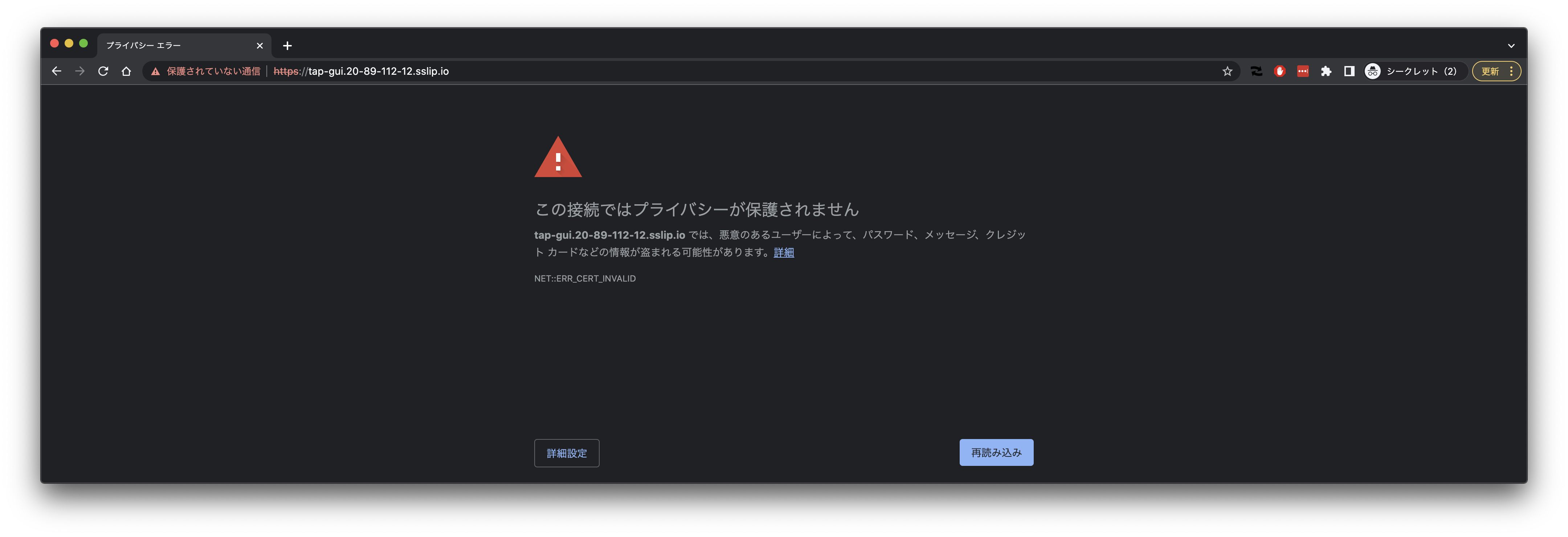 自己署名証明書を使用しているので"THIS IS UNSAFE"を入力してください。
 TAP GUIの認証設定を行っていないので、Guest Userでログインします。後ほどAzure ADでログインできるようにします。
 "YOUR ORGANIZATION"の"All"をクリックします。
インストール時に設定したCatalogが登録されています。
"YOUR ORGANIZATION"の"All"をクリックします。
インストール時に設定したCatalogが登録されています。
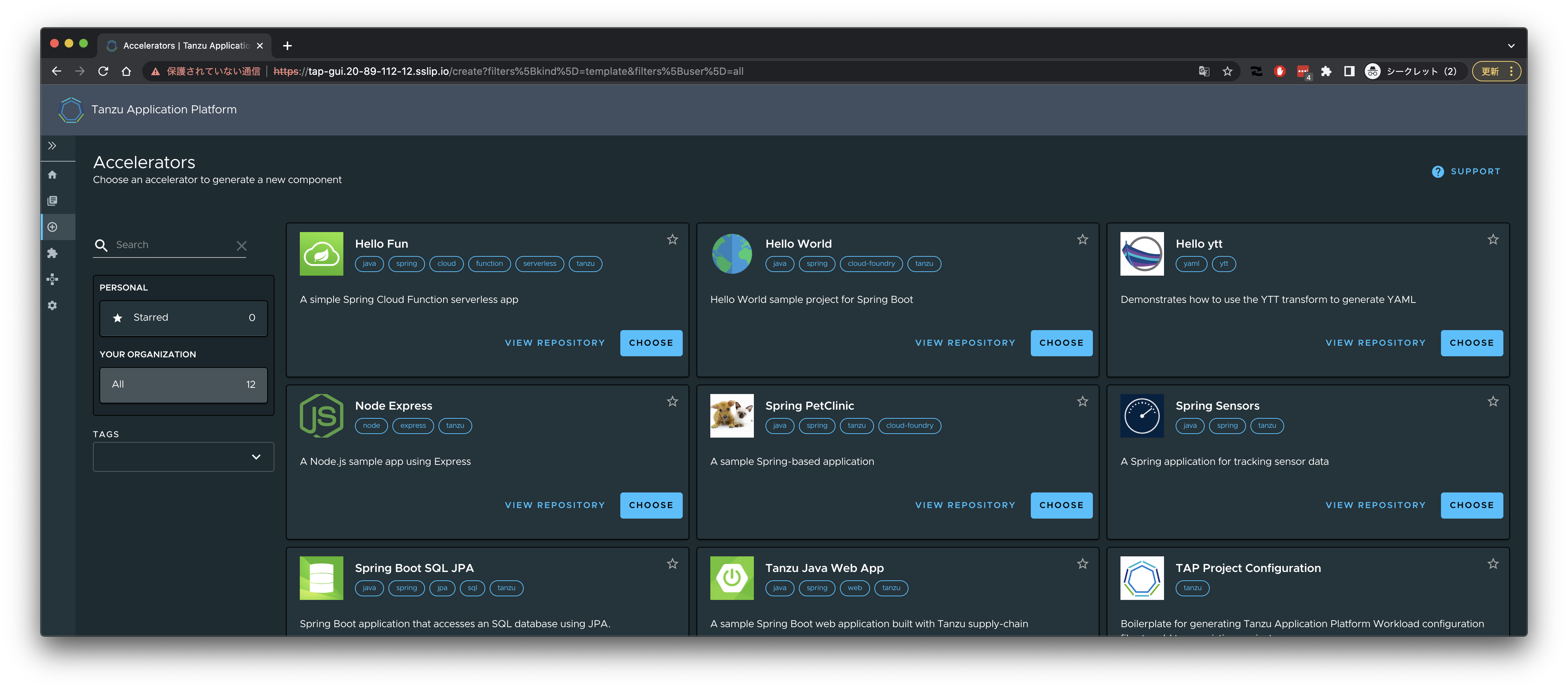
 サイドバーの➕アイコンをクリックすると"Accelerators"一覧が表示されます。
 ### ADグループの作成とメンバー追加
TAP Developer用のADグループを作成します。
```
GROUP_ID=$(az ad group create --display-name tap-demo-developer --mail-nickname tap-demo-developer --query id -o tsv)
```
自分のアカウント(ここでは`tmaki@pivotalazure.vmware.com`)をこのグループに追加します。
```
az ad group member add --group tap-demo-developer --member-id $(az ad user show --id tmaki@pivotalazure.vmware.com --query id -o tsv)
```
groupに追加されていることを確認します。
```
$ az ad group member list --group tap-demo-developer
[
{
"@odata.type": "#microsoft.graph.user",
"businessPhones": [],
"displayName": "Toshiaki Maki",
"givenName": "Toshiaki",
"id": "********",
"jobTitle": null,
"mail": null,
"mobilePhone": null,
"officeLocation": null,
"preferredLanguage": null,
"surname": "Maki",
"userPrincipalName": "tmaki@pivotalazure.vmware.com"
}
]
```
`GROUP_ID`は次のコマンドでも取得できます。
```
GROUP_ID=$(az ad group list --filter "displayname eq 'tap-demo-developer'" --query '[0].id' -o tsv )
```
### Workloadのデプロイ
#### Workloadを作成するための事前準備
ここは引き続き、adminとして作業します。
```
az aks get-credentials --resource-group tap-rg --name tap-sandbox --admin --overwrite-existing
```
https://docs.vmware.com/en/Tanzu-Application-Platform/1.1/tap/GUID-install-components.html#setup
(一部変更しています)
`demo` namespaceを作成します。
```
kubectl create ns demo
```
`demo` namespaceにおいた、先に作成したADグループに対して、[`app-editor`](https://docs.vmware.com/en/VMware-Tanzu-Application-Platform/1.1/tap/GUID-authn-authz-role-descriptions.html#appeditor-0) ClusterRoleをバインドします。
```
kubectl create rolebinding app-editor -n demo --clusterrole app-editor --group ${GROUP_ID}
```
ACRにアクセスするSecretを作成します。ここではadminアカウント使用しますが、[Service Principal](https://docs.microsoft.com/en-us/azure/container-registry/container-registry-authentication?tabs=azure-cli#service-principal)の方がいいかもしれません。
```
tanzu secret registry add registry-credentials --server ${ACR_SERVER} --username ${ACR_USERNAME} --password ${ACR_PASSWORD} --namespace demo
```
Service Accountの設定を行います。
```yaml
cat <
`default` namespaceに対するPodのRead権限はないので、`kubectl get pod`はForbiddenになります。
```
$ kubectl get pod
To sign in, use a web browser to open the page https://microsoft.com/devicelogin and enter the code AJ9MVQ438 to authenticate.
Error from server (Forbidden): pods is forbidden: User "tmaki@pivotalazure.vmware.com" cannot list resource "pods" in API group "" in the namespace "default"
```
`demo` namespaceはPod一覧を取得できます。
```
$ kubectl get pod -n demo
No resources found in demo namespace.
```
#### Javaアプリのデプロイ
```
tanzu apps workload apply spring-music \
--app spring-music \
--git-repo https://github.com/scottfrederick/spring-music \
--git-branch tanzu \
--type web \
--annotation autoscaling.knative.dev/minScale=1 \
-n demo \
-y
tanzu apps workload tail spring-music -n demo
```
作成されるリソースを確認したければ次のコマンドをwatchしてください。
```
watch kubectl get workload,pod,gitrepo,imgs,build,podintent,taskrun,imagerepository,app,ksvc -n demo -owide
```
```
$ kubectl get workload,pod,gitrepo,imgs,build,podintent,taskrun,imagerepository,app,ksvc -n demo -owide
NAME SOURCE SUPPLYCHAIN READY REASON AGE
workload.carto.run/spring-music https://github.com/scottfrederick/spring-music source-to-url True Ready 4m33s
NAME READY STATUS RESTARTS AGE IP NODE NOMINATED NODE READINESS GATES
pod/spring-music-00001-deployment-7ff68976cd-pplm4 2/2 Running 0 22s 10.244.1.29 aks-nodepool1-24504655-vmss000001
pod/spring-music-build-1-build-pod 0/1 Completed 0 4m26s 10.244.0.28 aks-nodepool1-24504655-vmss000002
pod/spring-music-config-writer-b772l-pod 0/1 Completed 0 115s 10.244.1.28 aks-nodepool1-24504655-vmss000001
NAME URL READY STATUS AGE
gitrepository.source.toolkit.fluxcd.io/spring-music https://github.com/scottfrederick/spring-music True Fetched revision: tanzu/922a509361d1345984899cafeb34622ef7dd2086 4m30s
NAME LATESTIMAGE READY
image.kpack.io/spring-music tap26070.azurecr.io/supply-chain/spring-music-demo@sha256:9ddb25fc7248e5a4120497e51148679395bd4279cc9228f15704dcf37317ae5c True
NAME IMAGE SUCCEEDED
build.kpack.io/spring-music-build-1 tap26070.azurecr.io/supply-chain/spring-music-demo@sha256:9ddb25fc7248e5a4120497e51148679395bd4279cc9228f15704dcf37317ae5c True
NAME READY REASON AGE
podintent.conventions.apps.tanzu.vmware.com/spring-music True ConventionsApplied 2m4s
NAME SUCCEEDED REASON STARTTIME COMPLETIONTIME
taskrun.tekton.dev/spring-music-config-writer-b772l True Succeeded 115s 76s
NAME IMAGE URL READY REASON AGE
imagerepository.source.apps.tanzu.vmware.com/spring-music-delivery tap26070.azurecr.io/supply-chain/spring-music-demo-bundle:8d71c03c-8ee5-4396-a56b-e572e4571512 http://source-controller-manager-artifact-service.source-system.svc.cluster.local./imagerepository/demo/spring-music-delivery/4da9775cb6be1ef5cb4187bb2d85b3c9ac46ebcc4998a87e343ff88d0874c7cf.tar.gz True Ready 4m27s
NAME DESCRIPTION SINCE-DEPLOY AGE
app.kappctrl.k14s.io/spring-music Reconcile succeeded 23s 4m27s
NAME URL LATESTCREATED LATESTREADY READY REASON
service.serving.knative.dev/spring-music https://spring-music-demo.20-194-210-187.sslip.io spring-music-00001 spring-music-00001 True
```
```
$ tanzu apps workload get -n demo spring-music
# spring-music: Ready
---
lastTransitionTime: "2022-07-11T07:58:53Z"
message: ""
reason: Ready
status: "True"
type: Ready
Pods
NAME STATUS RESTARTS AGE
spring-music-00001-deployment-7ff68976cd-pplm4 Running 0 39s
spring-music-build-1-build-pod Succeeded 0 4m43s
spring-music-config-writer-b772l-pod Succeeded 0 2m12s
Knative Services
NAME READY URL
spring-music Ready https://spring-music-demo.20-194-210-187.sslip.io
```
### ADグループの作成とメンバー追加
TAP Developer用のADグループを作成します。
```
GROUP_ID=$(az ad group create --display-name tap-demo-developer --mail-nickname tap-demo-developer --query id -o tsv)
```
自分のアカウント(ここでは`tmaki@pivotalazure.vmware.com`)をこのグループに追加します。
```
az ad group member add --group tap-demo-developer --member-id $(az ad user show --id tmaki@pivotalazure.vmware.com --query id -o tsv)
```
groupに追加されていることを確認します。
```
$ az ad group member list --group tap-demo-developer
[
{
"@odata.type": "#microsoft.graph.user",
"businessPhones": [],
"displayName": "Toshiaki Maki",
"givenName": "Toshiaki",
"id": "********",
"jobTitle": null,
"mail": null,
"mobilePhone": null,
"officeLocation": null,
"preferredLanguage": null,
"surname": "Maki",
"userPrincipalName": "tmaki@pivotalazure.vmware.com"
}
]
```
`GROUP_ID`は次のコマンドでも取得できます。
```
GROUP_ID=$(az ad group list --filter "displayname eq 'tap-demo-developer'" --query '[0].id' -o tsv )
```
### Workloadのデプロイ
#### Workloadを作成するための事前準備
ここは引き続き、adminとして作業します。
```
az aks get-credentials --resource-group tap-rg --name tap-sandbox --admin --overwrite-existing
```
https://docs.vmware.com/en/Tanzu-Application-Platform/1.1/tap/GUID-install-components.html#setup
(一部変更しています)
`demo` namespaceを作成します。
```
kubectl create ns demo
```
`demo` namespaceにおいた、先に作成したADグループに対して、[`app-editor`](https://docs.vmware.com/en/VMware-Tanzu-Application-Platform/1.1/tap/GUID-authn-authz-role-descriptions.html#appeditor-0) ClusterRoleをバインドします。
```
kubectl create rolebinding app-editor -n demo --clusterrole app-editor --group ${GROUP_ID}
```
ACRにアクセスするSecretを作成します。ここではadminアカウント使用しますが、[Service Principal](https://docs.microsoft.com/en-us/azure/container-registry/container-registry-authentication?tabs=azure-cli#service-principal)の方がいいかもしれません。
```
tanzu secret registry add registry-credentials --server ${ACR_SERVER} --username ${ACR_USERNAME} --password ${ACR_PASSWORD} --namespace demo
```
Service Accountの設定を行います。
```yaml
cat <
`default` namespaceに対するPodのRead権限はないので、`kubectl get pod`はForbiddenになります。
```
$ kubectl get pod
To sign in, use a web browser to open the page https://microsoft.com/devicelogin and enter the code AJ9MVQ438 to authenticate.
Error from server (Forbidden): pods is forbidden: User "tmaki@pivotalazure.vmware.com" cannot list resource "pods" in API group "" in the namespace "default"
```
`demo` namespaceはPod一覧を取得できます。
```
$ kubectl get pod -n demo
No resources found in demo namespace.
```
#### Javaアプリのデプロイ
```
tanzu apps workload apply spring-music \
--app spring-music \
--git-repo https://github.com/scottfrederick/spring-music \
--git-branch tanzu \
--type web \
--annotation autoscaling.knative.dev/minScale=1 \
-n demo \
-y
tanzu apps workload tail spring-music -n demo
```
作成されるリソースを確認したければ次のコマンドをwatchしてください。
```
watch kubectl get workload,pod,gitrepo,imgs,build,podintent,taskrun,imagerepository,app,ksvc -n demo -owide
```
```
$ kubectl get workload,pod,gitrepo,imgs,build,podintent,taskrun,imagerepository,app,ksvc -n demo -owide
NAME SOURCE SUPPLYCHAIN READY REASON AGE
workload.carto.run/spring-music https://github.com/scottfrederick/spring-music source-to-url True Ready 4m33s
NAME READY STATUS RESTARTS AGE IP NODE NOMINATED NODE READINESS GATES
pod/spring-music-00001-deployment-7ff68976cd-pplm4 2/2 Running 0 22s 10.244.1.29 aks-nodepool1-24504655-vmss000001
pod/spring-music-build-1-build-pod 0/1 Completed 0 4m26s 10.244.0.28 aks-nodepool1-24504655-vmss000002
pod/spring-music-config-writer-b772l-pod 0/1 Completed 0 115s 10.244.1.28 aks-nodepool1-24504655-vmss000001
NAME URL READY STATUS AGE
gitrepository.source.toolkit.fluxcd.io/spring-music https://github.com/scottfrederick/spring-music True Fetched revision: tanzu/922a509361d1345984899cafeb34622ef7dd2086 4m30s
NAME LATESTIMAGE READY
image.kpack.io/spring-music tap26070.azurecr.io/supply-chain/spring-music-demo@sha256:9ddb25fc7248e5a4120497e51148679395bd4279cc9228f15704dcf37317ae5c True
NAME IMAGE SUCCEEDED
build.kpack.io/spring-music-build-1 tap26070.azurecr.io/supply-chain/spring-music-demo@sha256:9ddb25fc7248e5a4120497e51148679395bd4279cc9228f15704dcf37317ae5c True
NAME READY REASON AGE
podintent.conventions.apps.tanzu.vmware.com/spring-music True ConventionsApplied 2m4s
NAME SUCCEEDED REASON STARTTIME COMPLETIONTIME
taskrun.tekton.dev/spring-music-config-writer-b772l True Succeeded 115s 76s
NAME IMAGE URL READY REASON AGE
imagerepository.source.apps.tanzu.vmware.com/spring-music-delivery tap26070.azurecr.io/supply-chain/spring-music-demo-bundle:8d71c03c-8ee5-4396-a56b-e572e4571512 http://source-controller-manager-artifact-service.source-system.svc.cluster.local./imagerepository/demo/spring-music-delivery/4da9775cb6be1ef5cb4187bb2d85b3c9ac46ebcc4998a87e343ff88d0874c7cf.tar.gz True Ready 4m27s
NAME DESCRIPTION SINCE-DEPLOY AGE
app.kappctrl.k14s.io/spring-music Reconcile succeeded 23s 4m27s
NAME URL LATESTCREATED LATESTREADY READY REASON
service.serving.knative.dev/spring-music https://spring-music-demo.20-194-210-187.sslip.io spring-music-00001 spring-music-00001 True
```
```
$ tanzu apps workload get -n demo spring-music
# spring-music: Ready
---
lastTransitionTime: "2022-07-11T07:58:53Z"
message: ""
reason: Ready
status: "True"
type: Ready
Pods
NAME STATUS RESTARTS AGE
spring-music-00001-deployment-7ff68976cd-pplm4 Running 0 39s
spring-music-build-1-build-pod Succeeded 0 4m43s
spring-music-config-writer-b772l-pod Succeeded 0 2m12s
Knative Services
NAME READY URL
spring-music Ready https://spring-music-demo.20-194-210-187.sslip.io
```
 "THIS IS UNSAFE"を入力
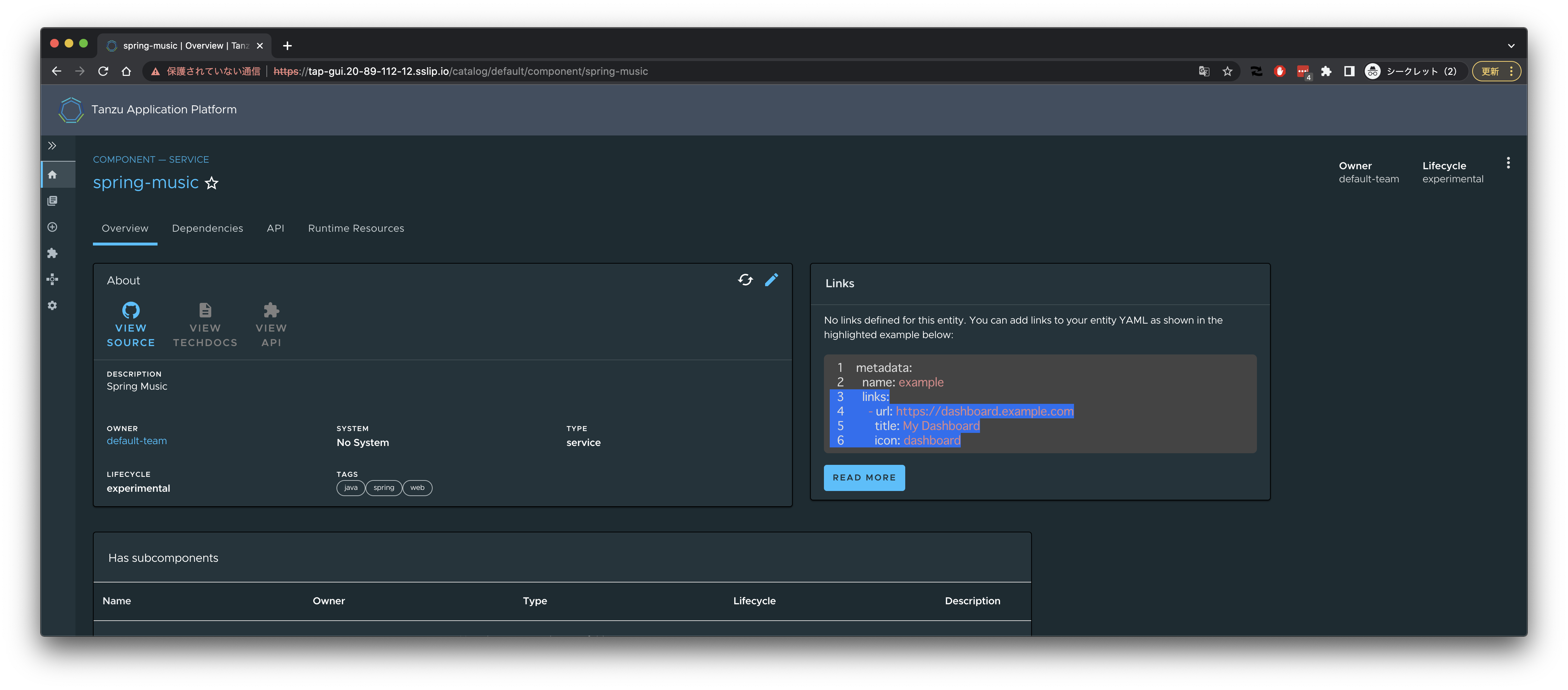
 TAP GUIでSpring Musicの情報を見ることができます。
TAP GUIのCatalogからSpring Musicを選択。
TAP GUIでSpring Musicの情報を見ることができます。
TAP GUIのCatalogからSpring Musicを選択。
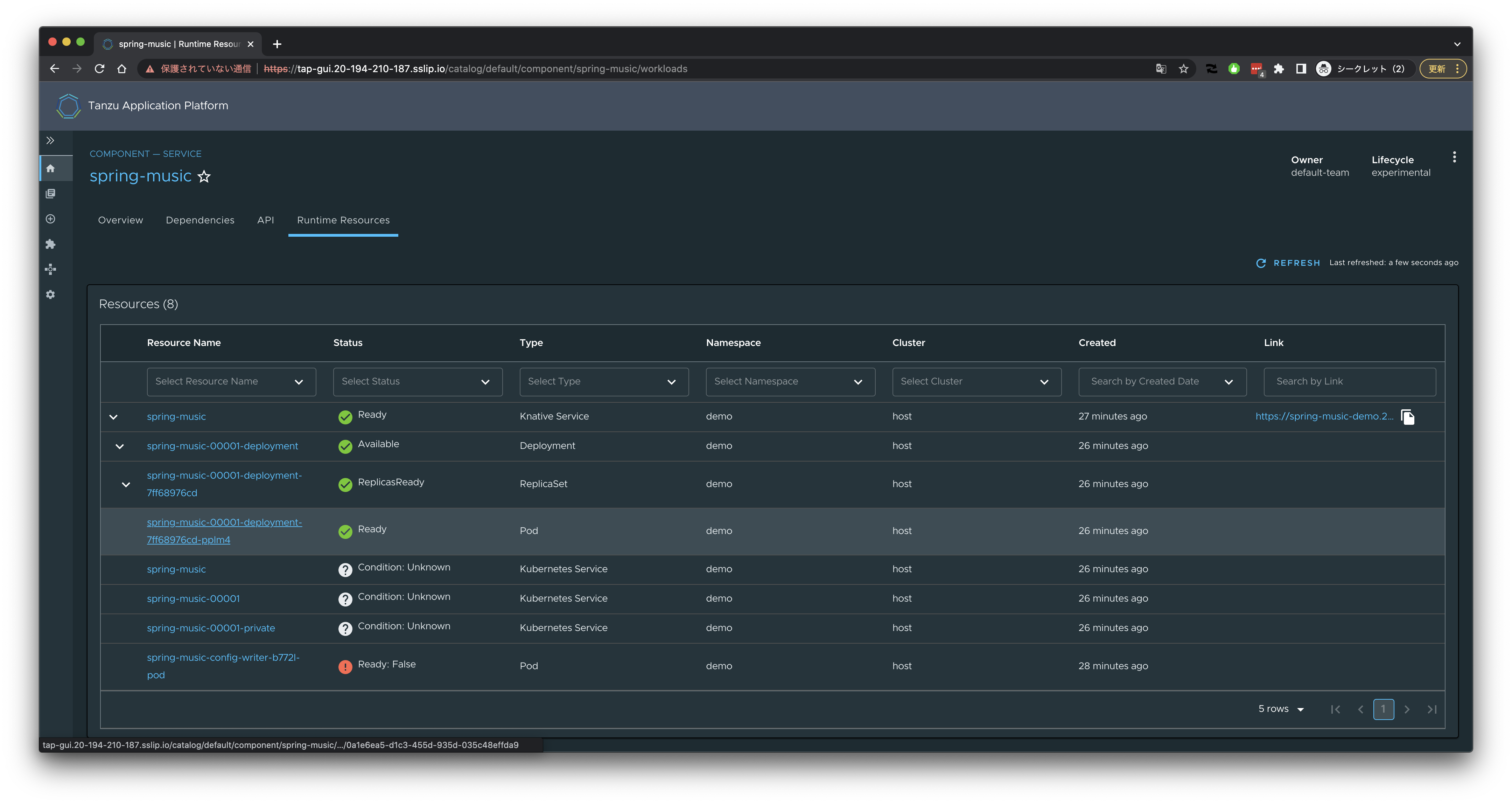
 Podを選択。
 Live Viewが見られます。
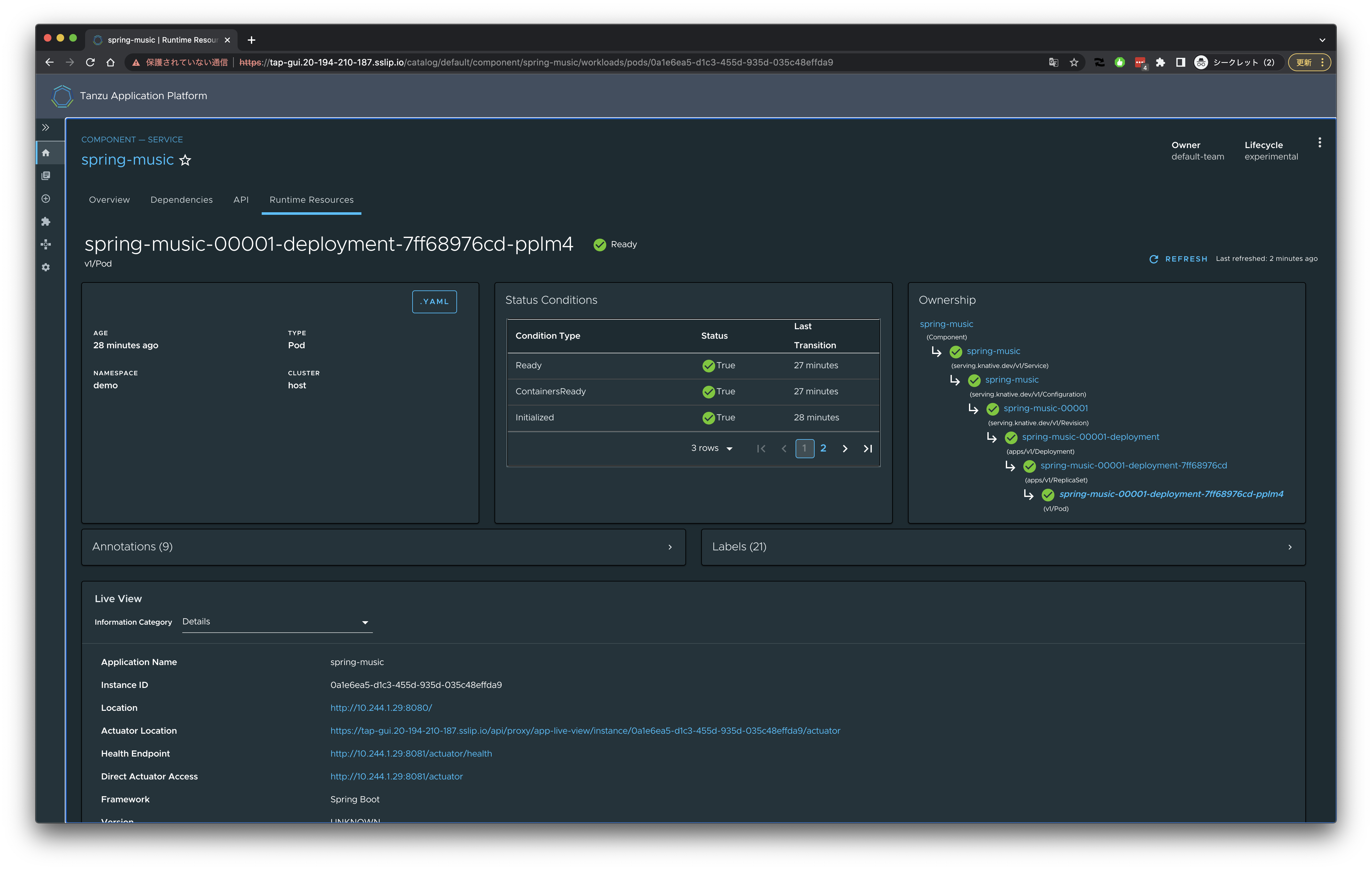 Spring Boot Actuatorのエンドポイントを選択できます。
 Memoryを選んだ場合、
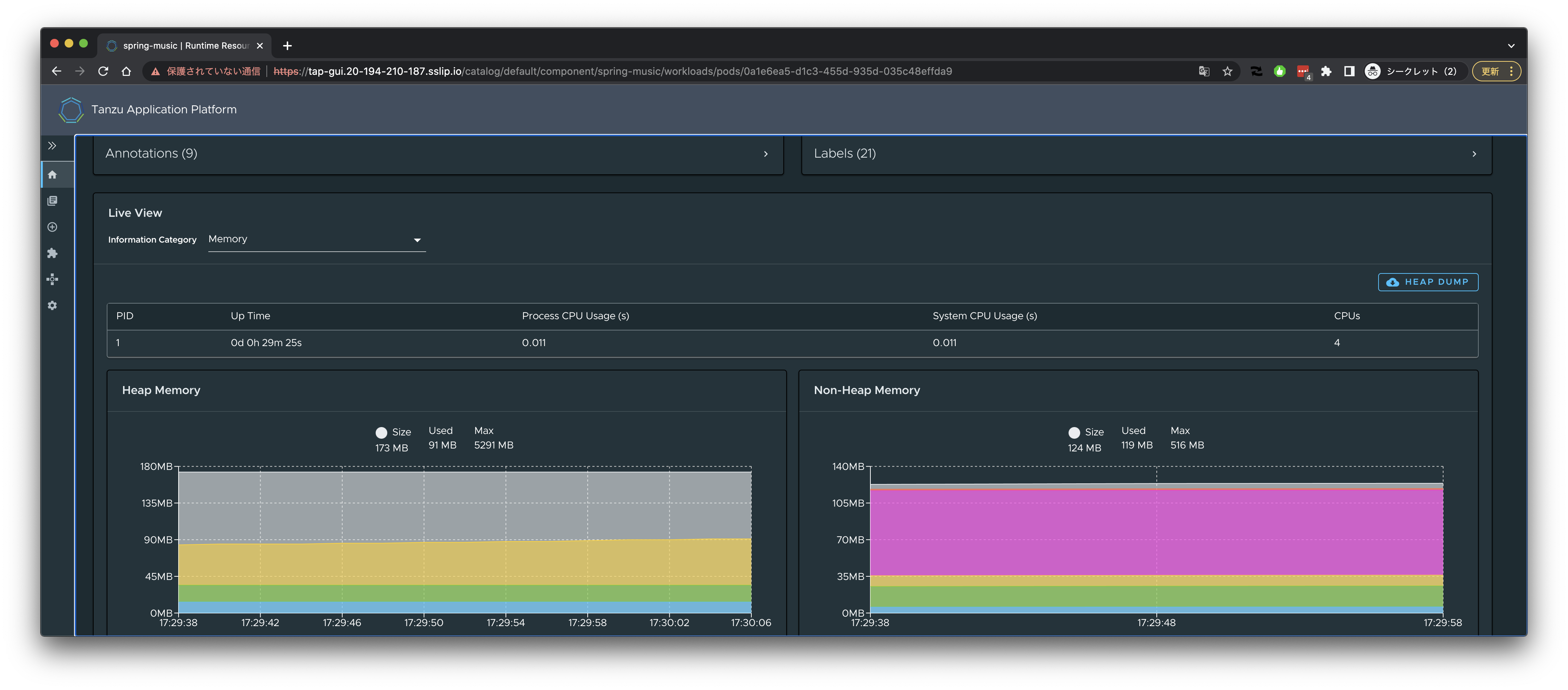 次に、サイドバーから"Workloads"を選択します。
 Spring Musicを選択すると、Supply Chainの状態を確認することができます。
 確認が終わればWorkloadを削除します。
```
tanzu apps workload delete -n demo spring-music -y
```
### Azure ADでTAP GUIにログインする
TAP GUIの認証にAzure ADを使用するには、[Backstageのドキュメント](https://backstage.io/docs/auth/microsoft/provider)の手順通り、
App Registrationを作成します。次の通りです。
> 1. Log in to the [Azure Portal](https://portal.azure.com/)
> 2. Create an [Active Directory Tenant](https://portal.azure.com/#blade/Microsoft_AAD_IAM/ActiveDirectoryMenuBlade/Overview), if one does not yet exist
> 3. Navigate to [Azure Active Directory > App Registrations](https://portal.azure.com/#blade/Microsoft_AAD_IAM/ActiveDirectoryMenuBlade/RegisteredApps)
> 4. Register an application
> * Name: TAP GUI
> * Redirect URI: Web > https://tap-gui.20-194-210-187.sslip.io/api/auth/microsoft/handler/frame
> 5. Navigate to Certificates & secrets > New client secret to create a secret
clientSecretはSecret生成直後にコピーできます。
確認が終わればWorkloadを削除します。
```
tanzu apps workload delete -n demo spring-music -y
```
### Azure ADでTAP GUIにログインする
TAP GUIの認証にAzure ADを使用するには、[Backstageのドキュメント](https://backstage.io/docs/auth/microsoft/provider)の手順通り、
App Registrationを作成します。次の通りです。
> 1. Log in to the [Azure Portal](https://portal.azure.com/)
> 2. Create an [Active Directory Tenant](https://portal.azure.com/#blade/Microsoft_AAD_IAM/ActiveDirectoryMenuBlade/Overview), if one does not yet exist
> 3. Navigate to [Azure Active Directory > App Registrations](https://portal.azure.com/#blade/Microsoft_AAD_IAM/ActiveDirectoryMenuBlade/RegisteredApps)
> 4. Register an application
> * Name: TAP GUI
> * Redirect URI: Web > https://tap-gui.20-194-210-187.sslip.io/api/auth/microsoft/handler/frame
> 5. Navigate to Certificates & secrets > New client secret to create a secret
clientSecretはSecret生成直後にコピーできます。
 clientId、tenantIdはOverviewから確認できます。
 `tap-values.yml`にclientId、clientSecret、tenantIdを設定します。
```yaml
tap_gui:
# ...
app_config:
# ...
auth:
environment: development
providers:
microsoft:
development:
clientId: ${AUTH_MICROSOFT_CLIENT_ID}
clientSecret: ${AUTH_MICROSOFT_CLIENT_SECRET}
tenantId: ${AUTH_MICROSOFT_TENANT_ID}
```
adminとして作業します。
```
az aks get-credentials --resource-group tap-rg --name tap-sandbox --admin --overwrite-existing
```
TAPを更新します。
```
tanzu package installed update tap -n tap-install -v 1.1.2 -f tap-values.yml
```
TAP GUIが再作成されるまで次のコマンドで確認して待ってください。
```
watch kubectl get pod -n tap-gui
```
再起動後、TAP GUIにアクセスすれば、"Sign in with Azure OAuth"と表示されます。
`tap-values.yml`にclientId、clientSecret、tenantIdを設定します。
```yaml
tap_gui:
# ...
app_config:
# ...
auth:
environment: development
providers:
microsoft:
development:
clientId: ${AUTH_MICROSOFT_CLIENT_ID}
clientSecret: ${AUTH_MICROSOFT_CLIENT_SECRET}
tenantId: ${AUTH_MICROSOFT_TENANT_ID}
```
adminとして作業します。
```
az aks get-credentials --resource-group tap-rg --name tap-sandbox --admin --overwrite-existing
```
TAPを更新します。
```
tanzu package installed update tap -n tap-install -v 1.1.2 -f tap-values.yml
```
TAP GUIが再作成されるまで次のコマンドで確認して待ってください。
```
watch kubectl get pod -n tap-gui
```
再起動後、TAP GUIにアクセスすれば、"Sign in with Azure OAuth"と表示されます。
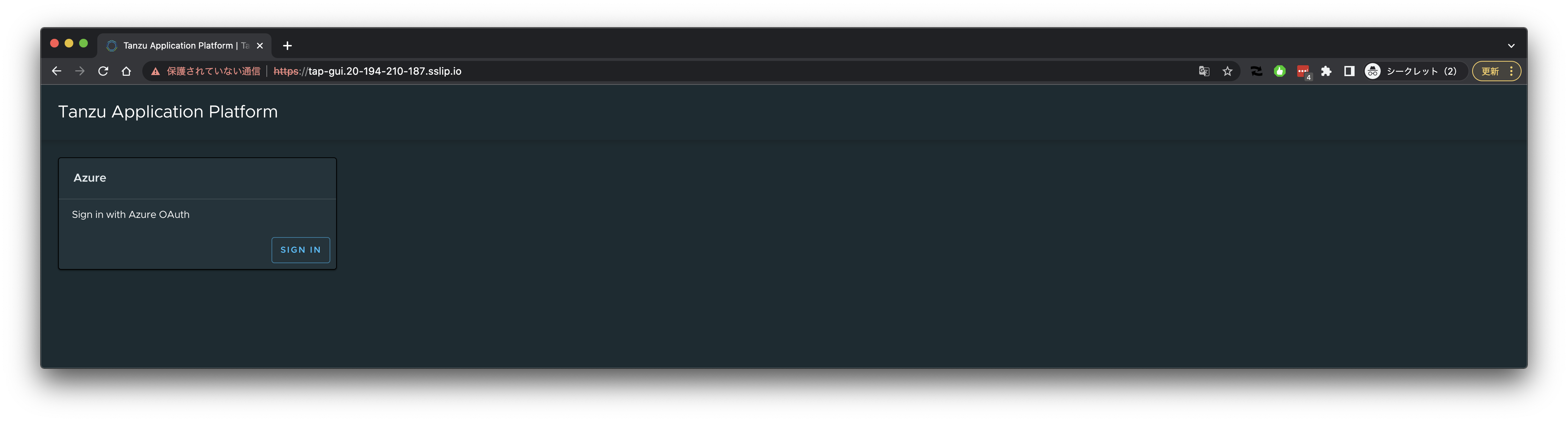 DeveloperのアカウントでAzureにログインします。
 承諾します。
 ログインに成功し、サイドバーから"Settings"を確認すると、ログインユーザー名とメールアドレスが表示されることを確認できます。
 ### [Optional] Source Test Scan to URLを試す
[こちらの記事](https://ik.am/entries/698)を参照。
### [Optional] ADユーザーの追加
先に使用したユーザー(`tmaki@pivotalazure.vmware.com`)はAKSのAdmin Roleを持っていました。
実際にTAP DeveloperがAKSのAdmin Roleを持つことはないはずなので、
User Roleを使うパターンを試します。
まずはユーザーを作成します。ここではユーザーを招待します。
### [Optional] Source Test Scan to URLを試す
[こちらの記事](https://ik.am/entries/698)を参照。
### [Optional] ADユーザーの追加
先に使用したユーザー(`tmaki@pivotalazure.vmware.com`)はAKSのAdmin Roleを持っていました。
実際にTAP DeveloperがAKSのAdmin Roleを持つことはないはずなので、
User Roleを使うパターンを試します。
まずはユーザーを作成します。ここではユーザーを招待します。

 招待をAcceptします。
 追加したユーザーにAKSのUser Roleをアサインします。
```
ACCOUNT_ID=$(az ad user show --id tmaki_vmware.com#EXT#@pivotalio.onmicrosoft.com --query id -o tsv)
AKS_ID=$(az aks show -g tap-rg -n tap-sandbox --query id -o tsv)
az role assignment create --assignee ${ACCOUNT_ID} --scope ${AKS_ID} --role "Azure Kubernetes Service Cluster User Role"
```
また、tap-demo-developer groupに追加します。
```
az ad group member add --group tap-demo-developer --member-id ${ACCOUNT_ID}
```
groupに追加されていることを確認します。
```
$ az ad group member list --group tap-demo-developer
[
{
"@odata.type": "#microsoft.graph.user",
"businessPhones": [],
"displayName": "Toshiaki Maki",
"givenName": "Toshiaki",
"id": "********",
"jobTitle": null,
"mail": null,
"mobilePhone": null,
"officeLocation": null,
"preferredLanguage": null,
"surname": "Maki",
"userPrincipalName": "tmaki@pivotalazure.vmware.com"
},
{
"@odata.type": "#microsoft.graph.user",
"businessPhones": [],
"displayName": "Toshiaki Maki",
"givenName": null,
"id": "********",
"jobTitle": null,
"mail": "tmaki@vmware.com",
"mobilePhone": null,
"officeLocation": null,
"preferredLanguage": null,
"surname": null,
"userPrincipalName": "tmaki_vmware.com#EXT#@pivotalio.onmicrosoft.com"
}
]
```
別の環境で追加されたユーザーにログインしてください。
```
az login
```
次のコマンドでkubeconfigを取得してください。`--admin`をつけるとエラーになります。
```
az aks get-credentials --resource-group tap-rg --name tap-sandbox --overwrite-existing
```
Workloadの作成はこれまでと同じです。
### TAPのアンインストール
```
kubectl delete workload -A --all
```
```
tanzu package installed delete tap -n tap-install -y
```
### AKSクラスタの削除
```
az aks delete \
--resource-group tap-rg \
--name tap-sandbox
```
### ACRインスタンスの削除
```
az acr delete --resource-group tap-rg --name ${ACR_NAME}
```
### リソースグループ削除
```
az group delete --name tap-rg
```
追加したユーザーにAKSのUser Roleをアサインします。
```
ACCOUNT_ID=$(az ad user show --id tmaki_vmware.com#EXT#@pivotalio.onmicrosoft.com --query id -o tsv)
AKS_ID=$(az aks show -g tap-rg -n tap-sandbox --query id -o tsv)
az role assignment create --assignee ${ACCOUNT_ID} --scope ${AKS_ID} --role "Azure Kubernetes Service Cluster User Role"
```
また、tap-demo-developer groupに追加します。
```
az ad group member add --group tap-demo-developer --member-id ${ACCOUNT_ID}
```
groupに追加されていることを確認します。
```
$ az ad group member list --group tap-demo-developer
[
{
"@odata.type": "#microsoft.graph.user",
"businessPhones": [],
"displayName": "Toshiaki Maki",
"givenName": "Toshiaki",
"id": "********",
"jobTitle": null,
"mail": null,
"mobilePhone": null,
"officeLocation": null,
"preferredLanguage": null,
"surname": "Maki",
"userPrincipalName": "tmaki@pivotalazure.vmware.com"
},
{
"@odata.type": "#microsoft.graph.user",
"businessPhones": [],
"displayName": "Toshiaki Maki",
"givenName": null,
"id": "********",
"jobTitle": null,
"mail": "tmaki@vmware.com",
"mobilePhone": null,
"officeLocation": null,
"preferredLanguage": null,
"surname": null,
"userPrincipalName": "tmaki_vmware.com#EXT#@pivotalio.onmicrosoft.com"
}
]
```
別の環境で追加されたユーザーにログインしてください。
```
az login
```
次のコマンドでkubeconfigを取得してください。`--admin`をつけるとエラーになります。
```
az aks get-credentials --resource-group tap-rg --name tap-sandbox --overwrite-existing
```
Workloadの作成はこれまでと同じです。
### TAPのアンインストール
```
kubectl delete workload -A --all
```
```
tanzu package installed delete tap -n tap-install -y
```
### AKSクラスタの削除
```
az aks delete \
--resource-group tap-rg \
--name tap-sandbox
```
### ACRインスタンスの削除
```
az acr delete --resource-group tap-rg --name ${ACR_NAME}
```
### リソースグループ削除
```
az group delete --name tap-rg
```