---
title: Tanzu Application PlatformのBitnami Servicesを使ってSpring Cloud Streamのアプリをデプロイする
tags: ["Kubernetes", "kind", "Tanzu", "TAP", "Bitnami Services", "Spring Boot", "Spring Cloud Stream", "Service Binding"]
categories: ["Dev", "CaaS", "Kubernetes", "TAP", "BitnamiServices"]
date: 2023-05-17T04:06:23Z
updated: 2023-05-19T13:57:23Z
---
Tanzu Application Platform 1.5で導入された[Bitnami Services](https://docs.vmware.com/en/VMware-Tanzu-Application-Platform/1.5/tap/bitnami-services-about.html)を使用して、
RabbitMQのサービスを動的にプロビジョンして、Spring Cloud Streamのアプリ(Source, Sink)をデプロイしてRabbitMQで繋げます。
> ℹ️ 本記事の内容をBitnami Servicesを使わずにRabbit MQをバインドしたい場合は[こちらの記事](https://ik.am/entries/743)を参照してください。
デプロイするアプリは次のリンクのSpring Cloud Stream Tutorialで作成する[hello-source](https://github.com/making/hello-source)と[hello-sink](https://github.com/making/hello-sink)です。
https://github.com/making/spring-cloud-stream-tutorial
 **目次**
以下はTAPのiterateまたはfullクラスタで試した内容です。TAP 1.5のインストールは[こちら](https://ik.am/entries/738)を参照してください。
### RabbitMQサービスの作成
まずはRabbitMQを立ち上げます。TAPから提供されているサービス一覧を次のコマンドで確認できます。
```
$ tanzu service class list
NAME DESCRIPTION
mysql-unmanaged MySQL by Bitnami
postgresql-unmanaged PostgreSQL by Bitnami
rabbitmq-unmanaged RabbitMQ by Bitnami
redis-unmanaged Redis by Bitnami
```
`rabbitmq-unmanaged`クラスを使用して、次のようにClassClaimリソースを作成します。
```
tanzu service class-claim create hello-rabbitmq --class rabbitmq-unmanaged -n demo
```
次のコマンドで進捗を確認し、`Status`の`Ready`が`True`になればOKです。
```
$ tanzu services class-claims get hello-rabbitmq --namespace demo
Name: hello-rabbitmq
Namespace: demo
Claim Reference: services.apps.tanzu.vmware.com/v1alpha1:ClassClaim:hello-rabbitmq
Class Reference:
Name: rabbitmq-unmanaged
Parameters: None
Status:
Ready: True
Claimed Resource:
Name: a65e8572-f3a8-4564-81fc-39c1702a05df
Namespace: demo
Group:
Version: v1
Kind: Secret
```
ClassClaimは`kubectl`コマンドでも次のように確認できます。
```
$ kubectl get -n demo classclaims
NAME READY REASON CLASSREF
hello-rabbitmq True Ready rabbitmq-unmanaged
```
作成されたRabbitMQのPodは次のように確認できます。デフォルトではランダムなnamespace上に作成されます。
```
RESOURCE_NAME=$(kubectl get -n demo classclaims hello-rabbitmq -ojsonpath='{.status.provisionedResourceRef.name}')
kubectl get pod -n ${RESOURCE_NAME}
```
出力結果
```
NAME READY STATUS RESTARTS AGE
hello-rabbitmq-qggk9-0 1/1 Running 0 6m
```
### Sourceの作成
まずはSourceのWorkloadを作成します。
```
tanzu apps workload apply hello-source \
--app hello-source \
--git-repo https://github.com/making/hello-source \
--git-branch main \
--type web \
--annotation autoscaling.knative.dev/minScale=1 \
--service-ref hello-rabbitmq=services.apps.tanzu.vmware.com/v1alpha1:ClassClaim:hello-rabbitmq \
--build-env BP_JVM_VERSION=17 \
-n demo \
-y
```
`stern`を使うとログが見やすいです。
```
stern -n demo hello-source
```
次のような結果が得られればSourceのデプロイが完了です。
```
$ tanzu apps workload get -n demo hello-source
📡 Overview
name: hello-source
type: web
namespace: demo
💾 Source
type: git
url: https://github.com/making/hello-source
branch: main
📦 Supply Chain
name: source-to-url
NAME READY HEALTHY UPDATED RESOURCE
source-provider True True 4m50s gitrepositories.source.toolkit.fluxcd.io/hello-source
image-provider True True 2m46s images.kpack.io/hello-source
config-provider True True 2m38s podintents.conventions.carto.run/hello-source
app-config True True 2m38s configmaps/hello-source
service-bindings True True 2m38s configmaps/hello-source-with-claims
api-descriptors True True 2m38s configmaps/hello-source-with-api-descriptors
config-writer True True 2m4s runnables.carto.run/hello-source-config-writer
🚚 Delivery
name: delivery-basic
NAME READY HEALTHY UPDATED RESOURCE
source-provider True True 106s imagerepositories.source.apps.tanzu.vmware.com/hello-source-delivery
deployer True True 102s apps.kappctrl.k14s.io/hello-source
💬 Messages
No messages found.
🔁 Services
CLAIM NAME KIND API VERSION
hello-rabbitmq hello-rabbitmq ClassClaim services.apps.tanzu.vmware.com/v1alpha1
🛶 Pods
NAME READY STATUS RESTARTS AGE
hello-source-00001-deployment-7ffbf7ffb6-5l6px 2/2 Running 0 103s
hello-source-build-1-build-pod 0/1 Completed 0 4m50s
hello-source-config-writer-vzf4z-pod 0/1 Completed 0 2m35s
🚢 Knative Services
NAME READY URL
hello-source Ready https://hello-source.demo.tap-happy-titmouse.tapsandbox.com
To see logs: "tanzu apps workload tail hello-source --namespace demo --timestamp --since 1h"
```
アプリのログは次のように出力されます。
```
$ stern -n demo hello-source -c workload
+ hello-source-00001-deployment-7ffbf7ffb6-5l6px › workload
hello-source-00001-deployment-7ffbf7ffb6-5l6px workload Setting Active Processor Count to 4
hello-source-00001-deployment-7ffbf7ffb6-5l6px workload Calculating JVM memory based on 14936152K available memory
hello-source-00001-deployment-7ffbf7ffb6-5l6px workload For more information on this calculation, see https://paketo.io/docs/reference/java-reference/#memory-calculator
hello-source-00001-deployment-7ffbf7ffb6-5l6px workload Calculated JVM Memory Configuration: -XX:MaxDirectMemorySize=10M -Xmx14529633K -XX:MaxMetaspaceSize=99318K -XX:ReservedCodeCacheSize=240M -Xss1M (Total Memory: 14936152K, Thread Count: 50, Loaded Class Count: 15121, Headroom: 0%)
hello-source-00001-deployment-7ffbf7ffb6-5l6px workload Enabling Java Native Memory Tracking
hello-source-00001-deployment-7ffbf7ffb6-5l6px workload Adding 124 container CA certificates to JVM truststore
hello-source-00001-deployment-7ffbf7ffb6-5l6px workload Spring Cloud Bindings Enabled
hello-source-00001-deployment-7ffbf7ffb6-5l6px workload Picked up JAVA_TOOL_OPTIONS: -Dmanagement.endpoint.health.probes.add-additional-paths="true" -Dmanagement.health.probes.enabled="true" -Dserver.port="8080" -Dserver.shutdown.grace-period="24s" -Djava.security.properties=/layers/paketo-buildpacks_bellsoft-liberica/java-security-properties/java-security.properties -XX:+ExitOnOutOfMemoryError -XX:ActiveProcessorCount=4 -XX:MaxDirectMemorySize=10M -Xmx14529633K -XX:MaxMetaspaceSize=99318K -XX:ReservedCodeCacheSize=240M -Xss1M -XX:+UnlockDiagnosticVMOptions -XX:NativeMemoryTracking=summary -XX:+PrintNMTStatistics -Dorg.springframework.cloud.bindings.boot.enable=true
hello-source-00001-deployment-7ffbf7ffb6-5l6px workload
hello-source-00001-deployment-7ffbf7ffb6-5l6px workload . ____ _ __ _ _
hello-source-00001-deployment-7ffbf7ffb6-5l6px workload /\\ / ___'_ __ _ _(_)_ __ __ _ \ \ \ \
hello-source-00001-deployment-7ffbf7ffb6-5l6px workload ( ( )\___ | '_ | '_| | '_ \/ _` | \ \ \ \
hello-source-00001-deployment-7ffbf7ffb6-5l6px workload \\/ ___)| |_)| | | | | || (_| | ) ) ) )
hello-source-00001-deployment-7ffbf7ffb6-5l6px workload ' |____| .__|_| |_|_| |_\__, | / / / /
hello-source-00001-deployment-7ffbf7ffb6-5l6px workload =========|_|==============|___/=/_/_/_/
hello-source-00001-deployment-7ffbf7ffb6-5l6px workload :: Spring Boot :: (v3.0.6)
hello-source-00001-deployment-7ffbf7ffb6-5l6px workload
hello-source-00001-deployment-7ffbf7ffb6-5l6px workload 2023-05-17T03:09:15.698Z INFO 1 --- [ main] com.example.HelloSourceApplication : Starting HelloSourceApplication v0.0.1-SNAPSHOT using Java 17.0.6 with PID 1 (/workspace/BOOT-INF/classes started by cnb in /workspace)
hello-source-00001-deployment-7ffbf7ffb6-5l6px workload 2023-05-17T03:09:15.712Z INFO 1 --- [ main] com.example.HelloSourceApplication : No active profile set, falling back to 1 default profile: "default"
hello-source-00001-deployment-7ffbf7ffb6-5l6px workload 2023-05-17T03:09:15.880Z INFO 1 --- [ main] .BindingSpecificEnvironmentPostProcessor : Creating binding-specific PropertySource from Kubernetes Service Bindings
hello-source-00001-deployment-7ffbf7ffb6-5l6px workload 2023-05-17T03:09:17.659Z INFO 1 --- [ main] faultConfiguringBeanFactoryPostProcessor : No bean named 'errorChannel' has been explicitly defined. Therefore, a default PublishSubscribeChannel will be created.
hello-source-00001-deployment-7ffbf7ffb6-5l6px workload 2023-05-17T03:09:17.676Z INFO 1 --- [ main] faultConfiguringBeanFactoryPostProcessor : No bean named 'integrationHeaderChannelRegistry' has been explicitly defined. Therefore, a default DefaultHeaderChannelRegistry will be created.
hello-source-00001-deployment-7ffbf7ffb6-5l6px workload 2023-05-17T03:09:18.459Z INFO 1 --- [ main] o.s.b.w.embedded.tomcat.TomcatWebServer : Tomcat initialized with port(s): 8080 (http)
hello-source-00001-deployment-7ffbf7ffb6-5l6px workload 2023-05-17T03:09:18.472Z INFO 1 --- [ main] o.apache.catalina.core.StandardService : Starting service [Tomcat]
hello-source-00001-deployment-7ffbf7ffb6-5l6px workload 2023-05-17T03:09:18.472Z INFO 1 --- [ main] o.apache.catalina.core.StandardEngine : Starting Servlet engine: [Apache Tomcat/10.1.8]
hello-source-00001-deployment-7ffbf7ffb6-5l6px workload 2023-05-17T03:09:18.627Z INFO 1 --- [ main] o.a.c.c.C.[Tomcat].[localhost].[/] : Initializing Spring embedded WebApplicationContext
hello-source-00001-deployment-7ffbf7ffb6-5l6px workload 2023-05-17T03:09:18.631Z INFO 1 --- [ main] w.s.c.ServletWebServerApplicationContext : Root WebApplicationContext: initialization completed in 2737 ms
hello-source-00001-deployment-7ffbf7ffb6-5l6px workload 2023-05-17T03:09:20.588Z INFO 1 --- [ main] o.s.b.a.e.web.EndpointLinksResolver : Exposing 1 endpoint(s) beneath base path '/actuator'
hello-source-00001-deployment-7ffbf7ffb6-5l6px workload 2023-05-17T03:09:20.785Z INFO 1 --- [ main] o.s.i.endpoint.EventDrivenConsumer : Adding {logging-channel-adapter:_org.springframework.integration.errorLogger} as a subscriber to the 'errorChannel' channel
hello-source-00001-deployment-7ffbf7ffb6-5l6px workload 2023-05-17T03:09:20.786Z INFO 1 --- [ main] o.s.i.channel.PublishSubscribeChannel : Channel 'application.errorChannel' has 1 subscriber(s).
hello-source-00001-deployment-7ffbf7ffb6-5l6px workload 2023-05-17T03:09:20.787Z INFO 1 --- [ main] o.s.i.endpoint.EventDrivenConsumer : started bean '_org.springframework.integration.errorLogger'
hello-source-00001-deployment-7ffbf7ffb6-5l6px workload 2023-05-17T03:09:20.814Z INFO 1 --- [ main] o.s.b.w.embedded.tomcat.TomcatWebServer : Tomcat started on port(s): 8080 (http) with context path ''
hello-source-00001-deployment-7ffbf7ffb6-5l6px workload 2023-05-17T03:09:20.852Z INFO 1 --- [ main] com.example.HelloSourceApplication : Started HelloSourceApplication in 5.882 seconds (process running for 6.378)
hello-source-00001-deployment-7ffbf7ffb6-5l6px workload 2023-05-17T03:09:20.942Z INFO 1 --- [nio-8080-exec-1] o.a.c.c.C.[Tomcat].[localhost].[/] : Initializing Spring DispatcherServlet 'dispatcherServlet'
hello-source-00001-deployment-7ffbf7ffb6-5l6px workload 2023-05-17T03:09:20.945Z INFO 1 --- [nio-8080-exec-1] o.s.web.servlet.DispatcherServlet : Initializing Servlet 'dispatcherServlet'
hello-source-00001-deployment-7ffbf7ffb6-5l6px workload 2023-05-17T03:09:20.949Z INFO 1 --- [nio-8080-exec-1] o.s.web.servlet.DispatcherServlet : Completed initialization in 2 ms
hello-source-00001-deployment-7ffbf7ffb6-5l6px workload 2023-05-17T03:09:29.814Z INFO 1 --- [nio-8080-exec-9] o.s.a.r.c.CachingConnectionFactory : Attempting to connect to: [10.35.246.240:5672]
hello-source-00001-deployment-7ffbf7ffb6-5l6px workload 2023-05-17T03:09:29.910Z INFO 1 --- [nio-8080-exec-9] o.s.a.r.c.CachingConnectionFactory : Created new connection: rabbitConnectionFactory#23121d14:0/SimpleConnection@52f4fc90 [delegate=amqp://rabbitmq@10.35.246.240:5672/, localPort=52988]
```
### Sinkの作成
次にSinkのWorkloadを作成します。
```
tanzu apps workload apply hello-sink \
--app hello-sink \
--git-repo https://github.com/making/hello-sink \
--git-branch main \
--type web \
--annotation autoscaling.knative.dev/minScale=1 \
--service-ref hello-rabbitmq=services.apps.tanzu.vmware.com/v1alpha1:ClassClaim:hello-rabbitmq \
--build-env BP_JVM_VERSION=17 \
-n demo \
-y
```
`stern`を使うとログが見やすいです。
```
stern -n demo hello-sink
```
次のような結果が得られればSinkのデプロイが完了です。
```
$ tanzu apps workload get -n demo hello-sink
📡 Overview
name: hello-sink
type: web
namespace: demo
💾 Source
type: git
url: https://github.com/making/hello-sink
branch: main
📦 Supply Chain
name: source-to-url
NAME READY HEALTHY UPDATED RESOURCE
source-provider True True 4m48s gitrepositories.source.toolkit.fluxcd.io/hello-sink
image-provider True True 3m22s images.kpack.io/hello-sink
config-provider True True 3m18s podintents.conventions.carto.run/hello-sink
app-config True True 3m18s configmaps/hello-sink
service-bindings True True 3m17s configmaps/hello-sink-with-claims
api-descriptors True True 3m17s configmaps/hello-sink-with-api-descriptors
config-writer True True 2m38s runnables.carto.run/hello-sink-config-writer
🚚 Delivery
name: delivery-basic
NAME READY HEALTHY UPDATED RESOURCE
source-provider True True 108s imagerepositories.source.apps.tanzu.vmware.com/hello-sink-delivery
deployer True True 104s apps.kappctrl.k14s.io/hello-sink
💬 Messages
No messages found.
🔁 Services
CLAIM NAME KIND API VERSION
hello-rabbitmq hello-rabbitmq ClassClaim services.apps.tanzu.vmware.com/v1alpha1
🛶 Pods
NAME READY STATUS RESTARTS AGE
hello-sink-00001-deployment-57c7c69b99-g7xtr 2/2 Running 0 105s
hello-sink-build-1-build-pod 0/1 Completed 0 4m53s
hello-sink-config-writer-5zssx-pod 0/1 Completed 0 3m15s
🚢 Knative Services
NAME READY URL
hello-sink Ready https://hello-sink.demo.tap-happy-titmouse.tapsandbox.com
To see logs: "tanzu apps workload tail hello-sink --namespace demo --timestamp --since 1h"
```
アプリのログは次のように出力されます。
```
$ stern -n demo hello-sink -c workload
+ hello-sink-00001-deployment-57c7c69b99-g7xtr › workload
hello-sink-00001-deployment-57c7c69b99-g7xtr workload Setting Active Processor Count to 4
hello-sink-00001-deployment-57c7c69b99-g7xtr workload Calculating JVM memory based on 14730148K available memory
hello-sink-00001-deployment-57c7c69b99-g7xtr workload For more information on this calculation, see https://paketo.io/docs/reference/java-reference/#memory-calculator
hello-sink-00001-deployment-57c7c69b99-g7xtr workload Calculated JVM Memory Configuration: -XX:MaxDirectMemorySize=10M -Xmx14323629K -XX:MaxMetaspaceSize=99318K -XX:ReservedCodeCacheSize=240M -Xss1M (Total Memory: 14730148K, Thread Count: 50, Loaded Class Count: 15121, Headroom: 0%)
hello-sink-00001-deployment-57c7c69b99-g7xtr workload Enabling Java Native Memory Tracking
hello-sink-00001-deployment-57c7c69b99-g7xtr workload Adding 124 container CA certificates to JVM truststore
hello-sink-00001-deployment-57c7c69b99-g7xtr workload Spring Cloud Bindings Enabled
hello-sink-00001-deployment-57c7c69b99-g7xtr workload Picked up JAVA_TOOL_OPTIONS: -Dmanagement.endpoint.health.probes.add-additional-paths="true" -Dmanagement.health.probes.enabled="true" -Dserver.port="8080" -Dserver.shutdown.grace-period="24s" -Djava.security.properties=/layers/paketo-buildpacks_bellsoft-liberica/java-security-properties/java-security.properties -XX:+ExitOnOutOfMemoryError -XX:ActiveProcessorCount=4 -XX:MaxDirectMemorySize=10M -Xmx14323629K -XX:MaxMetaspaceSize=99318K -XX:ReservedCodeCacheSize=240M -Xss1M -XX:+UnlockDiagnosticVMOptions -XX:NativeMemoryTracking=summary -XX:+PrintNMTStatistics -Dorg.springframework.cloud.bindings.boot.enable=true
hello-sink-00001-deployment-57c7c69b99-g7xtr workload
hello-sink-00001-deployment-57c7c69b99-g7xtr workload . ____ _ __ _ _
hello-sink-00001-deployment-57c7c69b99-g7xtr workload /\\ / ___'_ __ _ _(_)_ __ __ _ \ \ \ \
hello-sink-00001-deployment-57c7c69b99-g7xtr workload ( ( )\___ | '_ | '_| | '_ \/ _` | \ \ \ \
hello-sink-00001-deployment-57c7c69b99-g7xtr workload \\/ ___)| |_)| | | | | || (_| | ) ) ) )
hello-sink-00001-deployment-57c7c69b99-g7xtr workload ' |____| .__|_| |_|_| |_\__, | / / / /
hello-sink-00001-deployment-57c7c69b99-g7xtr workload =========|_|==============|___/=/_/_/_/
hello-sink-00001-deployment-57c7c69b99-g7xtr workload :: Spring Boot :: (v3.0.6)
hello-sink-00001-deployment-57c7c69b99-g7xtr workload
hello-sink-00001-deployment-57c7c69b99-g7xtr workload 2023-05-17T03:19:37.789Z INFO 1 --- [ main] com.example.HelloSinkApplication : Starting HelloSinkApplication v0.0.1-SNAPSHOT using Java 17.0.6 with PID 1 (/workspace/BOOT-INF/classes started by cnb in /workspace)
hello-sink-00001-deployment-57c7c69b99-g7xtr workload 2023-05-17T03:19:37.797Z INFO 1 --- [ main] com.example.HelloSinkApplication : No active profile set, falling back to 1 default profile: "default"
hello-sink-00001-deployment-57c7c69b99-g7xtr workload 2023-05-17T03:19:37.990Z INFO 1 --- [ main] .BindingSpecificEnvironmentPostProcessor : Creating binding-specific PropertySource from Kubernetes Service Bindings
hello-sink-00001-deployment-57c7c69b99-g7xtr workload 2023-05-17T03:19:39.990Z INFO 1 --- [ main] faultConfiguringBeanFactoryPostProcessor : No bean named 'errorChannel' has been explicitly defined. Therefore, a default PublishSubscribeChannel will be created.
hello-sink-00001-deployment-57c7c69b99-g7xtr workload 2023-05-17T03:19:40.012Z INFO 1 --- [ main] faultConfiguringBeanFactoryPostProcessor : No bean named 'integrationHeaderChannelRegistry' has been explicitly defined. Therefore, a default DefaultHeaderChannelRegistry will be created.
hello-sink-00001-deployment-57c7c69b99-g7xtr workload 2023-05-17T03:19:40.911Z INFO 1 --- [ main] o.s.b.w.embedded.tomcat.TomcatWebServer : Tomcat initialized with port(s): 8080 (http)
hello-sink-00001-deployment-57c7c69b99-g7xtr workload 2023-05-17T03:19:40.931Z INFO 1 --- [ main] o.apache.catalina.core.StandardService : Starting service [Tomcat]
hello-sink-00001-deployment-57c7c69b99-g7xtr workload 2023-05-17T03:19:40.933Z INFO 1 --- [ main] o.apache.catalina.core.StandardEngine : Starting Servlet engine: [Apache Tomcat/10.1.8]
hello-sink-00001-deployment-57c7c69b99-g7xtr workload 2023-05-17T03:19:41.111Z INFO 1 --- [ main] o.a.c.c.C.[Tomcat].[localhost].[/] : Initializing Spring embedded WebApplicationContext
hello-sink-00001-deployment-57c7c69b99-g7xtr workload 2023-05-17T03:19:41.115Z INFO 1 --- [ main] w.s.c.ServletWebServerApplicationContext : Root WebApplicationContext: initialization completed in 3108 ms
hello-sink-00001-deployment-57c7c69b99-g7xtr workload 2023-05-17T03:19:43.289Z INFO 1 --- [ main] o.s.c.s.m.DirectWithAttributesChannel : Channel 'application.input' has 1 subscriber(s).
hello-sink-00001-deployment-57c7c69b99-g7xtr workload 2023-05-17T03:19:43.571Z INFO 1 --- [ main] o.s.b.a.e.web.EndpointLinksResolver : Exposing 1 endpoint(s) beneath base path '/actuator'
hello-sink-00001-deployment-57c7c69b99-g7xtr workload 2023-05-17T03:19:43.754Z INFO 1 --- [ main] o.s.i.endpoint.EventDrivenConsumer : Adding {logging-channel-adapter:_org.springframework.integration.errorLogger} as a subscriber to the 'errorChannel' channel
hello-sink-00001-deployment-57c7c69b99-g7xtr workload 2023-05-17T03:19:43.754Z INFO 1 --- [ main] o.s.i.channel.PublishSubscribeChannel : Channel 'application.errorChannel' has 1 subscriber(s).
hello-sink-00001-deployment-57c7c69b99-g7xtr workload 2023-05-17T03:19:43.756Z INFO 1 --- [ main] o.s.i.endpoint.EventDrivenConsumer : started bean '_org.springframework.integration.errorLogger'
hello-sink-00001-deployment-57c7c69b99-g7xtr workload 2023-05-17T03:19:43.796Z INFO 1 --- [ main] o.s.b.w.embedded.tomcat.TomcatWebServer : Tomcat started on port(s): 8080 (http) with context path ''
hello-sink-00001-deployment-57c7c69b99-g7xtr workload 2023-05-17T03:19:43.813Z INFO 1 --- [ main] o.s.c.s.binder.DefaultBinderFactory : Creating binder: rabbit
hello-sink-00001-deployment-57c7c69b99-g7xtr workload 2023-05-17T03:19:43.817Z INFO 1 --- [ main] o.s.c.s.binder.DefaultBinderFactory : Constructing binder child context for rabbit
hello-sink-00001-deployment-57c7c69b99-g7xtr workload 2023-05-17T03:19:43.915Z INFO 1 --- [nio-8080-exec-1] o.a.c.c.C.[Tomcat].[localhost].[/] : Initializing Spring DispatcherServlet 'dispatcherServlet'
hello-sink-00001-deployment-57c7c69b99-g7xtr workload 2023-05-17T03:19:43.917Z INFO 1 --- [nio-8080-exec-1] o.s.web.servlet.DispatcherServlet : Initializing Servlet 'dispatcherServlet'
hello-sink-00001-deployment-57c7c69b99-g7xtr workload 2023-05-17T03:19:43.926Z INFO 1 --- [nio-8080-exec-1] o.s.web.servlet.DispatcherServlet : Completed initialization in 8 ms
hello-sink-00001-deployment-57c7c69b99-g7xtr workload 2023-05-17T03:19:44.018Z INFO 1 --- [ main] o.s.c.s.binder.DefaultBinderFactory : Caching the binder: rabbit
hello-sink-00001-deployment-57c7c69b99-g7xtr workload 2023-05-17T03:19:44.116Z INFO 1 --- [ main] c.s.b.r.p.RabbitExchangeQueueProvisioner : declaring queue for inbound: hello.printer, bound to: hello
hello-sink-00001-deployment-57c7c69b99-g7xtr workload 2023-05-17T03:19:44.138Z INFO 1 --- [ main] o.s.a.r.c.CachingConnectionFactory : Attempting to connect to: [10.35.246.240:5672]
hello-sink-00001-deployment-57c7c69b99-g7xtr workload 2023-05-17T03:19:44.254Z INFO 1 --- [ main] o.s.a.r.c.CachingConnectionFactory : Created new connection: rabbitConnectionFactory#1c84d80a:0/SimpleConnection@17f8db6 [delegate=amqp://rabbitmq@10.35.246.240:5672/, localPort=55134]
hello-sink-00001-deployment-57c7c69b99-g7xtr workload 2023-05-17T03:19:44.383Z INFO 1 --- [ main] o.s.c.stream.binder.BinderErrorChannel : Channel 'rabbit-1841440668.input.errors' has 1 subscriber(s).
hello-sink-00001-deployment-57c7c69b99-g7xtr workload 2023-05-17T03:19:44.385Z INFO 1 --- [ main] o.s.c.stream.binder.BinderErrorChannel : Channel 'rabbit-1841440668.input.errors' has 2 subscriber(s).
hello-sink-00001-deployment-57c7c69b99-g7xtr workload 2023-05-17T03:19:44.420Z INFO 1 --- [ main] o.s.i.a.i.AmqpInboundChannelAdapter : started bean 'inbound.hello.printer'
hello-sink-00001-deployment-57c7c69b99-g7xtr workload 2023-05-17T03:19:44.453Z INFO 1 --- [ main] com.example.HelloSinkApplication : Started HelloSinkApplication in 7.558 seconds (process running for 8.119)
```
### リクエストの送信
SourceとSinkがデプロイできたので、次のようにSourceにリクエストを送ります。
```
SOURCE_URL=$(kubectl get ksvc -n demo hello-source -ojsonpath='{.status.url}')
curl -kv ${SOURCE_URL} -d '{"text":"Hello"}' -H 'Content-Type: application/json'
```
Sink側のログにメッセージが出力されます。
```
$ stern -n demo hello-sink -c workload
...
hello-sink-00001-deployment-57c7c69b99-g7xtr workload Received Hello
```
これでRabbitMQを介してSourceからSinkにメッセージが送信されたことがわかりました。
### RabbitMQ Management画面にアクセス
Bitnami ServicesでプロビジョンされたRabbitMQのManagement画面にアクセスしてみます。
次のコマンドでRabbitMQの認証情報を参照できます。
```
SECRET_NAME=$(kubectl get -n demo classclaims hello-rabbitmq -ojsonpath='{.status.binding.name}')
kubectl get secret -n demo ${SECRET_NAME} -ojson | jq '.data | map_values(@base64d)'
```
出力結果
```
{
"host": "10.35.246.240",
"password": "gznm7jS63pGiEEsbwdt71uwRjEq7zItR",
"port": "5672",
"provider": "bitnami",
"type": "rabbitmq",
"username": "rabbitmq"
}
```
次のコマンドでRabbitMQ Managemenをポートフォワードします。
```
RESOURCE_NAME=$(kubectl get -n demo classclaims hello-rabbitmq -ojsonpath='{.status.provisionedResourceRef.name}')
kubectl port-forward -n ${RESOURCE_NAME} svc/${RESOURCE_NAME} 15672:15672
```
[http://localhost:15672](http://localhost:15672) でRabbitMQ Management画面にアクセスできます。
**目次**
以下はTAPのiterateまたはfullクラスタで試した内容です。TAP 1.5のインストールは[こちら](https://ik.am/entries/738)を参照してください。
### RabbitMQサービスの作成
まずはRabbitMQを立ち上げます。TAPから提供されているサービス一覧を次のコマンドで確認できます。
```
$ tanzu service class list
NAME DESCRIPTION
mysql-unmanaged MySQL by Bitnami
postgresql-unmanaged PostgreSQL by Bitnami
rabbitmq-unmanaged RabbitMQ by Bitnami
redis-unmanaged Redis by Bitnami
```
`rabbitmq-unmanaged`クラスを使用して、次のようにClassClaimリソースを作成します。
```
tanzu service class-claim create hello-rabbitmq --class rabbitmq-unmanaged -n demo
```
次のコマンドで進捗を確認し、`Status`の`Ready`が`True`になればOKです。
```
$ tanzu services class-claims get hello-rabbitmq --namespace demo
Name: hello-rabbitmq
Namespace: demo
Claim Reference: services.apps.tanzu.vmware.com/v1alpha1:ClassClaim:hello-rabbitmq
Class Reference:
Name: rabbitmq-unmanaged
Parameters: None
Status:
Ready: True
Claimed Resource:
Name: a65e8572-f3a8-4564-81fc-39c1702a05df
Namespace: demo
Group:
Version: v1
Kind: Secret
```
ClassClaimは`kubectl`コマンドでも次のように確認できます。
```
$ kubectl get -n demo classclaims
NAME READY REASON CLASSREF
hello-rabbitmq True Ready rabbitmq-unmanaged
```
作成されたRabbitMQのPodは次のように確認できます。デフォルトではランダムなnamespace上に作成されます。
```
RESOURCE_NAME=$(kubectl get -n demo classclaims hello-rabbitmq -ojsonpath='{.status.provisionedResourceRef.name}')
kubectl get pod -n ${RESOURCE_NAME}
```
出力結果
```
NAME READY STATUS RESTARTS AGE
hello-rabbitmq-qggk9-0 1/1 Running 0 6m
```
### Sourceの作成
まずはSourceのWorkloadを作成します。
```
tanzu apps workload apply hello-source \
--app hello-source \
--git-repo https://github.com/making/hello-source \
--git-branch main \
--type web \
--annotation autoscaling.knative.dev/minScale=1 \
--service-ref hello-rabbitmq=services.apps.tanzu.vmware.com/v1alpha1:ClassClaim:hello-rabbitmq \
--build-env BP_JVM_VERSION=17 \
-n demo \
-y
```
`stern`を使うとログが見やすいです。
```
stern -n demo hello-source
```
次のような結果が得られればSourceのデプロイが完了です。
```
$ tanzu apps workload get -n demo hello-source
📡 Overview
name: hello-source
type: web
namespace: demo
💾 Source
type: git
url: https://github.com/making/hello-source
branch: main
📦 Supply Chain
name: source-to-url
NAME READY HEALTHY UPDATED RESOURCE
source-provider True True 4m50s gitrepositories.source.toolkit.fluxcd.io/hello-source
image-provider True True 2m46s images.kpack.io/hello-source
config-provider True True 2m38s podintents.conventions.carto.run/hello-source
app-config True True 2m38s configmaps/hello-source
service-bindings True True 2m38s configmaps/hello-source-with-claims
api-descriptors True True 2m38s configmaps/hello-source-with-api-descriptors
config-writer True True 2m4s runnables.carto.run/hello-source-config-writer
🚚 Delivery
name: delivery-basic
NAME READY HEALTHY UPDATED RESOURCE
source-provider True True 106s imagerepositories.source.apps.tanzu.vmware.com/hello-source-delivery
deployer True True 102s apps.kappctrl.k14s.io/hello-source
💬 Messages
No messages found.
🔁 Services
CLAIM NAME KIND API VERSION
hello-rabbitmq hello-rabbitmq ClassClaim services.apps.tanzu.vmware.com/v1alpha1
🛶 Pods
NAME READY STATUS RESTARTS AGE
hello-source-00001-deployment-7ffbf7ffb6-5l6px 2/2 Running 0 103s
hello-source-build-1-build-pod 0/1 Completed 0 4m50s
hello-source-config-writer-vzf4z-pod 0/1 Completed 0 2m35s
🚢 Knative Services
NAME READY URL
hello-source Ready https://hello-source.demo.tap-happy-titmouse.tapsandbox.com
To see logs: "tanzu apps workload tail hello-source --namespace demo --timestamp --since 1h"
```
アプリのログは次のように出力されます。
```
$ stern -n demo hello-source -c workload
+ hello-source-00001-deployment-7ffbf7ffb6-5l6px › workload
hello-source-00001-deployment-7ffbf7ffb6-5l6px workload Setting Active Processor Count to 4
hello-source-00001-deployment-7ffbf7ffb6-5l6px workload Calculating JVM memory based on 14936152K available memory
hello-source-00001-deployment-7ffbf7ffb6-5l6px workload For more information on this calculation, see https://paketo.io/docs/reference/java-reference/#memory-calculator
hello-source-00001-deployment-7ffbf7ffb6-5l6px workload Calculated JVM Memory Configuration: -XX:MaxDirectMemorySize=10M -Xmx14529633K -XX:MaxMetaspaceSize=99318K -XX:ReservedCodeCacheSize=240M -Xss1M (Total Memory: 14936152K, Thread Count: 50, Loaded Class Count: 15121, Headroom: 0%)
hello-source-00001-deployment-7ffbf7ffb6-5l6px workload Enabling Java Native Memory Tracking
hello-source-00001-deployment-7ffbf7ffb6-5l6px workload Adding 124 container CA certificates to JVM truststore
hello-source-00001-deployment-7ffbf7ffb6-5l6px workload Spring Cloud Bindings Enabled
hello-source-00001-deployment-7ffbf7ffb6-5l6px workload Picked up JAVA_TOOL_OPTIONS: -Dmanagement.endpoint.health.probes.add-additional-paths="true" -Dmanagement.health.probes.enabled="true" -Dserver.port="8080" -Dserver.shutdown.grace-period="24s" -Djava.security.properties=/layers/paketo-buildpacks_bellsoft-liberica/java-security-properties/java-security.properties -XX:+ExitOnOutOfMemoryError -XX:ActiveProcessorCount=4 -XX:MaxDirectMemorySize=10M -Xmx14529633K -XX:MaxMetaspaceSize=99318K -XX:ReservedCodeCacheSize=240M -Xss1M -XX:+UnlockDiagnosticVMOptions -XX:NativeMemoryTracking=summary -XX:+PrintNMTStatistics -Dorg.springframework.cloud.bindings.boot.enable=true
hello-source-00001-deployment-7ffbf7ffb6-5l6px workload
hello-source-00001-deployment-7ffbf7ffb6-5l6px workload . ____ _ __ _ _
hello-source-00001-deployment-7ffbf7ffb6-5l6px workload /\\ / ___'_ __ _ _(_)_ __ __ _ \ \ \ \
hello-source-00001-deployment-7ffbf7ffb6-5l6px workload ( ( )\___ | '_ | '_| | '_ \/ _` | \ \ \ \
hello-source-00001-deployment-7ffbf7ffb6-5l6px workload \\/ ___)| |_)| | | | | || (_| | ) ) ) )
hello-source-00001-deployment-7ffbf7ffb6-5l6px workload ' |____| .__|_| |_|_| |_\__, | / / / /
hello-source-00001-deployment-7ffbf7ffb6-5l6px workload =========|_|==============|___/=/_/_/_/
hello-source-00001-deployment-7ffbf7ffb6-5l6px workload :: Spring Boot :: (v3.0.6)
hello-source-00001-deployment-7ffbf7ffb6-5l6px workload
hello-source-00001-deployment-7ffbf7ffb6-5l6px workload 2023-05-17T03:09:15.698Z INFO 1 --- [ main] com.example.HelloSourceApplication : Starting HelloSourceApplication v0.0.1-SNAPSHOT using Java 17.0.6 with PID 1 (/workspace/BOOT-INF/classes started by cnb in /workspace)
hello-source-00001-deployment-7ffbf7ffb6-5l6px workload 2023-05-17T03:09:15.712Z INFO 1 --- [ main] com.example.HelloSourceApplication : No active profile set, falling back to 1 default profile: "default"
hello-source-00001-deployment-7ffbf7ffb6-5l6px workload 2023-05-17T03:09:15.880Z INFO 1 --- [ main] .BindingSpecificEnvironmentPostProcessor : Creating binding-specific PropertySource from Kubernetes Service Bindings
hello-source-00001-deployment-7ffbf7ffb6-5l6px workload 2023-05-17T03:09:17.659Z INFO 1 --- [ main] faultConfiguringBeanFactoryPostProcessor : No bean named 'errorChannel' has been explicitly defined. Therefore, a default PublishSubscribeChannel will be created.
hello-source-00001-deployment-7ffbf7ffb6-5l6px workload 2023-05-17T03:09:17.676Z INFO 1 --- [ main] faultConfiguringBeanFactoryPostProcessor : No bean named 'integrationHeaderChannelRegistry' has been explicitly defined. Therefore, a default DefaultHeaderChannelRegistry will be created.
hello-source-00001-deployment-7ffbf7ffb6-5l6px workload 2023-05-17T03:09:18.459Z INFO 1 --- [ main] o.s.b.w.embedded.tomcat.TomcatWebServer : Tomcat initialized with port(s): 8080 (http)
hello-source-00001-deployment-7ffbf7ffb6-5l6px workload 2023-05-17T03:09:18.472Z INFO 1 --- [ main] o.apache.catalina.core.StandardService : Starting service [Tomcat]
hello-source-00001-deployment-7ffbf7ffb6-5l6px workload 2023-05-17T03:09:18.472Z INFO 1 --- [ main] o.apache.catalina.core.StandardEngine : Starting Servlet engine: [Apache Tomcat/10.1.8]
hello-source-00001-deployment-7ffbf7ffb6-5l6px workload 2023-05-17T03:09:18.627Z INFO 1 --- [ main] o.a.c.c.C.[Tomcat].[localhost].[/] : Initializing Spring embedded WebApplicationContext
hello-source-00001-deployment-7ffbf7ffb6-5l6px workload 2023-05-17T03:09:18.631Z INFO 1 --- [ main] w.s.c.ServletWebServerApplicationContext : Root WebApplicationContext: initialization completed in 2737 ms
hello-source-00001-deployment-7ffbf7ffb6-5l6px workload 2023-05-17T03:09:20.588Z INFO 1 --- [ main] o.s.b.a.e.web.EndpointLinksResolver : Exposing 1 endpoint(s) beneath base path '/actuator'
hello-source-00001-deployment-7ffbf7ffb6-5l6px workload 2023-05-17T03:09:20.785Z INFO 1 --- [ main] o.s.i.endpoint.EventDrivenConsumer : Adding {logging-channel-adapter:_org.springframework.integration.errorLogger} as a subscriber to the 'errorChannel' channel
hello-source-00001-deployment-7ffbf7ffb6-5l6px workload 2023-05-17T03:09:20.786Z INFO 1 --- [ main] o.s.i.channel.PublishSubscribeChannel : Channel 'application.errorChannel' has 1 subscriber(s).
hello-source-00001-deployment-7ffbf7ffb6-5l6px workload 2023-05-17T03:09:20.787Z INFO 1 --- [ main] o.s.i.endpoint.EventDrivenConsumer : started bean '_org.springframework.integration.errorLogger'
hello-source-00001-deployment-7ffbf7ffb6-5l6px workload 2023-05-17T03:09:20.814Z INFO 1 --- [ main] o.s.b.w.embedded.tomcat.TomcatWebServer : Tomcat started on port(s): 8080 (http) with context path ''
hello-source-00001-deployment-7ffbf7ffb6-5l6px workload 2023-05-17T03:09:20.852Z INFO 1 --- [ main] com.example.HelloSourceApplication : Started HelloSourceApplication in 5.882 seconds (process running for 6.378)
hello-source-00001-deployment-7ffbf7ffb6-5l6px workload 2023-05-17T03:09:20.942Z INFO 1 --- [nio-8080-exec-1] o.a.c.c.C.[Tomcat].[localhost].[/] : Initializing Spring DispatcherServlet 'dispatcherServlet'
hello-source-00001-deployment-7ffbf7ffb6-5l6px workload 2023-05-17T03:09:20.945Z INFO 1 --- [nio-8080-exec-1] o.s.web.servlet.DispatcherServlet : Initializing Servlet 'dispatcherServlet'
hello-source-00001-deployment-7ffbf7ffb6-5l6px workload 2023-05-17T03:09:20.949Z INFO 1 --- [nio-8080-exec-1] o.s.web.servlet.DispatcherServlet : Completed initialization in 2 ms
hello-source-00001-deployment-7ffbf7ffb6-5l6px workload 2023-05-17T03:09:29.814Z INFO 1 --- [nio-8080-exec-9] o.s.a.r.c.CachingConnectionFactory : Attempting to connect to: [10.35.246.240:5672]
hello-source-00001-deployment-7ffbf7ffb6-5l6px workload 2023-05-17T03:09:29.910Z INFO 1 --- [nio-8080-exec-9] o.s.a.r.c.CachingConnectionFactory : Created new connection: rabbitConnectionFactory#23121d14:0/SimpleConnection@52f4fc90 [delegate=amqp://rabbitmq@10.35.246.240:5672/, localPort=52988]
```
### Sinkの作成
次にSinkのWorkloadを作成します。
```
tanzu apps workload apply hello-sink \
--app hello-sink \
--git-repo https://github.com/making/hello-sink \
--git-branch main \
--type web \
--annotation autoscaling.knative.dev/minScale=1 \
--service-ref hello-rabbitmq=services.apps.tanzu.vmware.com/v1alpha1:ClassClaim:hello-rabbitmq \
--build-env BP_JVM_VERSION=17 \
-n demo \
-y
```
`stern`を使うとログが見やすいです。
```
stern -n demo hello-sink
```
次のような結果が得られればSinkのデプロイが完了です。
```
$ tanzu apps workload get -n demo hello-sink
📡 Overview
name: hello-sink
type: web
namespace: demo
💾 Source
type: git
url: https://github.com/making/hello-sink
branch: main
📦 Supply Chain
name: source-to-url
NAME READY HEALTHY UPDATED RESOURCE
source-provider True True 4m48s gitrepositories.source.toolkit.fluxcd.io/hello-sink
image-provider True True 3m22s images.kpack.io/hello-sink
config-provider True True 3m18s podintents.conventions.carto.run/hello-sink
app-config True True 3m18s configmaps/hello-sink
service-bindings True True 3m17s configmaps/hello-sink-with-claims
api-descriptors True True 3m17s configmaps/hello-sink-with-api-descriptors
config-writer True True 2m38s runnables.carto.run/hello-sink-config-writer
🚚 Delivery
name: delivery-basic
NAME READY HEALTHY UPDATED RESOURCE
source-provider True True 108s imagerepositories.source.apps.tanzu.vmware.com/hello-sink-delivery
deployer True True 104s apps.kappctrl.k14s.io/hello-sink
💬 Messages
No messages found.
🔁 Services
CLAIM NAME KIND API VERSION
hello-rabbitmq hello-rabbitmq ClassClaim services.apps.tanzu.vmware.com/v1alpha1
🛶 Pods
NAME READY STATUS RESTARTS AGE
hello-sink-00001-deployment-57c7c69b99-g7xtr 2/2 Running 0 105s
hello-sink-build-1-build-pod 0/1 Completed 0 4m53s
hello-sink-config-writer-5zssx-pod 0/1 Completed 0 3m15s
🚢 Knative Services
NAME READY URL
hello-sink Ready https://hello-sink.demo.tap-happy-titmouse.tapsandbox.com
To see logs: "tanzu apps workload tail hello-sink --namespace demo --timestamp --since 1h"
```
アプリのログは次のように出力されます。
```
$ stern -n demo hello-sink -c workload
+ hello-sink-00001-deployment-57c7c69b99-g7xtr › workload
hello-sink-00001-deployment-57c7c69b99-g7xtr workload Setting Active Processor Count to 4
hello-sink-00001-deployment-57c7c69b99-g7xtr workload Calculating JVM memory based on 14730148K available memory
hello-sink-00001-deployment-57c7c69b99-g7xtr workload For more information on this calculation, see https://paketo.io/docs/reference/java-reference/#memory-calculator
hello-sink-00001-deployment-57c7c69b99-g7xtr workload Calculated JVM Memory Configuration: -XX:MaxDirectMemorySize=10M -Xmx14323629K -XX:MaxMetaspaceSize=99318K -XX:ReservedCodeCacheSize=240M -Xss1M (Total Memory: 14730148K, Thread Count: 50, Loaded Class Count: 15121, Headroom: 0%)
hello-sink-00001-deployment-57c7c69b99-g7xtr workload Enabling Java Native Memory Tracking
hello-sink-00001-deployment-57c7c69b99-g7xtr workload Adding 124 container CA certificates to JVM truststore
hello-sink-00001-deployment-57c7c69b99-g7xtr workload Spring Cloud Bindings Enabled
hello-sink-00001-deployment-57c7c69b99-g7xtr workload Picked up JAVA_TOOL_OPTIONS: -Dmanagement.endpoint.health.probes.add-additional-paths="true" -Dmanagement.health.probes.enabled="true" -Dserver.port="8080" -Dserver.shutdown.grace-period="24s" -Djava.security.properties=/layers/paketo-buildpacks_bellsoft-liberica/java-security-properties/java-security.properties -XX:+ExitOnOutOfMemoryError -XX:ActiveProcessorCount=4 -XX:MaxDirectMemorySize=10M -Xmx14323629K -XX:MaxMetaspaceSize=99318K -XX:ReservedCodeCacheSize=240M -Xss1M -XX:+UnlockDiagnosticVMOptions -XX:NativeMemoryTracking=summary -XX:+PrintNMTStatistics -Dorg.springframework.cloud.bindings.boot.enable=true
hello-sink-00001-deployment-57c7c69b99-g7xtr workload
hello-sink-00001-deployment-57c7c69b99-g7xtr workload . ____ _ __ _ _
hello-sink-00001-deployment-57c7c69b99-g7xtr workload /\\ / ___'_ __ _ _(_)_ __ __ _ \ \ \ \
hello-sink-00001-deployment-57c7c69b99-g7xtr workload ( ( )\___ | '_ | '_| | '_ \/ _` | \ \ \ \
hello-sink-00001-deployment-57c7c69b99-g7xtr workload \\/ ___)| |_)| | | | | || (_| | ) ) ) )
hello-sink-00001-deployment-57c7c69b99-g7xtr workload ' |____| .__|_| |_|_| |_\__, | / / / /
hello-sink-00001-deployment-57c7c69b99-g7xtr workload =========|_|==============|___/=/_/_/_/
hello-sink-00001-deployment-57c7c69b99-g7xtr workload :: Spring Boot :: (v3.0.6)
hello-sink-00001-deployment-57c7c69b99-g7xtr workload
hello-sink-00001-deployment-57c7c69b99-g7xtr workload 2023-05-17T03:19:37.789Z INFO 1 --- [ main] com.example.HelloSinkApplication : Starting HelloSinkApplication v0.0.1-SNAPSHOT using Java 17.0.6 with PID 1 (/workspace/BOOT-INF/classes started by cnb in /workspace)
hello-sink-00001-deployment-57c7c69b99-g7xtr workload 2023-05-17T03:19:37.797Z INFO 1 --- [ main] com.example.HelloSinkApplication : No active profile set, falling back to 1 default profile: "default"
hello-sink-00001-deployment-57c7c69b99-g7xtr workload 2023-05-17T03:19:37.990Z INFO 1 --- [ main] .BindingSpecificEnvironmentPostProcessor : Creating binding-specific PropertySource from Kubernetes Service Bindings
hello-sink-00001-deployment-57c7c69b99-g7xtr workload 2023-05-17T03:19:39.990Z INFO 1 --- [ main] faultConfiguringBeanFactoryPostProcessor : No bean named 'errorChannel' has been explicitly defined. Therefore, a default PublishSubscribeChannel will be created.
hello-sink-00001-deployment-57c7c69b99-g7xtr workload 2023-05-17T03:19:40.012Z INFO 1 --- [ main] faultConfiguringBeanFactoryPostProcessor : No bean named 'integrationHeaderChannelRegistry' has been explicitly defined. Therefore, a default DefaultHeaderChannelRegistry will be created.
hello-sink-00001-deployment-57c7c69b99-g7xtr workload 2023-05-17T03:19:40.911Z INFO 1 --- [ main] o.s.b.w.embedded.tomcat.TomcatWebServer : Tomcat initialized with port(s): 8080 (http)
hello-sink-00001-deployment-57c7c69b99-g7xtr workload 2023-05-17T03:19:40.931Z INFO 1 --- [ main] o.apache.catalina.core.StandardService : Starting service [Tomcat]
hello-sink-00001-deployment-57c7c69b99-g7xtr workload 2023-05-17T03:19:40.933Z INFO 1 --- [ main] o.apache.catalina.core.StandardEngine : Starting Servlet engine: [Apache Tomcat/10.1.8]
hello-sink-00001-deployment-57c7c69b99-g7xtr workload 2023-05-17T03:19:41.111Z INFO 1 --- [ main] o.a.c.c.C.[Tomcat].[localhost].[/] : Initializing Spring embedded WebApplicationContext
hello-sink-00001-deployment-57c7c69b99-g7xtr workload 2023-05-17T03:19:41.115Z INFO 1 --- [ main] w.s.c.ServletWebServerApplicationContext : Root WebApplicationContext: initialization completed in 3108 ms
hello-sink-00001-deployment-57c7c69b99-g7xtr workload 2023-05-17T03:19:43.289Z INFO 1 --- [ main] o.s.c.s.m.DirectWithAttributesChannel : Channel 'application.input' has 1 subscriber(s).
hello-sink-00001-deployment-57c7c69b99-g7xtr workload 2023-05-17T03:19:43.571Z INFO 1 --- [ main] o.s.b.a.e.web.EndpointLinksResolver : Exposing 1 endpoint(s) beneath base path '/actuator'
hello-sink-00001-deployment-57c7c69b99-g7xtr workload 2023-05-17T03:19:43.754Z INFO 1 --- [ main] o.s.i.endpoint.EventDrivenConsumer : Adding {logging-channel-adapter:_org.springframework.integration.errorLogger} as a subscriber to the 'errorChannel' channel
hello-sink-00001-deployment-57c7c69b99-g7xtr workload 2023-05-17T03:19:43.754Z INFO 1 --- [ main] o.s.i.channel.PublishSubscribeChannel : Channel 'application.errorChannel' has 1 subscriber(s).
hello-sink-00001-deployment-57c7c69b99-g7xtr workload 2023-05-17T03:19:43.756Z INFO 1 --- [ main] o.s.i.endpoint.EventDrivenConsumer : started bean '_org.springframework.integration.errorLogger'
hello-sink-00001-deployment-57c7c69b99-g7xtr workload 2023-05-17T03:19:43.796Z INFO 1 --- [ main] o.s.b.w.embedded.tomcat.TomcatWebServer : Tomcat started on port(s): 8080 (http) with context path ''
hello-sink-00001-deployment-57c7c69b99-g7xtr workload 2023-05-17T03:19:43.813Z INFO 1 --- [ main] o.s.c.s.binder.DefaultBinderFactory : Creating binder: rabbit
hello-sink-00001-deployment-57c7c69b99-g7xtr workload 2023-05-17T03:19:43.817Z INFO 1 --- [ main] o.s.c.s.binder.DefaultBinderFactory : Constructing binder child context for rabbit
hello-sink-00001-deployment-57c7c69b99-g7xtr workload 2023-05-17T03:19:43.915Z INFO 1 --- [nio-8080-exec-1] o.a.c.c.C.[Tomcat].[localhost].[/] : Initializing Spring DispatcherServlet 'dispatcherServlet'
hello-sink-00001-deployment-57c7c69b99-g7xtr workload 2023-05-17T03:19:43.917Z INFO 1 --- [nio-8080-exec-1] o.s.web.servlet.DispatcherServlet : Initializing Servlet 'dispatcherServlet'
hello-sink-00001-deployment-57c7c69b99-g7xtr workload 2023-05-17T03:19:43.926Z INFO 1 --- [nio-8080-exec-1] o.s.web.servlet.DispatcherServlet : Completed initialization in 8 ms
hello-sink-00001-deployment-57c7c69b99-g7xtr workload 2023-05-17T03:19:44.018Z INFO 1 --- [ main] o.s.c.s.binder.DefaultBinderFactory : Caching the binder: rabbit
hello-sink-00001-deployment-57c7c69b99-g7xtr workload 2023-05-17T03:19:44.116Z INFO 1 --- [ main] c.s.b.r.p.RabbitExchangeQueueProvisioner : declaring queue for inbound: hello.printer, bound to: hello
hello-sink-00001-deployment-57c7c69b99-g7xtr workload 2023-05-17T03:19:44.138Z INFO 1 --- [ main] o.s.a.r.c.CachingConnectionFactory : Attempting to connect to: [10.35.246.240:5672]
hello-sink-00001-deployment-57c7c69b99-g7xtr workload 2023-05-17T03:19:44.254Z INFO 1 --- [ main] o.s.a.r.c.CachingConnectionFactory : Created new connection: rabbitConnectionFactory#1c84d80a:0/SimpleConnection@17f8db6 [delegate=amqp://rabbitmq@10.35.246.240:5672/, localPort=55134]
hello-sink-00001-deployment-57c7c69b99-g7xtr workload 2023-05-17T03:19:44.383Z INFO 1 --- [ main] o.s.c.stream.binder.BinderErrorChannel : Channel 'rabbit-1841440668.input.errors' has 1 subscriber(s).
hello-sink-00001-deployment-57c7c69b99-g7xtr workload 2023-05-17T03:19:44.385Z INFO 1 --- [ main] o.s.c.stream.binder.BinderErrorChannel : Channel 'rabbit-1841440668.input.errors' has 2 subscriber(s).
hello-sink-00001-deployment-57c7c69b99-g7xtr workload 2023-05-17T03:19:44.420Z INFO 1 --- [ main] o.s.i.a.i.AmqpInboundChannelAdapter : started bean 'inbound.hello.printer'
hello-sink-00001-deployment-57c7c69b99-g7xtr workload 2023-05-17T03:19:44.453Z INFO 1 --- [ main] com.example.HelloSinkApplication : Started HelloSinkApplication in 7.558 seconds (process running for 8.119)
```
### リクエストの送信
SourceとSinkがデプロイできたので、次のようにSourceにリクエストを送ります。
```
SOURCE_URL=$(kubectl get ksvc -n demo hello-source -ojsonpath='{.status.url}')
curl -kv ${SOURCE_URL} -d '{"text":"Hello"}' -H 'Content-Type: application/json'
```
Sink側のログにメッセージが出力されます。
```
$ stern -n demo hello-sink -c workload
...
hello-sink-00001-deployment-57c7c69b99-g7xtr workload Received Hello
```
これでRabbitMQを介してSourceからSinkにメッセージが送信されたことがわかりました。
### RabbitMQ Management画面にアクセス
Bitnami ServicesでプロビジョンされたRabbitMQのManagement画面にアクセスしてみます。
次のコマンドでRabbitMQの認証情報を参照できます。
```
SECRET_NAME=$(kubectl get -n demo classclaims hello-rabbitmq -ojsonpath='{.status.binding.name}')
kubectl get secret -n demo ${SECRET_NAME} -ojson | jq '.data | map_values(@base64d)'
```
出力結果
```
{
"host": "10.35.246.240",
"password": "gznm7jS63pGiEEsbwdt71uwRjEq7zItR",
"port": "5672",
"provider": "bitnami",
"type": "rabbitmq",
"username": "rabbitmq"
}
```
次のコマンドでRabbitMQ Managemenをポートフォワードします。
```
RESOURCE_NAME=$(kubectl get -n demo classclaims hello-rabbitmq -ojsonpath='{.status.provisionedResourceRef.name}')
kubectl port-forward -n ${RESOURCE_NAME} svc/${RESOURCE_NAME} 15672:15672
```
[http://localhost:15672](http://localhost:15672) でRabbitMQ Management画面にアクセスできます。
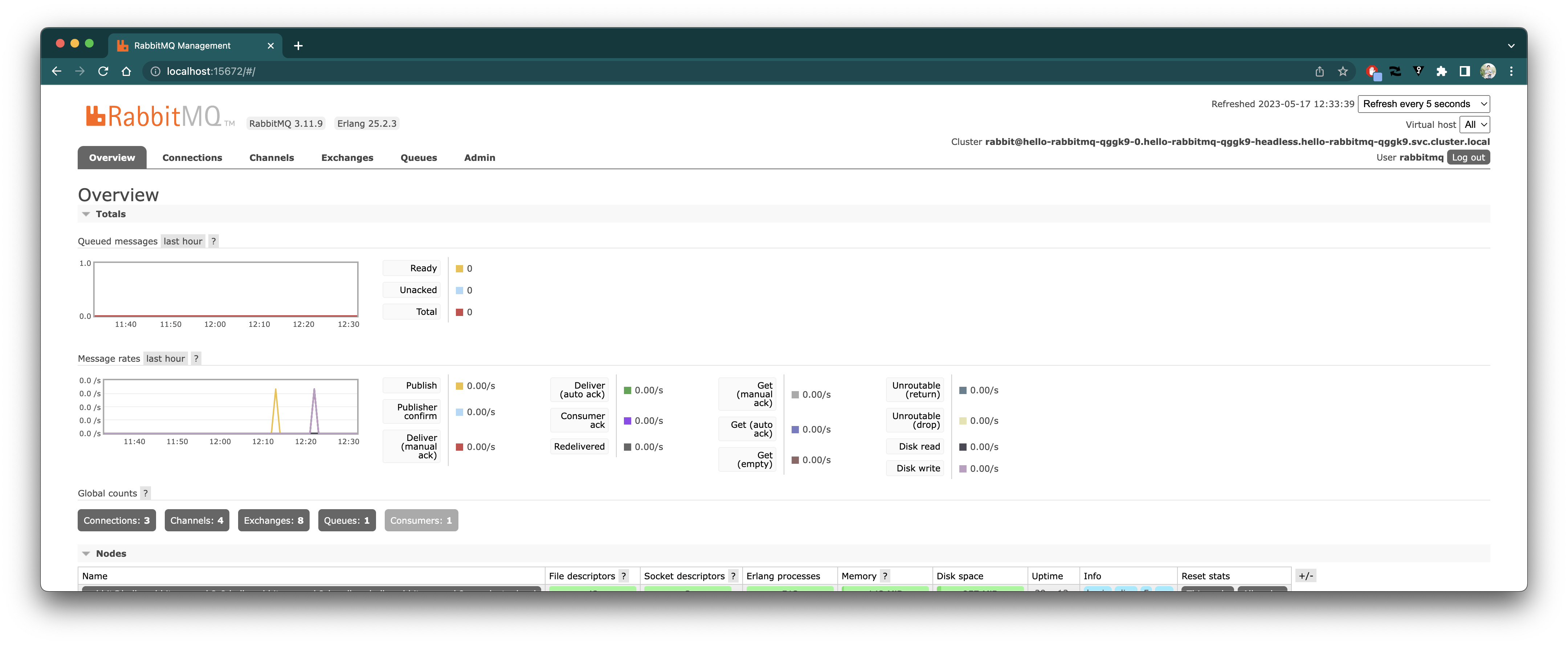
 先ほど取得した認証情報を入力してログインするとOverview画面が見れます。
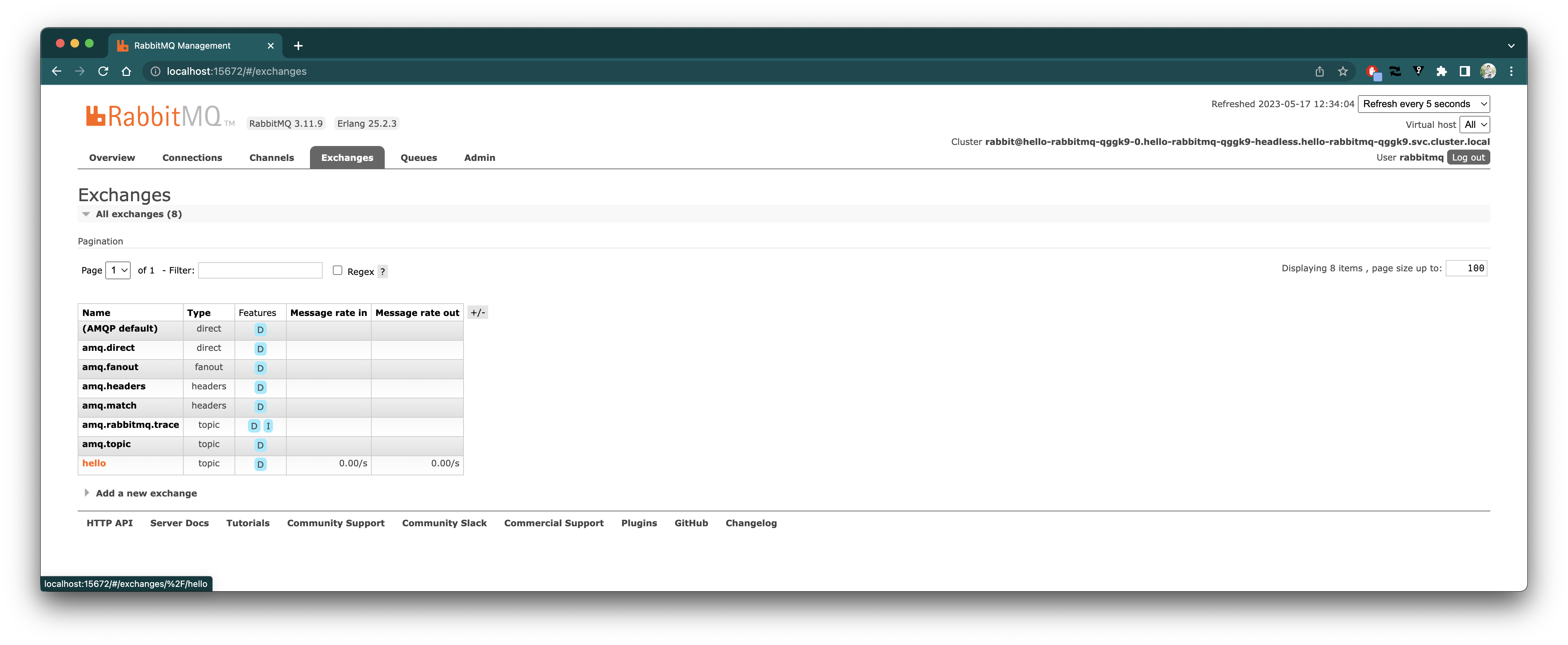
 "Exchange"タブをクリックしてExchange一覧画面へ遷移すると、`hello` Exchangeが作成されていることがわかります。
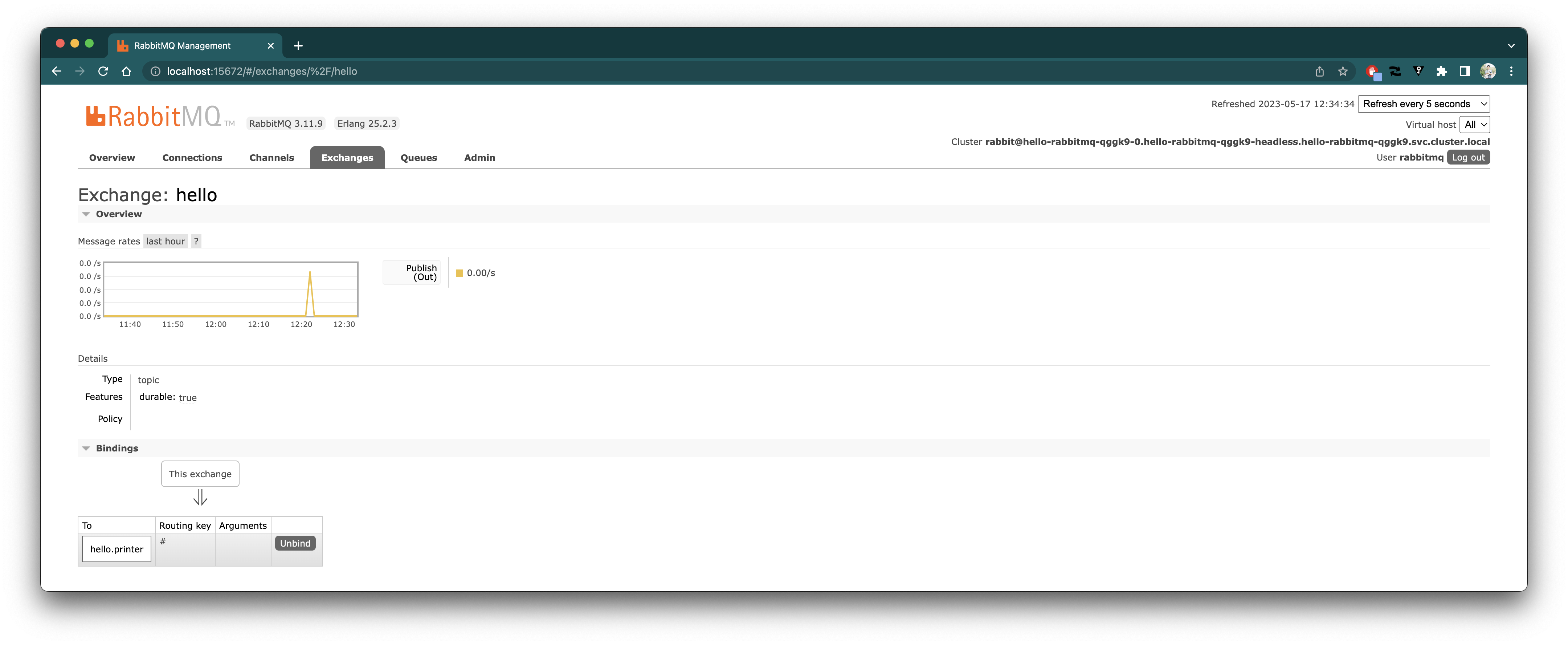
 `hello` Exchangeをクリックすると詳細を見ることができます。
 "Queue"タブをクリックしてQueue一覧画面へ遷移すると、`hello.printer` Queueが作成されていることがわかります。
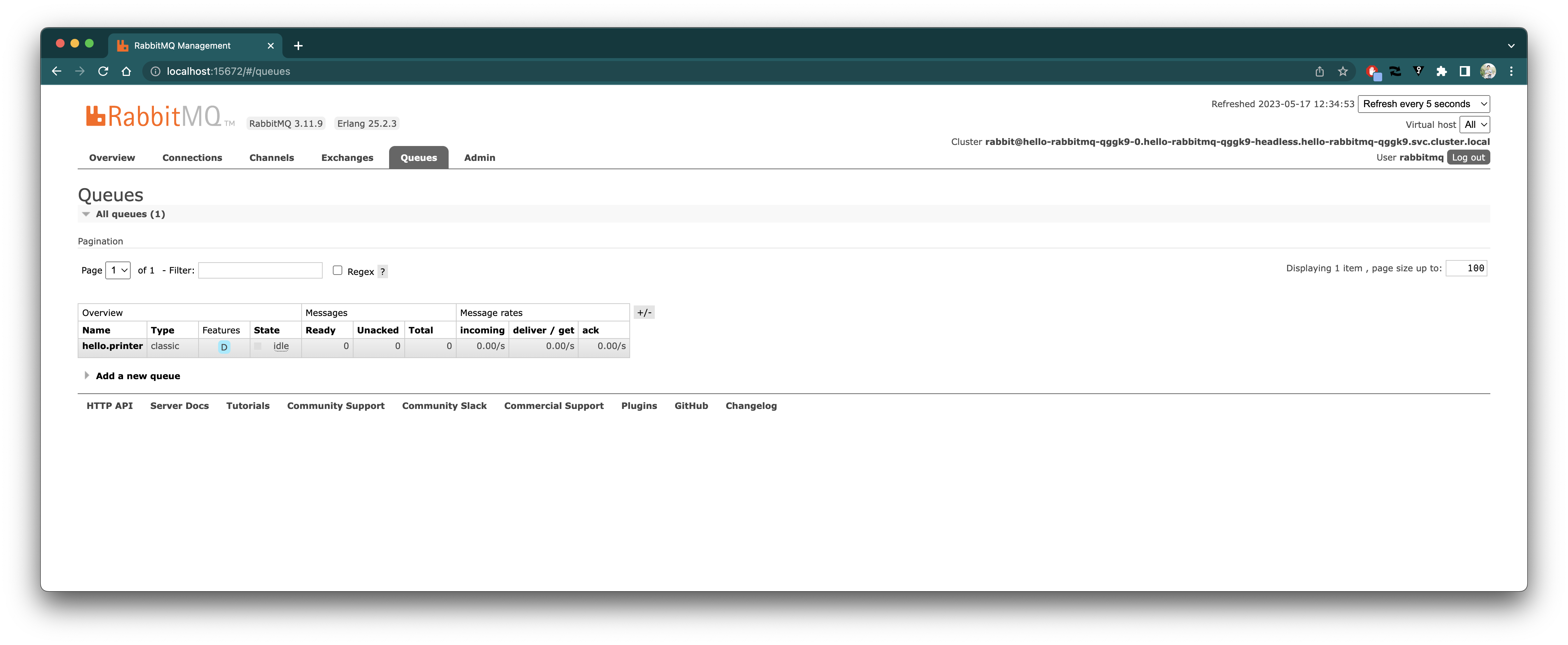 `hello.printer` Queueをクリックすると詳細を見ることができます。
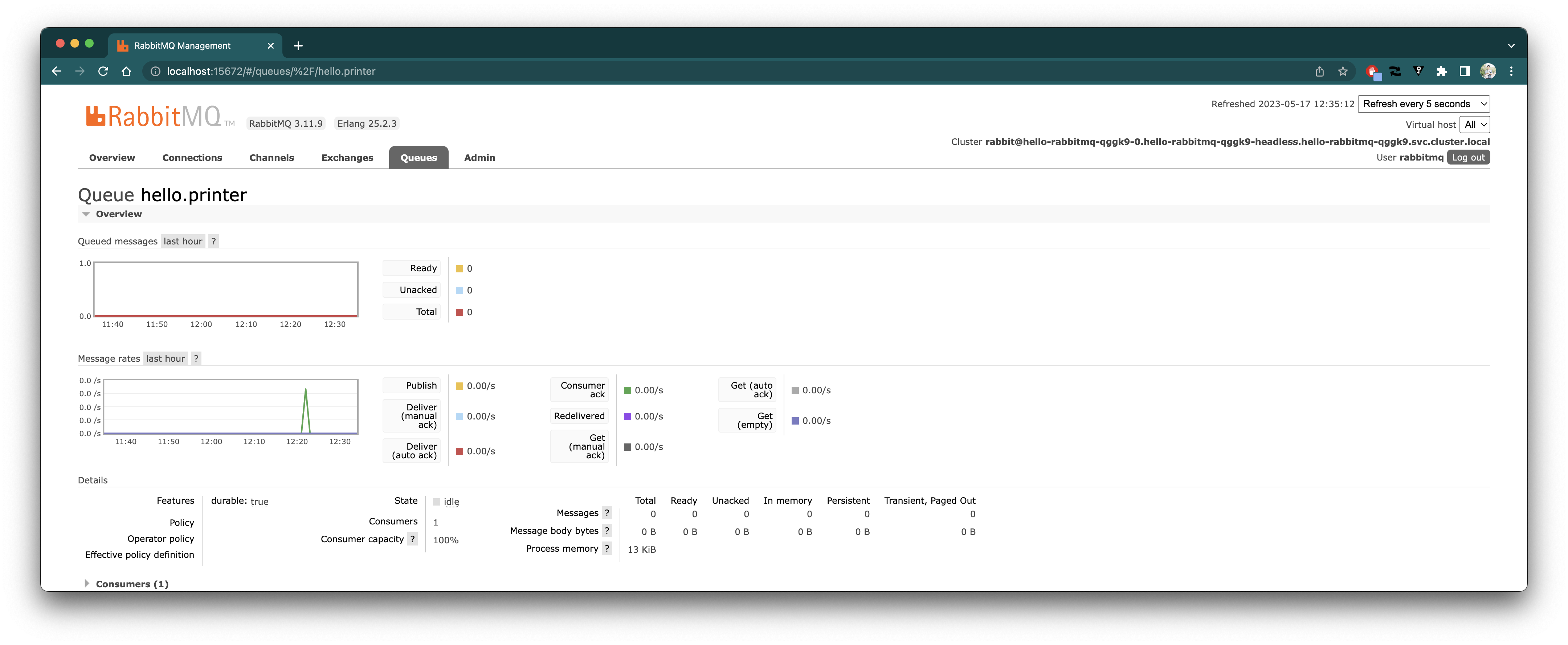 ExchangeやQueueに関しては[Spring Cloud Stream Tutorial](https://github.com/making/spring-cloud-stream-tutorial)を参照してください。
---
Bitnami Servicesを使用して、RabbitMQサービスを作成し、
それをバインドしたメッセージドリブンなアプリを簡単にTAPにデプロイすることができました。
ExchangeやQueueに関しては[Spring Cloud Stream Tutorial](https://github.com/making/spring-cloud-stream-tutorial)を参照してください。
---
Bitnami Servicesを使用して、RabbitMQサービスを作成し、
それをバインドしたメッセージドリブンなアプリを簡単にTAPにデプロイすることができました。