---
title: Implement Polling-based Outbox pattern with Spring Integration
tags: ["Spring Boot", "Spring Integration", "Java", "Outbox"]
categories: ["Programming", "Java", "org", "springframework", "integration", "jdbc"]
date: 2023-05-31T05:00:16Z
updated: 2023-06-02T00:39:51Z
---
This blog post introduces how to implement the Polling-based Outbox pattern with Spring Integration.
**table of contents**
### What is the Outbox pattern?
The [Outbox pattern](https://microservices.io/patterns/data/transactional-outbox.html) (more precisely "Transactional outbox" ) is one of the [microservice patterns](https://microservices.io/patterns/index.html) compiled by Chris Richardson.
> detailed in the following books
> [](https://www.amazon.co.jp/dp/B09782192F?&linkCode=ll1&tag=ikam-22&linkId=f398d4aa499d6b1143c28a11618cbe66&language=ja_JP&ref_=as_li_ss_tl)
> [Microservices Patterns](https://www.amazon.co.jp/dp/B09782192F?&linkCode=ll1&tag=ikam-22&linkId=f398d4aa499d6b1143c28a11618cbe66&language=ja_JP&ref_=as_li_ss_tl)
This is an implementation pattern for realizing "atomicity" when updating the database **and** sending messages to Message Brokers (RabbitMQ, Kafka, etc.) from a certain process. It is assumed that 2 Phase Commit is not considered.
What if we don't use the Outbox pattern to update the database and send messages to the Message Broker? There are two possible patterns:
1. Commit database transaction before sending message to Message Broker
1. Send message to Message Broker and then commit database transaction
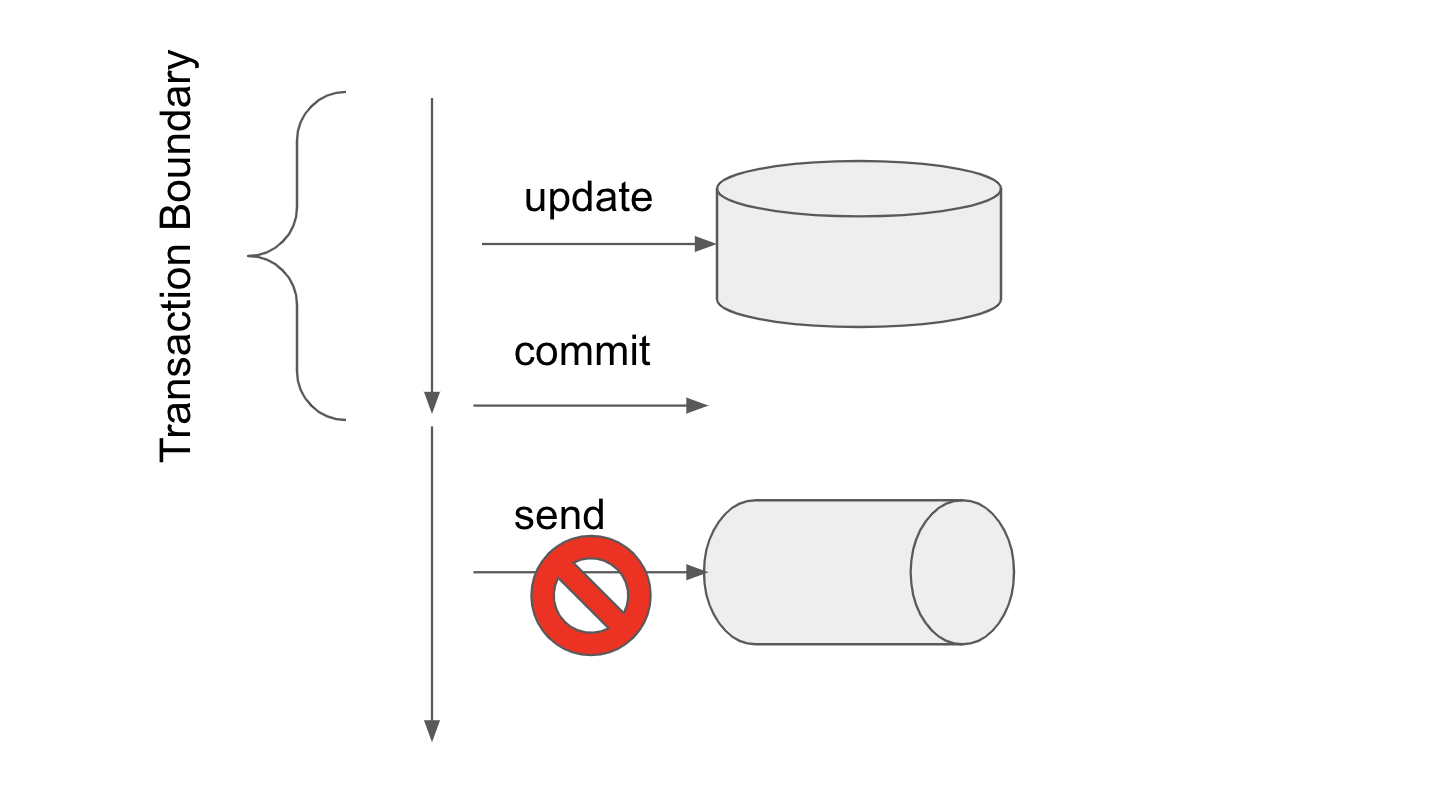
If you commit the database first, as shown in the following figure, if message transmission fails after committing, only the database update will be finalized.
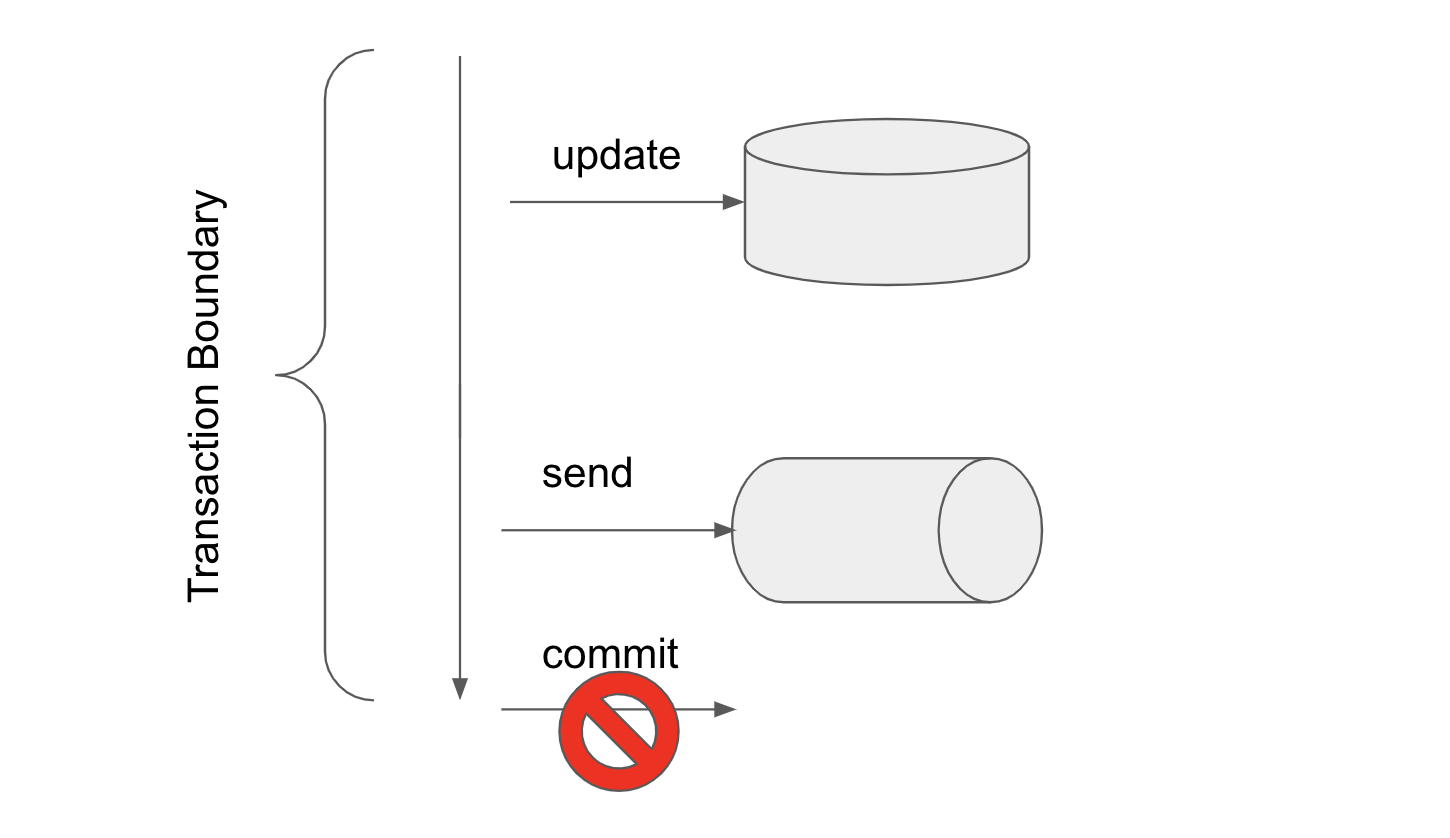
 Also, if you send a message and then perform a database transaction, as shown in the following figure, if you fail to commit the transaction after sending the message, only the message will be sent.
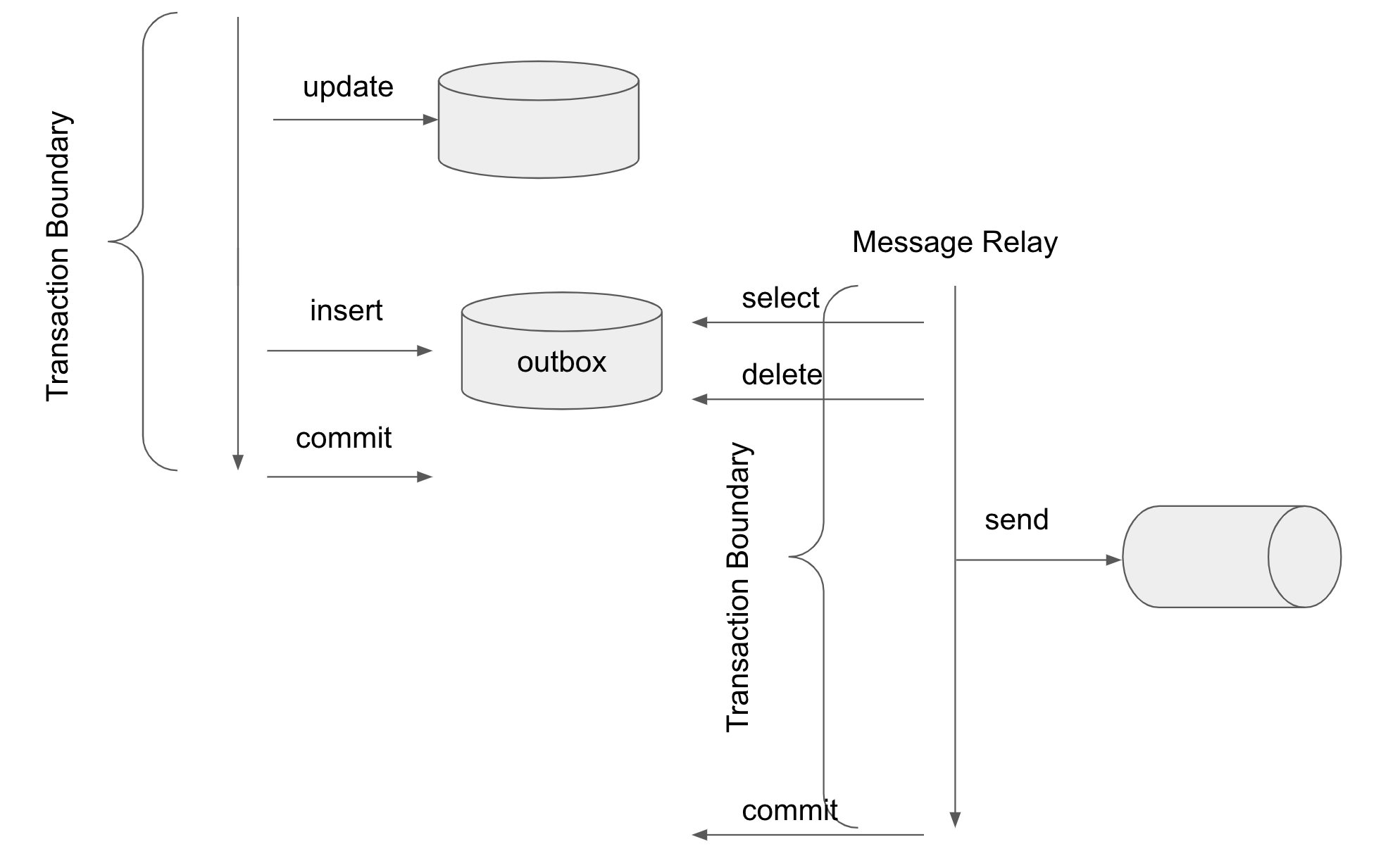
 To solve this problem, the Outbox pattern is implemented as shown in the following figure to ensure that messages are always sent (at least) once when the database is updated.
 The Outbox pattern does not send a message when writing to the database, but instead inserts what you want to send to a table called "outbox" in the same database.
Writing to the outbox table is done within the same transaction as the main process, so atomicity is guaranteed.
Information written to the outbox is read by a process called "Message Relay" and sent to the Message Broker.
The read information is deleted. If the transaction is committed after sending the message, we can guarantee that the message can be sent at least once once the data is written to the outbox.
If the transaction fails to commit, the data remains in the outbox and may be processed by the Message Relay again and the message may be resent.
Therefore, the message receiver should be idempotent in mind that it will receive the message more than once.
In [Microservices Patterns](https://microservices.io/patterns/data/transactional-outbox.html) as a reading method, the below two methods are described.
* [Transaction log based (Transaction log tailing)](https://microservices.io/patterns/data/transaction-log-tailing.html)
* [Polling based (Polling publisher)](https://microservices.io/patterns/data/polling-publisher.html)
Transaction log-based methods use PostgreSQL's WAL (Write Ahead Log), MySQL's binlog, or AWS DynamoDB table streams to detect outbox changes on the database side.
[Debezium](https://debezium.io/) is well known as a famous library that uses this technique.
This method can be expected to perform better than the Polling-based method described below. On the other hand, different special settings are required for each database product (or a database with special feature is required), and the cost of introducing a library such as Debezium is not low.
Polling-based techniques simply periodically select (for update) the outbox table to see if new records have been added, as shown in the image below. Then, delete the processed data.
Since it can be implemented using only SQL, no special database settings are required, making it simple to implement. On the other hand, executing selects against the outbox table on a regular basis puts a heavy load on the database and can affect performance.
The Outbox pattern does not send a message when writing to the database, but instead inserts what you want to send to a table called "outbox" in the same database.
Writing to the outbox table is done within the same transaction as the main process, so atomicity is guaranteed.
Information written to the outbox is read by a process called "Message Relay" and sent to the Message Broker.
The read information is deleted. If the transaction is committed after sending the message, we can guarantee that the message can be sent at least once once the data is written to the outbox.
If the transaction fails to commit, the data remains in the outbox and may be processed by the Message Relay again and the message may be resent.
Therefore, the message receiver should be idempotent in mind that it will receive the message more than once.
In [Microservices Patterns](https://microservices.io/patterns/data/transactional-outbox.html) as a reading method, the below two methods are described.
* [Transaction log based (Transaction log tailing)](https://microservices.io/patterns/data/transaction-log-tailing.html)
* [Polling based (Polling publisher)](https://microservices.io/patterns/data/polling-publisher.html)
Transaction log-based methods use PostgreSQL's WAL (Write Ahead Log), MySQL's binlog, or AWS DynamoDB table streams to detect outbox changes on the database side.
[Debezium](https://debezium.io/) is well known as a famous library that uses this technique.
This method can be expected to perform better than the Polling-based method described below. On the other hand, different special settings are required for each database product (or a database with special feature is required), and the cost of introducing a library such as Debezium is not low.
Polling-based techniques simply periodically select (for update) the outbox table to see if new records have been added, as shown in the image below. Then, delete the processed data.
Since it can be implemented using only SQL, no special database settings are required, making it simple to implement. On the other hand, executing selects against the outbox table on a regular basis puts a heavy load on the database and can affect performance.
 This blog post uses the latter Polling-based Outbox pattern.
### Outbox pattern with Spring Integration
Blog Post "[Introducing Microservices Patterns with Spring Integration](https://spring.io/blog/2023/01/25/introducing-microservices-patterns-with-spring-integration)" by [Artem Bilan](https://spring.io/team/artembilan), Lead of Spring Integration, introduced a sample implementing the Outbox pattern with Spring Integration.
The sample source code is below. The Outbox pattern can be implemented simply with only Spring Integration alone.
https://github.com/artembilan/microservices-patterns-spring-integration/tree/main/outbox
Spring Integration is a messaging abstraction framework. You can connect Endpoints with MessageChannels to define flows and send and receive messages.
A Message sent from the Inbound Endpoint is sent to the MessageChannel, processed by the Endpoint, passed to the MessageChanel, and sent by the Outbound Endpoint.
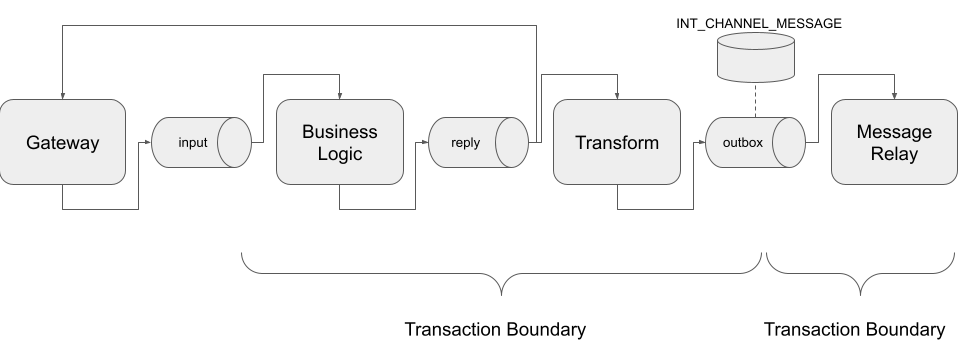
You can implement the Outbox pattern by defining the following flow in Spring Integration. The square in the figure is the Endpoint, and the tube is the MessageChannel (in the figure above, the tube represents the Message Broker, so it may be confusing...).

The point here is the MessageChannel named "outbox".
[MessageChannel](https://docs.spring.io/spring-integration/docs/current/reference/html/core.html#channel) transmits Messages in-memory by default, but you can also use JDBC as the backend for MessageChannel using [JdbcChannelMessageStore](https://docs.spring.io/spring-integration/docs/current/reference/html/jdbc.html#jdbc-message-store-channels).
This MessageChannel is a Pollable [QueueChannel](https://docs.spring.io/spring-integration/docs/current/reference/html/core.html#channel-implementations-queuechannel) implementation.
This MessageChannel is just available as an "outbox" table. [`INT_CHANNEL_MESSAGE`](https://github.com/spring-projects/spring-integration/blob/main/spring-integration-jdbc/src/main/resources/org/springframework/integration/jdbc/schema-postgresql.sql#L39-L48) tables are equivalent to [microservice patterns](https://microservices.io/patterns/data/transactional-outbox.html) "outbox" tables.
If you use Spring Integration, writing messages to the outbox and polling messages from the outbox in the Outbox pattern are hidden by MessageChannel and you don't need to implement them.
As shown in the figure below, define the Spring Integration flow so that the business logic, writing to the outbox, retrieving messages from the outbox, and sending messages to Message Broker (Message Relay) are each performed within the same transaction. That way you can implement the outbox pattern.
### Implementing the sample app
I implemented a sample application using the above flow. The Order Service sends messages to the Shipment Service via a message broker as shown in the diagram below. At the same time, we also update the Order DB. I implemented these two updates with the Outbox pattern.
This time, I used RabbitMQ, which is easy to set up, as the message broker.
> ℹ️ As will be explained later, in cases like this demo, it would have been better to use a message broker that supports partitioning, and it would have been better to use [RabbitMQ Streams](https://www.rabbitmq.com/streams.html)' [Super Streams](https://www.rabbitmq.com/streams.html#super-streams) (or Kafka).
This blog post uses the latter Polling-based Outbox pattern.
### Outbox pattern with Spring Integration
Blog Post "[Introducing Microservices Patterns with Spring Integration](https://spring.io/blog/2023/01/25/introducing-microservices-patterns-with-spring-integration)" by [Artem Bilan](https://spring.io/team/artembilan), Lead of Spring Integration, introduced a sample implementing the Outbox pattern with Spring Integration.
The sample source code is below. The Outbox pattern can be implemented simply with only Spring Integration alone.
https://github.com/artembilan/microservices-patterns-spring-integration/tree/main/outbox
Spring Integration is a messaging abstraction framework. You can connect Endpoints with MessageChannels to define flows and send and receive messages.
A Message sent from the Inbound Endpoint is sent to the MessageChannel, processed by the Endpoint, passed to the MessageChanel, and sent by the Outbound Endpoint.
You can implement the Outbox pattern by defining the following flow in Spring Integration. The square in the figure is the Endpoint, and the tube is the MessageChannel (in the figure above, the tube represents the Message Broker, so it may be confusing...).

The point here is the MessageChannel named "outbox".
[MessageChannel](https://docs.spring.io/spring-integration/docs/current/reference/html/core.html#channel) transmits Messages in-memory by default, but you can also use JDBC as the backend for MessageChannel using [JdbcChannelMessageStore](https://docs.spring.io/spring-integration/docs/current/reference/html/jdbc.html#jdbc-message-store-channels).
This MessageChannel is a Pollable [QueueChannel](https://docs.spring.io/spring-integration/docs/current/reference/html/core.html#channel-implementations-queuechannel) implementation.
This MessageChannel is just available as an "outbox" table. [`INT_CHANNEL_MESSAGE`](https://github.com/spring-projects/spring-integration/blob/main/spring-integration-jdbc/src/main/resources/org/springframework/integration/jdbc/schema-postgresql.sql#L39-L48) tables are equivalent to [microservice patterns](https://microservices.io/patterns/data/transactional-outbox.html) "outbox" tables.
If you use Spring Integration, writing messages to the outbox and polling messages from the outbox in the Outbox pattern are hidden by MessageChannel and you don't need to implement them.
As shown in the figure below, define the Spring Integration flow so that the business logic, writing to the outbox, retrieving messages from the outbox, and sending messages to Message Broker (Message Relay) are each performed within the same transaction. That way you can implement the outbox pattern.

### Implementing the sample app
I implemented a sample application using the above flow. The Order Service sends messages to the Shipment Service via a message broker as shown in the diagram below. At the same time, we also update the Order DB. I implemented these two updates with the Outbox pattern.
This time, I used RabbitMQ, which is easy to set up, as the message broker.
> ℹ️ As will be explained later, in cases like this demo, it would have been better to use a message broker that supports partitioning, and it would have been better to use [RabbitMQ Streams](https://www.rabbitmq.com/streams.html)' [Super Streams](https://www.rabbitmq.com/streams.html#super-streams) (or Kafka).
> At the time of writing, spring-rabbitmq-stream [did not support Observaility](https://github.com/spring-projects/spring-amqp/issues/2467), so I used plain RabbitMQ so that I could focus on implementing the Outbox pattern.
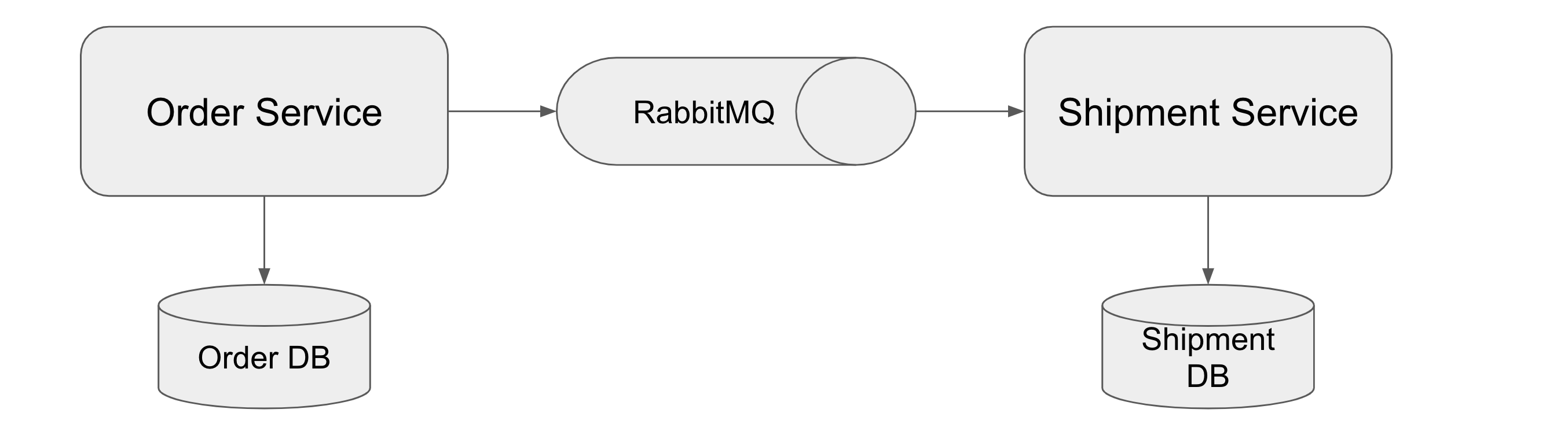 The sample code is https://github.com/making/outbox-pattern-demo. I also referred to Debezium's [outbox examples](https://github.com/debezium/debezium-examples/tree/main/outbox). (The implementation of the Order Service and the Shipment Service itself is dummy, as the implementation of the Outbox pattern is the main one.)
Define the following interface as a gateway that is the entrance of the flow. There is a `placeOrder` method to process an order and a `cancelOrder` method to cancel an order.
`placeOrder` is a two-way messaging where input is sent to the `order.create` channel and output is returned from `order.create.reply`. `cancelOrder` is one-way messaging, with input sent to the `order.cancel` channel and no output.
```java
@MessagingGateway
public interface OrderGateway {
@Gateway(requestChannel = "order.create", replyChannel = "order.create.reply")
Order placeOrder(Order order);
@Gateway(requestChannel = "order.cancel")
void cancelOrder(Long orderId);
}
```
Input to Gateway is simply implemented with `@RestController` as follows.
```java
@RestController
public class OrderController {
private final OrderGateway orderGateway;
private final Clock clock;
private final Logger log = LoggerFactory.getLogger(OrderController.class);
public OrderController(OrderGateway orderGateway, Clock clock) {
this.orderGateway = orderGateway;
this.clock = clock;
}
@PostMapping(path = "/orders")
public Order placeOrder(@RequestBody OrderRequest orderRequest) {
final Order newOrder = orderRequest.newOrder(this.clock);
final Order order = this.orderGateway.placeOrder(newOrder);
log.info("Created {}", order);
return order;
}
@DeleteMapping(path = "/orders/{orderId}")
public void cancelOrder(@PathVariable Long orderId) {
this.orderGateway.cancelOrder(orderId);
log.info("Cancelled {}", orderId);
}
}
```
The following `OrderService` and `OrderRepository` are used to store and update Orders in the Order DB.
```java
@Service
@Transactional
@Observed
public class OrderService {
private final OrderRepository orderRepository;
public OrderService(OrderRepository orderRepository) {
this.orderRepository = orderRepository;
}
public Order create(Order order) {
return this.orderRepository.save(order);
}
public int cancel(Long orderId) {
return this.orderRepository.updateStatus(orderId, OrderStatus.CANCELLED);
}
}
```
```java
public interface OrderRepository extends ListCrudRepository {
@Modifying
@Query("UPDATE Order SET status=:status WHERE orderId=:orderId AND status <> :status")
int updateStatus(Long orderId, OrderStatus status);
}
```
Define the flow of messaging from the `order.create` channel to the `outbox` as follows:
```java
@Bean
public IntegrationFlow orderCreateFlow(OrderService orderService) {
return IntegrationFlow.from("order.create")
.routeToRecipients(routes -> routes.transactional() // (1)
.recipientFlow(f -> f.handle((order, headers) -> orderService.create(order)) // (2)
.channel(c -> c.publishSubscribe("order.create.reply")) // (3)
.transform(OrderEvents.Created::from) // (4)
.enrichHeaders(h -> h.header("eventType", "order_created")) // (5)
.channel("outbox"))) // (6)
.get();
}
```
| 番号 | 説明 |
| -- | -- |
| (1) | Using the [Recipient List Router](https://docs.spring.io/spring-integration/docs/current/reference/html/message-routing.html#router-implementations-recipientlistrouter) transaction processing like [Artem's sample](https://github.com/artembilan/microservices-patterns-spring-integration/tree/main/outbox), the process from receiving a message from the order.create channel to sending it to the outbox channel will be performed in the same transaction. |
| (2) | Create a MessageHandler that just calls `OrderService#create`. |
| (3) | Define a Pub/Sub type MessageChannel and name it `order.create.reply` so that the message from the output channel of the endpoint in (2) can be sent to the reply of the gateway and the next endpoint (`transform`) of the flow at the same time. Since the default MessageChannel implementation `DirectChannel` only sends messages to one Subscriber at a time (round-robbin), we use `PublishSubscribeChannel` which supports multiple Subscribers. |
| (4) | Convert the Payload of the message resulting from the endpoint in (2) from the `Order` instance to the `OrderEvents.Created` instance sent to the Shipment Service. |
| (5) | Set eventType to Header. |
| (6) | Set the output channel of the Endpoint in (5) to `outbox` (defined later). |
Define the flow from the `outbox` channel to sending to AMQP (RabbitMQ) as follows. This flow corresponds to the Message Relay in the Outbox pattern.
```java
@Bean
public IntegrationFlow messageRelayFlow(MessageHandler amqpHandler) {
return IntegrationFlow.from("outbox")
.handle(amqpHandler, e -> e.poller(poller -> poller.fixedDelay(3_000, 3_000).transactional())) // (1)
.get();
}
@Bean
public MessageHandler amqpHandler(AmqpTemplate amqpTemplate, ObjectMapper objectMapper) {
final MessageHandler messageHandler = Amqp.outboundAdapter(amqpTemplate)
.exchangeName("order")
.routingKey("event")
.getObject(); // (2)
final Logger log = LoggerFactory.getLogger("amqpHandler");
return message -> { // (3)
final JsonNode payload = objectMapper.convertValue(message.getPayload(), JsonNode.class);
log.info("Send {}", payload);
messageHandler.handleMessage(MessageBuilder.createMessage(payload, message.getHeaders()));
};
}
```
| 番号 | 説明 |
| -- | -- |
| (1) | Receive messages from the `outbox` channel and process them with `amqpHandler`. Receiving from `outbox` is done by polling, and the polling interval is 3000ms. By setting `transactional()`, selecting and deleting messages from `outbox` and processing MeeageHandler will be done in the same transaction. |
| (2) | Define a MessageHandler that sends messages to AMQP (RabbitMQ). |
| (3) | For (2) MessageHandeler, wrap and return the process of converting Payload to `JsonNode` type so that the receiving side can easily handle it. |
below is the `outbox` channel definition using [JdbcChannelMessageStore](https://docs.spring.io/spring-integration/docs/current/reference/html/jdbc.html#jdbc-message-store-channels) .
```java
@Bean
public JdbcChannelMessageStore jdbcChannelMessageStore(DataSource dataSource) {
final JdbcChannelMessageStore jdbcChannelMessageStore = new JdbcChannelMessageStore(dataSource);
jdbcChannelMessageStore.setChannelMessageStoreQueryProvider(new PostgresChannelMessageStoreQueryProvider());
return jdbcChannelMessageStore;
}
@Bean
public QueueChannel outbox(JdbcChannelMessageStore jdbcChannelMessageStore) {
return MessageChannels.queue(jdbcChannelMessageStore, "outbox").getObject();
}
```
Similarly, we can define the flow of messaging from the `order.cancel` channel to `outbox` as follows:
```java
@Bean
public IntegrationFlow orderCancelFlow(OrderService orderService, Clock clock) {
return IntegrationFlow.from("order.cancel")
.routeToRecipients(
routes -> routes.transactional().recipientFlow(f -> f.handle((orderId, headers) -> {
final int updated = orderService.cancel(orderId);
return updated > 0 ? orderId : null; // (1)
}).transform(
orderId -> new OrderEvents.Cancelled(orderId,
clock.instant().atOffset(ZoneOffset.UTC))) // (2)
.enrichHeaders(h -> h.header("eventType", "order_cancelled"))
.channel("outbox")))
.get();
}
```
| 番号 | 説明 |
| -- | -- |
| (1) | Create a MessageHandler that calls `OrderService#cancel`. If the number of updates is 0, that is, if there is no update target, discard the message. |
| (2) | Convert the Payload of the message resulting from the Endpoint in (2) from the `Order` instance to the `OrderEvents.Cancelled` instance sent to the Shipment Service. |
The following diagram shows the flow up to this point (the endpoint of `enrichHeaders` is omitted).

below is the receiver code:
```java
@Component
@Observed
public class OrderListener {
private final ShipmentService shipmentService;
private final ObjectMapper objectMapper;
private final Logger log = LoggerFactory.getLogger(OrderListener.class);
public OrderListener(ShipmentService shipmentService, ObjectMapper objectMapper) {
this.shipmentService = shipmentService;
this.objectMapper = objectMapper;
}
@RabbitListener(queues = "order.event")
public void handleOrderEvent(JsonNode payload, @Header("eventType") String eventType) {
switch (eventType) {
case "order_created" -> {
final OrderEvents.Created event = this.objectMapper.convertValue(payload, OrderEvents.Created.class);
this.shipmentService.orderCreated(event);
}
case "order_cancelled" -> {
final OrderEvents.Cancelled event = this.objectMapper.convertValue(payload,
OrderEvents.Cancelled.class);
this.shipmentService.orderCancelled(event);
}
default -> log.warn("Unknown Event Type: {}", eventType);
}
}
}
```
### Launching the sample app
Let's start the sample app and send a request to OrderController. Requires Java 17+ with Docker and Docker Compose.
```
git clone https://github.com/making/outbox-pattern-demo
cd outbox-pattern-demo
```
First, start the Order Service with the following command.
```
./mvnw clean spring-boot:run -f order-service -Dspring-boot.run.arguments=--spring.docker.compose.file=$(pwd)/docker-compose.yaml
```
It uses the [Docker Compose support](https://docs.spring.io/spring-boot/docs/current/reference/html/features.html#features.docker-compose) introduced in Spring Boot 3.1, so it automatically starts Docker Compose and brings up PostgresSQL*2, RabbitMQ and Zipkin.
When the app starts, it prints DEBUG logs like this every 3 seconds: This is the SQL log of polling the "outbox" table on the Message Relay side. You can see that a `SELECT ... FOR UPDATE` is being executed on the `INT_CHANNEL_MESSAGE` table.
```
2023-05-30T19:39:34.648+09:00 DEBUG [order-service,,] 15244 --- [ scheduling-1] o.s.orm.jpa.JpaTransactionManager : Creating new transaction with name [org.springframework.integration.endpoint.AbstractPollingEndpoint$$Lambda$1931/0x0000000801799a30.call]: PROPAGATION_REQUIRED,ISOLATION_DEFAULT
2023-05-30T19:39:34.649+09:00 DEBUG [order-service,,] 15244 --- [ scheduling-1] o.s.orm.jpa.JpaTransactionManager : Opened new EntityManager [SessionImpl(665386702)] for JPA transaction
2023-05-30T19:39:34.651+09:00 DEBUG [order-service,6475d266281a7d296e14099b15056603,6e14099b15056603] 15244 --- [ scheduling-1] o.s.orm.jpa.JpaTransactionManager : Exposing JPA transaction as JDBC [org.springframework.orm.jpa.vendor.HibernateJpaDialect$HibernateConnectionHandle@719fa2ea]
2023-05-30T19:39:34.652+09:00 DEBUG [order-service,6475d266281a7d296e14099b15056603,6e14099b15056603] 15244 --- [ scheduling-1] o.s.jdbc.core.JdbcTemplate : Executing prepared SQL query
2023-05-30T19:39:34.652+09:00 DEBUG [order-service,6475d266281a7d296e14099b15056603,6e14099b15056603] 15244 --- [ scheduling-1] o.s.jdbc.core.JdbcTemplate : Executing prepared SQL statement [SELECT INT_CHANNEL_MESSAGE.MESSAGE_ID, INT_CHANNEL_MESSAGE.MESSAGE_BYTES from INT_CHANNEL_MESSAGE where INT_CHANNEL_MESSAGE.GROUP_KEY = ? and INT_CHANNEL_MESSAGE.REGION = ? order by CREATED_DATE, MESSAGE_SEQUENCE LIMIT 1 FOR UPDATE]
2023-05-30T19:39:35.655+09:00 DEBUG [order-service,6475d266281a7d296e14099b15056603,6e14099b15056603] 15244 --- [ scheduling-1] o.s.jdbc.core.JdbcTemplate : Executing prepared SQL query
2023-05-30T19:39:35.655+09:00 DEBUG [order-service,6475d266281a7d296e14099b15056603,6e14099b15056603] 15244 --- [ scheduling-1] o.s.jdbc.core.JdbcTemplate : Executing prepared SQL statement [SELECT INT_CHANNEL_MESSAGE.MESSAGE_ID, INT_CHANNEL_MESSAGE.MESSAGE_BYTES from INT_CHANNEL_MESSAGE where INT_CHANNEL_MESSAGE.GROUP_KEY = ? and INT_CHANNEL_MESSAGE.REGION = ? order by CREATED_DATE, MESSAGE_SEQUENCE LIMIT 1 FOR UPDATE]
2023-05-30T19:39:35.658+09:00 DEBUG [order-service,6475d266281a7d296e14099b15056603,6e14099b15056603] 15244 --- [ scheduling-1] o.s.orm.jpa.JpaTransactionManager : Initiating transaction commit
2023-05-30T19:39:35.658+09:00 DEBUG [order-service,6475d266281a7d296e14099b15056603,6e14099b15056603] 15244 --- [ scheduling-1] o.s.orm.jpa.JpaTransactionManager : Committing JPA transaction on EntityManager [SessionImpl(665386702)]
2023-05-30T19:39:35.660+09:00 DEBUG [order-service,6475d266281a7d296e14099b15056603,6e14099b15056603] 15244 --- [ scheduling-1] o.s.orm.jpa.JpaTransactionManager : Closing JPA EntityManager [SessionImpl(665386702)] after transaction
```
Then start the Shipment Service with the following command:
```
./mvnw clean spring-boot:run -f shipment-service -Dspring-boot.run.arguments=--spring.docker.compose.file=$(pwd)/docker-compose.yaml
```
Send an order request to the Order Service.
```
curl -s localhost:8080/orders -d "{\"amount\":50}" -H "content-type:application/json"
```
The following log is output on the Order Service side.
```
2023-05-30T19:40:05.034+09:00 DEBUG [order-service,6475d2851c60c07b94f48ba27be40330,5e0461918b9baeab] 15244 --- [nio-8080-exec-1] o.s.orm.jpa.JpaTransactionManager : Found thread-bound EntityManager [SessionImpl(621471343)] for JPA transaction
2023-05-30T19:40:05.034+09:00 DEBUG [order-service,6475d2851c60c07b94f48ba27be40330,5e0461918b9baeab] 15244 --- [nio-8080-exec-1] o.s.orm.jpa.JpaTransactionManager : Creating new transaction with name [org.springframework.integration.router.RecipientListRouter.handleMessage]: PROPAGATION_REQUIRED,ISOLATION_DEFAULT
2023-05-30T19:40:05.037+09:00 DEBUG [order-service,6475d2851c60c07b94f48ba27be40330,749b60ad16fa0f18] 15244 --- [nio-8080-exec-1] o.s.orm.jpa.JpaTransactionManager : Exposing JPA transaction as JDBC [org.springframework.orm.jpa.vendor.HibernateJpaDialect$HibernateConnectionHandle@76bd8f3]
2023-05-30T19:40:05.038+09:00 DEBUG [order-service,6475d2851c60c07b94f48ba27be40330,749b60ad16fa0f18] 15244 --- [nio-8080-exec-1] o.s.orm.jpa.JpaTransactionManager : Found thread-bound EntityManager [SessionImpl(621471343)] for JPA transaction
2023-05-30T19:40:05.038+09:00 DEBUG [order-service,6475d2851c60c07b94f48ba27be40330,749b60ad16fa0f18] 15244 --- [nio-8080-exec-1] o.s.orm.jpa.JpaTransactionManager : Participating in existing transaction
2023-05-30T19:40:05.046+09:00 DEBUG [order-service,6475d2851c60c07b94f48ba27be40330,797bb7fc586708fc] 15244 --- [nio-8080-exec-1] o.s.orm.jpa.JpaTransactionManager : Found thread-bound EntityManager [SessionImpl(621471343)] for JPA transaction
2023-05-30T19:40:05.046+09:00 DEBUG [order-service,6475d2851c60c07b94f48ba27be40330,797bb7fc586708fc] 15244 --- [nio-8080-exec-1] o.s.orm.jpa.JpaTransactionManager : Participating in existing transaction
2023-05-30T19:40:05.061+09:00 DEBUG [order-service,6475d2851c60c07b94f48ba27be40330,797bb7fc586708fc] 15244 --- [nio-8080-exec-1] org.hibernate.SQL : insert into "order" (amount,order_date,status) values (?,?,?)
2023-05-30T19:40:05.077+09:00 DEBUG [order-service,6475d2851c60c07b94f48ba27be40330,33749e49f54ae50b] 15244 --- [nio-8080-exec-1] o.s.jdbc.core.JdbcTemplate : Executing prepared SQL update
2023-05-30T19:40:05.077+09:00 DEBUG [order-service,6475d2851c60c07b94f48ba27be40330,33749e49f54ae50b] 15244 --- [nio-8080-exec-1] o.s.jdbc.core.JdbcTemplate : Executing prepared SQL statement [INSERT into INT_CHANNEL_MESSAGE(MESSAGE_ID, GROUP_KEY, REGION, CREATED_DATE, MESSAGE_PRIORITY, MESSAGE_BYTES) values (?, ?, ?, ?, ?, ?)]
2023-05-30T19:40:05.090+09:00 DEBUG [order-service,6475d2851c60c07b94f48ba27be40330,749b60ad16fa0f18] 15244 --- [nio-8080-exec-1] o.s.orm.jpa.JpaTransactionManager : Initiating transaction commit
2023-05-30T19:40:05.091+09:00 DEBUG [order-service,6475d2851c60c07b94f48ba27be40330,749b60ad16fa0f18] 15244 --- [nio-8080-exec-1] o.s.orm.jpa.JpaTransactionManager : Committing JPA transaction on EntityManager [SessionImpl(621471343)]
2023-05-30T19:40:05.097+09:00 DEBUG [order-service,6475d2851c60c07b94f48ba27be40330,749b60ad16fa0f18] 15244 --- [nio-8080-exec-1] o.s.orm.jpa.JpaTransactionManager : Not closing pre-bound JPA EntityManager after transaction
2023-05-30T19:40:05.097+09:00 INFO [order-service,6475d2851c60c07b94f48ba27be40330,94f48ba27be40330] 15244 --- [nio-8080-exec-1] c.e.outbox.order.web.OrderController : Created Order{orderId=1, amount=50, status=CREATED, orderDate=2023-05-30T10:40:05.027954Z}
2023-05-30T19:40:05.125+09:00 INFO [order-service,6475d2851c60c07b94f48ba27be40330,5e0461918b9baeab] 15244 --- [nio-8080-exec-1] accesslog : remote=127.0.0.1 ts="2023-05-30T10:40:05.004566Z" method=POST url="http://localhost:8080/orders" status=200 ua="curl/7.87.0" response_time=120
```
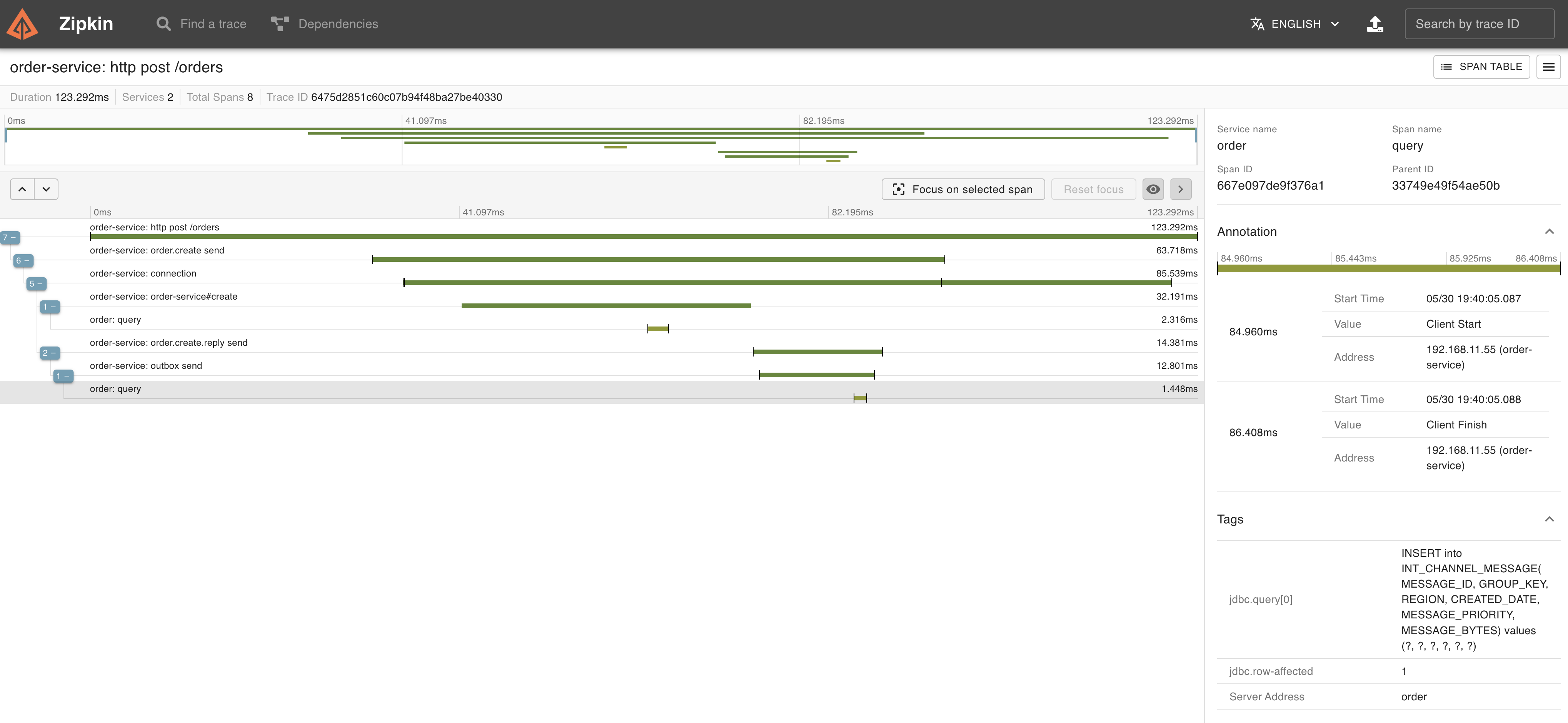
You can see that after the transaction starts, `insert into "order" ...` and `INSERT into INT_CHANNEL_MESSAGE ...` are executed, and then the transaction is committed. These series of processes are traced with Trace ID `6475d2851c60c07b94f48ba27be40330`.
Let's take a look at Trace for `6475d2851c60c07b94f48ba27be40330` in Zipkin.
HTTP POST request processing is being traced.
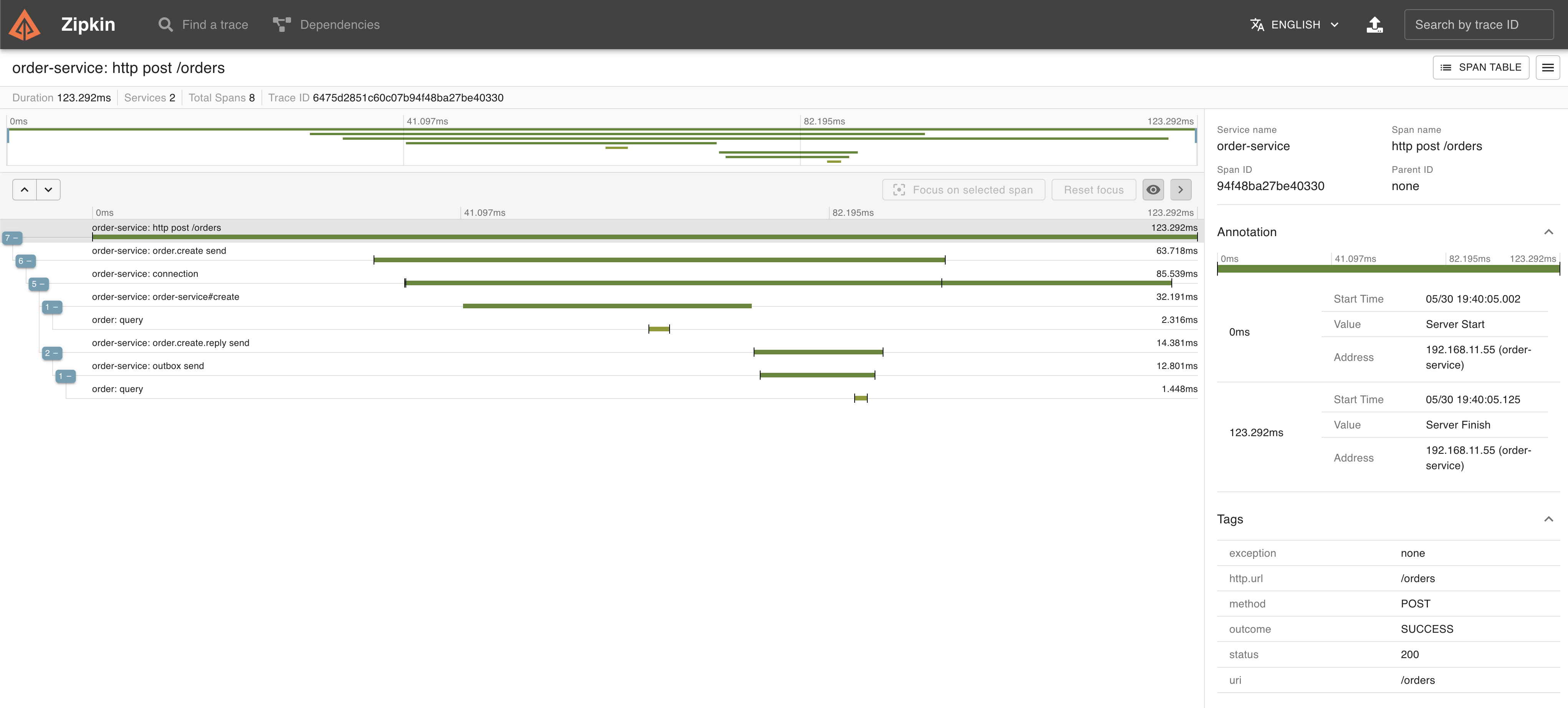 The span whose Span Name is `connection` is the span that is doing transaction processing.
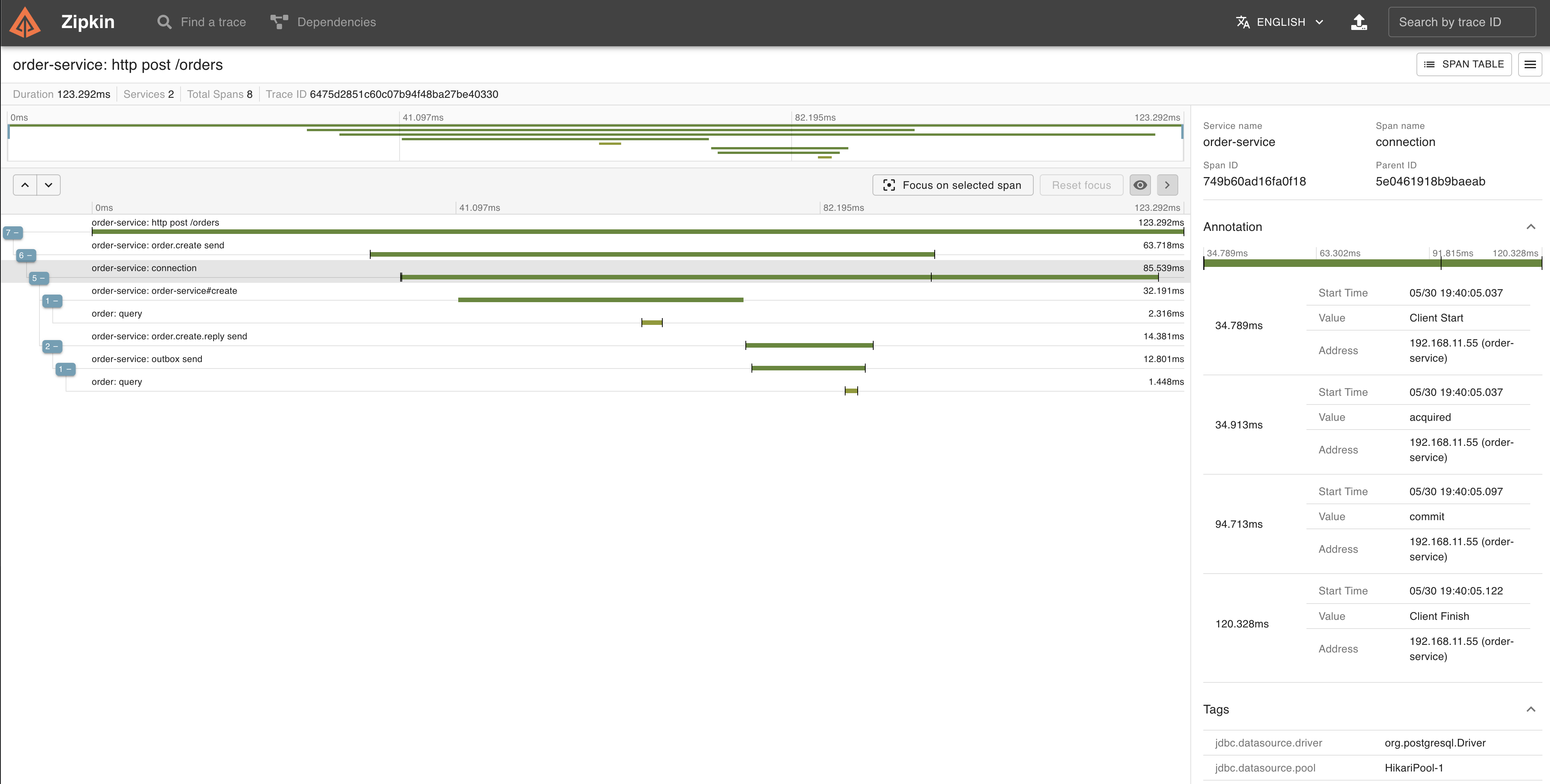 Within this transaction, You can also see from the Trace that `insert into "order" ...` and
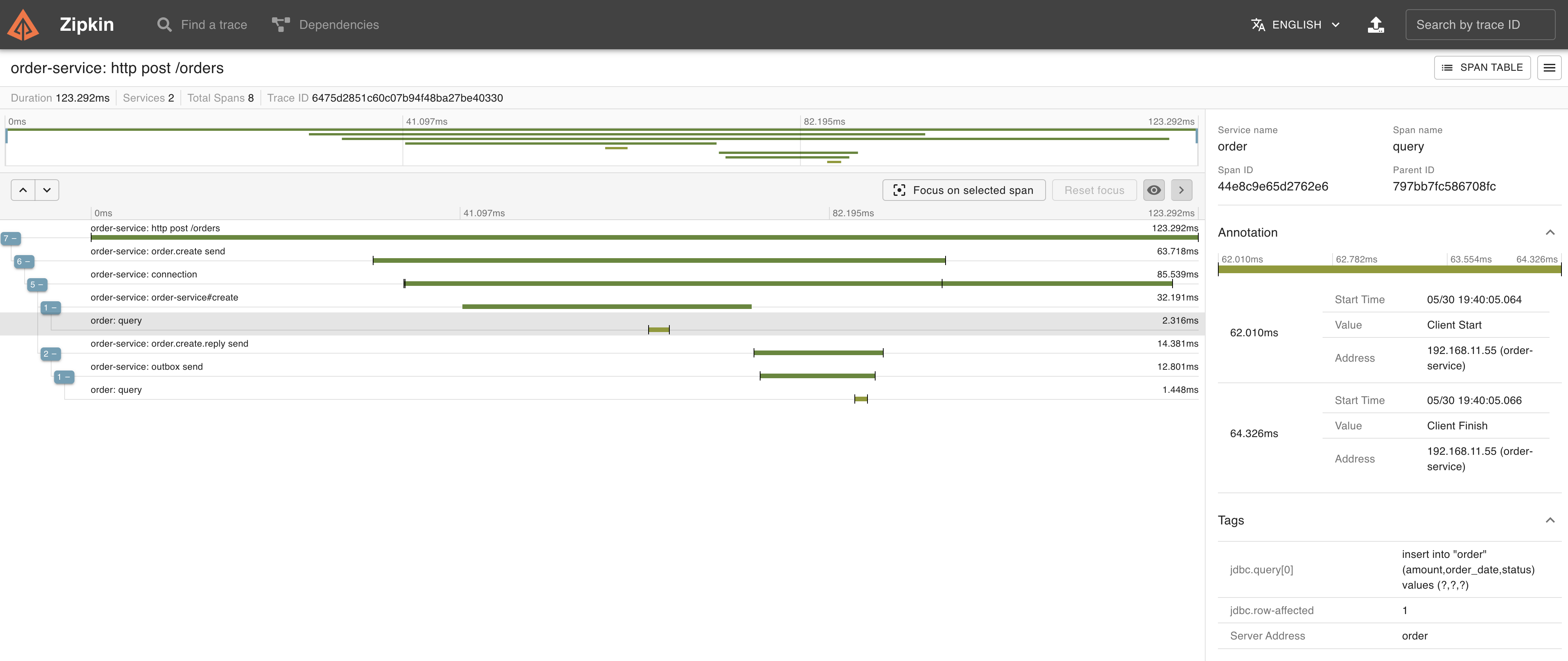 `INSERT into INT_CHANNEL_MESSAGE...` were being executed.
 After a while, the log of the processing on the Message Relay side of the Order Service will also be output.
```
2023-05-30T19:40:06.755+09:00 DEBUG [order-service,6475d28681fab3a59d13cb361f68e48d,9d13cb361f68e48d] 15244 --- [ scheduling-1] o.s.orm.jpa.JpaTransactionManager : Exposing JPA transaction as JDBC [org.springframework.orm.jpa.vendor.HibernateJpaDialect$HibernateConnectionHandle@bf6fa00]
2023-05-30T19:40:06.755+09:00 DEBUG [order-service,6475d28681fab3a59d13cb361f68e48d,9d13cb361f68e48d] 15244 --- [ scheduling-1] o.s.jdbc.core.JdbcTemplate : Executing prepared SQL query
2023-05-30T19:40:06.755+09:00 DEBUG [order-service,6475d28681fab3a59d13cb361f68e48d,9d13cb361f68e48d] 15244 --- [ scheduling-1] o.s.jdbc.core.JdbcTemplate : Executing prepared SQL statement [SELECT INT_CHANNEL_MESSAGE.MESSAGE_ID, INT_CHANNEL_MESSAGE.MESSAGE_BYTES from INT_CHANNEL_MESSAGE where INT_CHANNEL_MESSAGE.GROUP_KEY = ? and INT_CHANNEL_MESSAGE.REGION = ? order by CREATED_DATE, MESSAGE_SEQUENCE LIMIT 1 FOR UPDATE]
2023-05-30T19:40:06.763+09:00 DEBUG [order-service,6475d28681fab3a59d13cb361f68e48d,9d13cb361f68e48d] 15244 --- [ scheduling-1] o.s.jdbc.core.JdbcTemplate : Executing prepared SQL update
2023-05-30T19:40:06.763+09:00 DEBUG [order-service,6475d28681fab3a59d13cb361f68e48d,9d13cb361f68e48d] 15244 --- [ scheduling-1] o.s.jdbc.core.JdbcTemplate : Executing prepared SQL statement [DELETE from INT_CHANNEL_MESSAGE where MESSAGE_ID=? and GROUP_KEY=? and REGION=?]
2023-05-30T19:40:06.769+09:00 INFO [order-service,6475d28681fab3a59d13cb361f68e48d,9d13cb361f68e48d] 15244 --- [ scheduling-1] amqpHandler : Send {"orderId":1,"amount":5E+1,"orderDate":"2023-05-30T10:40:05.027954Z"}
2023-05-30T19:40:06.778+09:00 INFO [order-service,6475d28681fab3a59d13cb361f68e48d,9d13cb361f68e48d] 15244 --- [ scheduling-1] o.s.a.r.c.CachingConnectionFactory : Attempting to connect to: [127.0.0.1:5672]
2023-05-30T19:40:06.809+09:00 INFO [order-service,6475d28681fab3a59d13cb361f68e48d,9d13cb361f68e48d] 15244 --- [ scheduling-1] o.s.a.r.c.CachingConnectionFactory : Created new connection: rabbitConnectionFactory#5b115d71:0/SimpleConnection@19e406fa [delegate=amqp://guest@127.0.0.1:5672/, localPort=54381]
2023-05-30T19:40:06.831+09:00 DEBUG [order-service,6475d28681fab3a59d13cb361f68e48d,9d13cb361f68e48d] 15244 --- [ scheduling-1] o.s.orm.jpa.JpaTransactionManager : Initiating transaction commit
2023-05-30T19:40:06.831+09:00 DEBUG [order-service,6475d28681fab3a59d13cb361f68e48d,9d13cb361f68e48d] 15244 --- [ scheduling-1] o.s.orm.jpa.JpaTransactionManager : Committing JPA transaction on EntityManager [SessionImpl(1566708299)]
2023-05-30T19:40:06.834+09:00 DEBUG [order-service,6475d28681fab3a59d13cb361f68e48d,9d13cb361f68e48d] 15244 --- [ scheduling-1] o.s.orm.jpa.JpaTransactionManager : Closing JPA EntityManager [SessionImpl(1566708299)] after transaction
```
After the transaction started, `SELECT ... from INT_CHANNEL_MESSAGE ... FOR UPDATE` and `DELETE from INT_CHANNEL_MESSAGE ...` were executed, and after the message was sent to RabbitMQ, the transaction was committed.
Message Relay processing is traced with a different Trace ID (`6475d28681fab3a59d13cb361f68e48d`) from POST request processing.
The following log is output on the Shipment Service side. This is traced with the same Trace ID (`6475d28681fab3a59d13cb361f68e48d`) as the message sent.
```
2023-05-30T19:40:06.864+09:00 INFO [shipment-service,6475d28681fab3a59d13cb361f68e48d,2c76e61f1852629c] 15275 --- [ntContainer#0-1] c.e.outbox.shipment.ShipmentService : Created order: Created[orderId=1, amount=50.0, orderDate=2023-05-30T10:40:05.027954Z]
2023-05-30T19:40:06.882+09:00 DEBUG [shipment-service,6475d28681fab3a59d13cb361f68e48d,2c76e61f1852629c] 15275 --- [ntContainer#0-1] org.hibernate.SQL : insert into shipment (order_date,order_id) values (?,?)
2023-05-30T19:40:06.900+09:00 INFO [shipment-service,6475d28681fab3a59d13cb361f68e48d,2c76e61f1852629c] 15275 --- [ntContainer#0-1] c.e.outbox.shipment.ShipmentService : Create shipment: Shipment{shipmentId=1, orderId=1, orderDate=2023-05-30T10:40:05.027954Z}
```
Let's take a look at Trace of `6475d28681fab3a59d13cb361f68e48d` in Zipkin.
The Message Relay side processing of the Order Service and the Message Receiving processing of the Shipment Service are traced.
After a while, the log of the processing on the Message Relay side of the Order Service will also be output.
```
2023-05-30T19:40:06.755+09:00 DEBUG [order-service,6475d28681fab3a59d13cb361f68e48d,9d13cb361f68e48d] 15244 --- [ scheduling-1] o.s.orm.jpa.JpaTransactionManager : Exposing JPA transaction as JDBC [org.springframework.orm.jpa.vendor.HibernateJpaDialect$HibernateConnectionHandle@bf6fa00]
2023-05-30T19:40:06.755+09:00 DEBUG [order-service,6475d28681fab3a59d13cb361f68e48d,9d13cb361f68e48d] 15244 --- [ scheduling-1] o.s.jdbc.core.JdbcTemplate : Executing prepared SQL query
2023-05-30T19:40:06.755+09:00 DEBUG [order-service,6475d28681fab3a59d13cb361f68e48d,9d13cb361f68e48d] 15244 --- [ scheduling-1] o.s.jdbc.core.JdbcTemplate : Executing prepared SQL statement [SELECT INT_CHANNEL_MESSAGE.MESSAGE_ID, INT_CHANNEL_MESSAGE.MESSAGE_BYTES from INT_CHANNEL_MESSAGE where INT_CHANNEL_MESSAGE.GROUP_KEY = ? and INT_CHANNEL_MESSAGE.REGION = ? order by CREATED_DATE, MESSAGE_SEQUENCE LIMIT 1 FOR UPDATE]
2023-05-30T19:40:06.763+09:00 DEBUG [order-service,6475d28681fab3a59d13cb361f68e48d,9d13cb361f68e48d] 15244 --- [ scheduling-1] o.s.jdbc.core.JdbcTemplate : Executing prepared SQL update
2023-05-30T19:40:06.763+09:00 DEBUG [order-service,6475d28681fab3a59d13cb361f68e48d,9d13cb361f68e48d] 15244 --- [ scheduling-1] o.s.jdbc.core.JdbcTemplate : Executing prepared SQL statement [DELETE from INT_CHANNEL_MESSAGE where MESSAGE_ID=? and GROUP_KEY=? and REGION=?]
2023-05-30T19:40:06.769+09:00 INFO [order-service,6475d28681fab3a59d13cb361f68e48d,9d13cb361f68e48d] 15244 --- [ scheduling-1] amqpHandler : Send {"orderId":1,"amount":5E+1,"orderDate":"2023-05-30T10:40:05.027954Z"}
2023-05-30T19:40:06.778+09:00 INFO [order-service,6475d28681fab3a59d13cb361f68e48d,9d13cb361f68e48d] 15244 --- [ scheduling-1] o.s.a.r.c.CachingConnectionFactory : Attempting to connect to: [127.0.0.1:5672]
2023-05-30T19:40:06.809+09:00 INFO [order-service,6475d28681fab3a59d13cb361f68e48d,9d13cb361f68e48d] 15244 --- [ scheduling-1] o.s.a.r.c.CachingConnectionFactory : Created new connection: rabbitConnectionFactory#5b115d71:0/SimpleConnection@19e406fa [delegate=amqp://guest@127.0.0.1:5672/, localPort=54381]
2023-05-30T19:40:06.831+09:00 DEBUG [order-service,6475d28681fab3a59d13cb361f68e48d,9d13cb361f68e48d] 15244 --- [ scheduling-1] o.s.orm.jpa.JpaTransactionManager : Initiating transaction commit
2023-05-30T19:40:06.831+09:00 DEBUG [order-service,6475d28681fab3a59d13cb361f68e48d,9d13cb361f68e48d] 15244 --- [ scheduling-1] o.s.orm.jpa.JpaTransactionManager : Committing JPA transaction on EntityManager [SessionImpl(1566708299)]
2023-05-30T19:40:06.834+09:00 DEBUG [order-service,6475d28681fab3a59d13cb361f68e48d,9d13cb361f68e48d] 15244 --- [ scheduling-1] o.s.orm.jpa.JpaTransactionManager : Closing JPA EntityManager [SessionImpl(1566708299)] after transaction
```
After the transaction started, `SELECT ... from INT_CHANNEL_MESSAGE ... FOR UPDATE` and `DELETE from INT_CHANNEL_MESSAGE ...` were executed, and after the message was sent to RabbitMQ, the transaction was committed.
Message Relay processing is traced with a different Trace ID (`6475d28681fab3a59d13cb361f68e48d`) from POST request processing.
The following log is output on the Shipment Service side. This is traced with the same Trace ID (`6475d28681fab3a59d13cb361f68e48d`) as the message sent.
```
2023-05-30T19:40:06.864+09:00 INFO [shipment-service,6475d28681fab3a59d13cb361f68e48d,2c76e61f1852629c] 15275 --- [ntContainer#0-1] c.e.outbox.shipment.ShipmentService : Created order: Created[orderId=1, amount=50.0, orderDate=2023-05-30T10:40:05.027954Z]
2023-05-30T19:40:06.882+09:00 DEBUG [shipment-service,6475d28681fab3a59d13cb361f68e48d,2c76e61f1852629c] 15275 --- [ntContainer#0-1] org.hibernate.SQL : insert into shipment (order_date,order_id) values (?,?)
2023-05-30T19:40:06.900+09:00 INFO [shipment-service,6475d28681fab3a59d13cb361f68e48d,2c76e61f1852629c] 15275 --- [ntContainer#0-1] c.e.outbox.shipment.ShipmentService : Create shipment: Shipment{shipmentId=1, orderId=1, orderDate=2023-05-30T10:40:05.027954Z}
```
Let's take a look at Trace of `6475d28681fab3a59d13cb361f68e48d` in Zipkin.
The Message Relay side processing of the Order Service and the Message Receiving processing of the Shipment Service are traced.
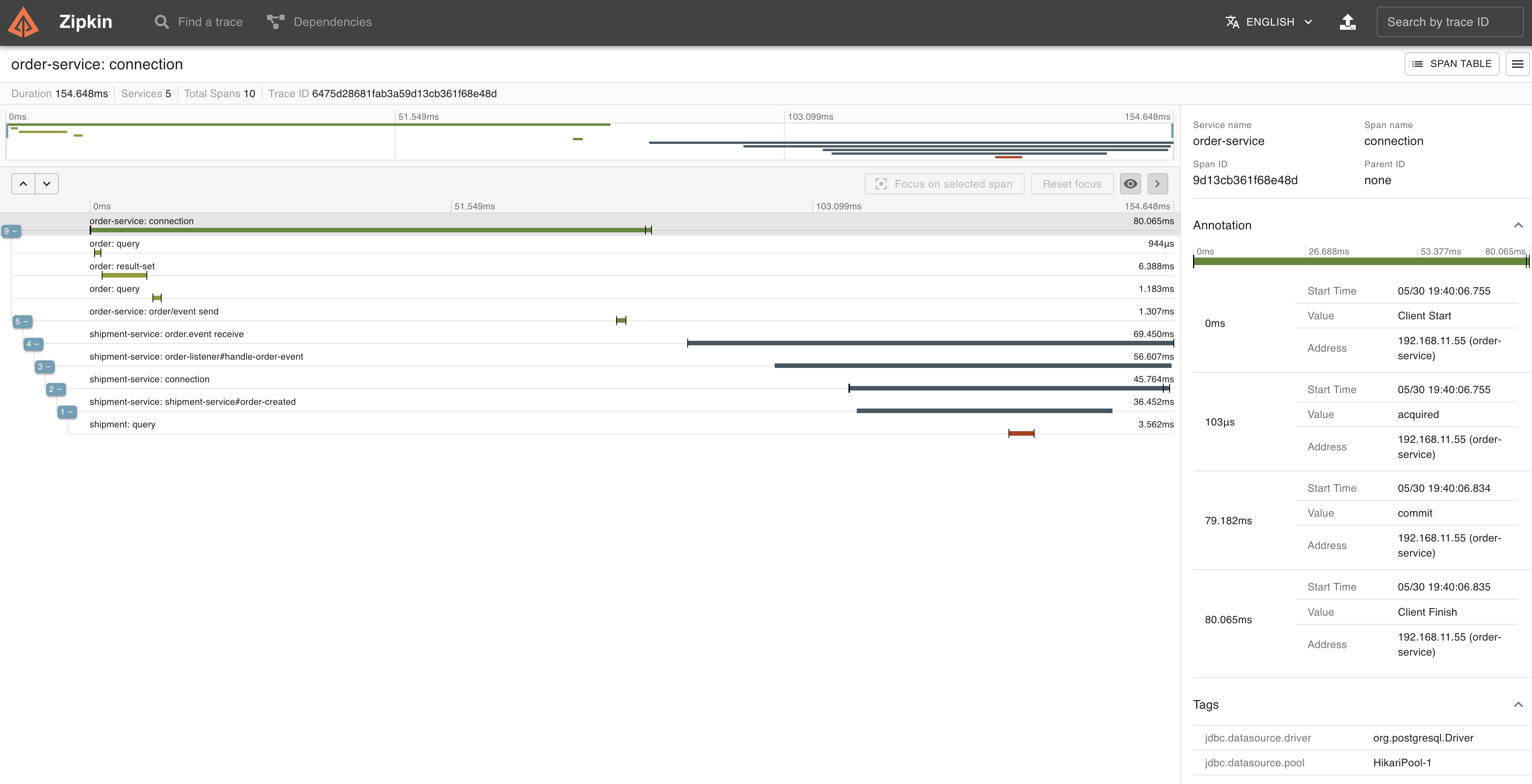 In the `connection` span (= transaction) of the message relay side processing, you can see from the trace that `SELECT ... from INT_CHANNEL_MESSAGE ... FOR UPDATE` and
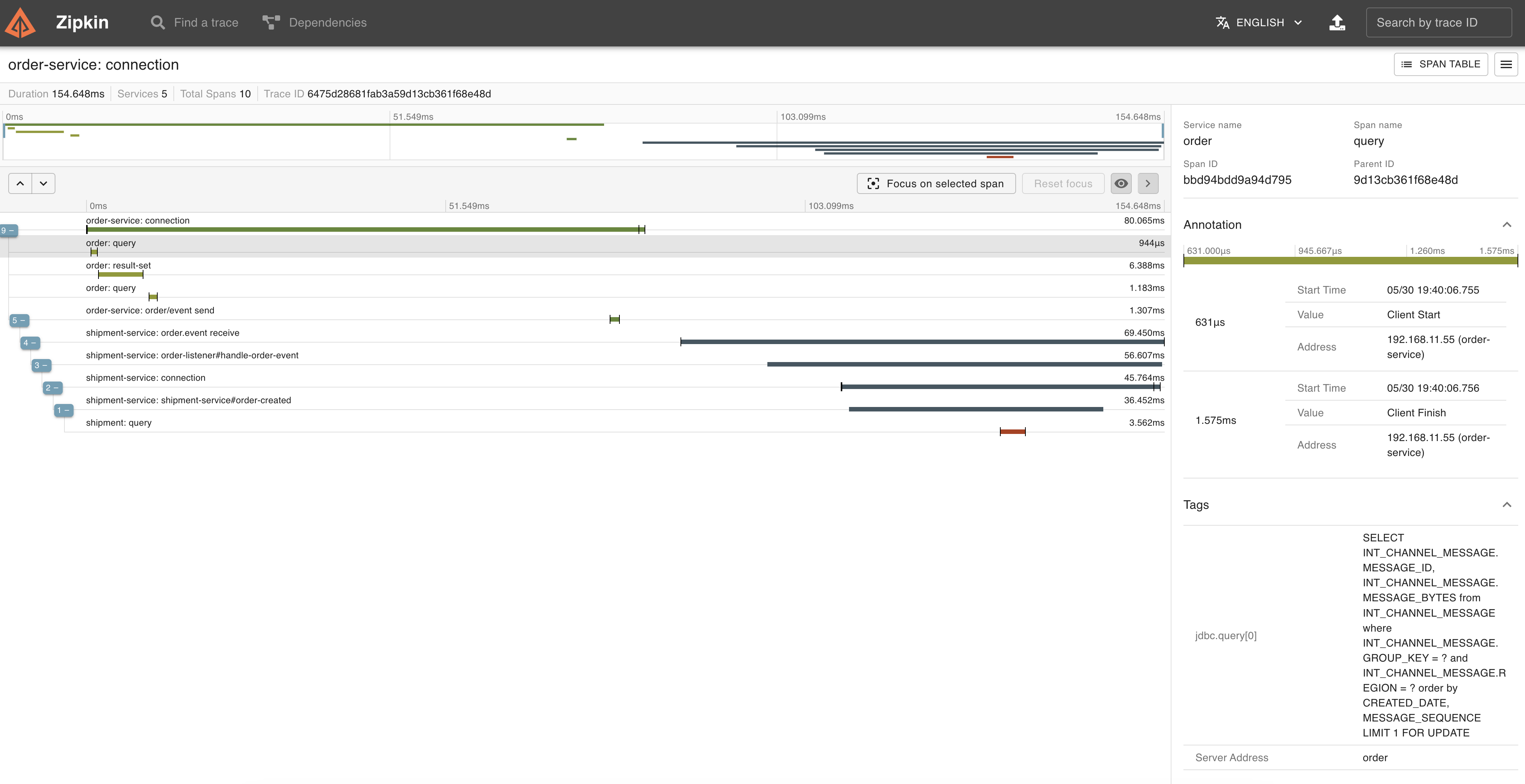 `DELETE from INT_CHANNEL_MESSAGE ...` were executed and
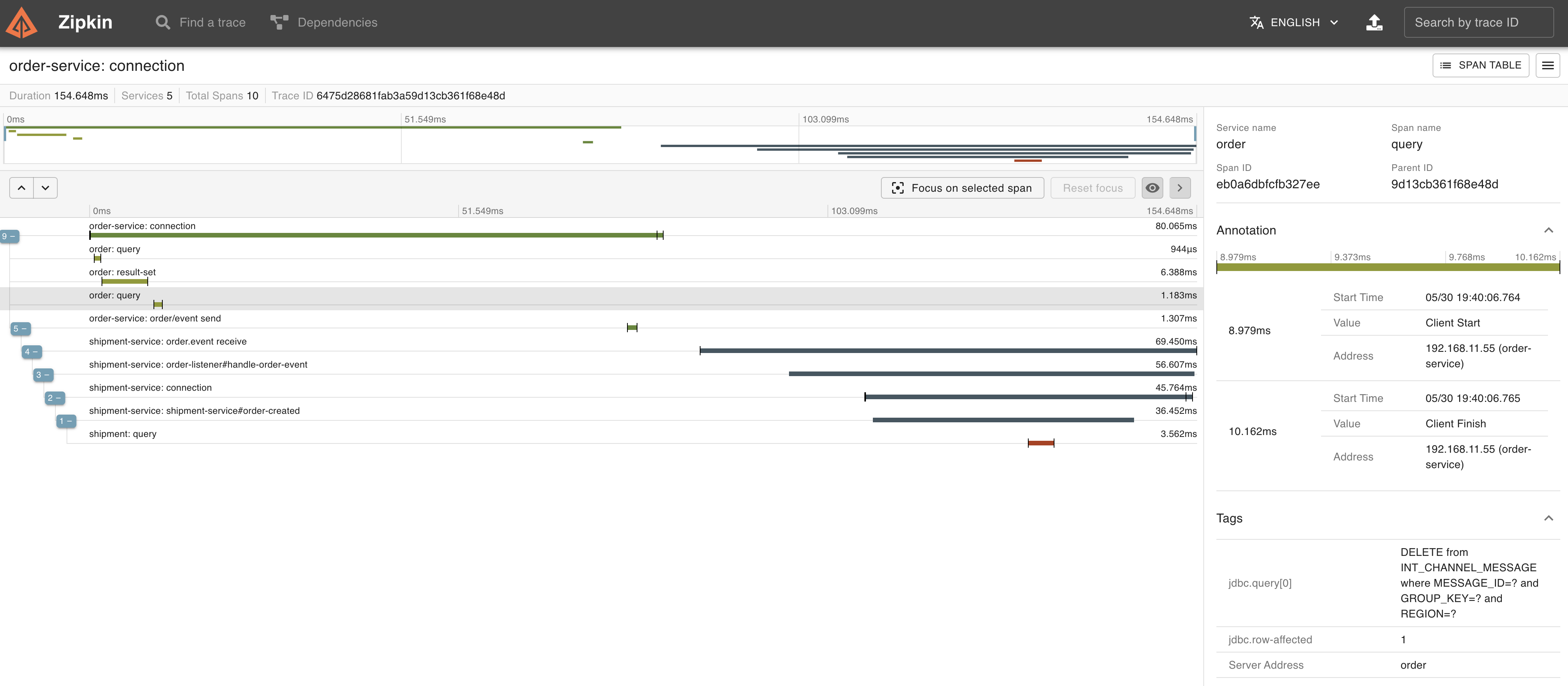 the sending of the message was also executed within the same transaction.
 ---
I was able to implement the Outbox pattern using only Spring Integration.
---
I was able to implement the Outbox pattern using only Spring Integration.
Compared to other methods, this method has the advantage that if you have knowledge of Spring Integration, you can simply implement the Outbox pattern using only existing mechanisms.
You may be concerned about the load on polling. Although it is limited to PostgreSQL, as an outbox MessageChannel implementation, `PostgresSubscribableChannel` in "[PostgreSQL: Receiving Push Notifications](https://docs.spring.io/spring-integration/docs/current/reference/html/jdbc.html#postgresql-push)" may eliminate polling overhead.
> When I tried `PostgresSubscribableChannel` before, it didn't support transactions, so I didn't adopt it in this implementation. But, looking at the document, it seems that transactions have been supported since 6.0.5, so I would like to try again.
### (Aside) Partition support
It may not be directly related to the Outbox pattern, but you may want Partition support if you want to send Event messages.
Incoming messages are processed in parallel when the message receiver scales out. We do not know which instance will be processed in this implementation.
For example, if you want messages with the same order ID or the same customer ID to be processed in the same instance in order, you need to associate the ID with the instance.
When implementing with normal RabbitMQ, it is necessary to define multiple queues and associate IDs and queues with routing keys.
When using [Spring Cloud Stream](https://spring.io/projects/spring-cloud-stream), this work is done transparently by [Partition Support](https://docs.spring.io/spring-cloud-stream/docs/current/reference/html/spring-cloud-stream.html#spring-cloud-stream-overview-partitioning).
If you use [RabbitMQ Streams](https://www.rabbitmq.com/streams.html), you can use [Single Active Consumer](https://www.rabbitmq.com/streams.html#single-active-consumer) and [Super Streams](https://www.rabbitmq.com/streams.html#super-streams) supported by RabbitMQ 3.11. The sample at https://github.com/acogoluegnes/rabbitmq-stream-single-active-consumer is easy to understand. Spring AMQP and Spring Integration also support Super Streams, so I'll try it next time.
Or you can use Kafka instead of RabbitMQ as it natively supports Partition. ([Artem's example](https://github.com/artembilan/microservices-patterns-spring-integration/tree/main/outbox) uses Kafka.)
---
**P.S.**
[PartitinonedChannel](https://docs.spring.io/spring-integration/docs/6.1.0/reference/html/channel.html#partitioned-channel) was introduced in Spring Integration 6.1!
[Debezium support](https://github.com/spring-projects/spring-integration/commit/8b004e9ec2be349cd112c84ba7075e84f1eaa232) is also comming, according to Artem.