---
title: Notes on Using Java 21 with Tanzu Application Platform 1.7
tags: ["Kubernetes", "Tanzu Build Service", "Tanzu", "TAP", "kpack"]
categories: ["Dev", "CaaS", "Kubernetes", "TAP"]
date: 2023-12-03T08:43:24Z
updated: 2023-12-03T08:48:03Z
---
In a [previous article](/entries/773/en), I introduced steps to update a specific Buildpack in Tanzu Application Platform.
TAP 1.7 does not yet support Buildpacks for Java 21. However, a Java 21 compatible [tanzu java buildpack 9.13.0](https://network.tanzu.vmware.com/products/tanzu-java-buildpack#/releases/1423990) was released on 2023-12-01.
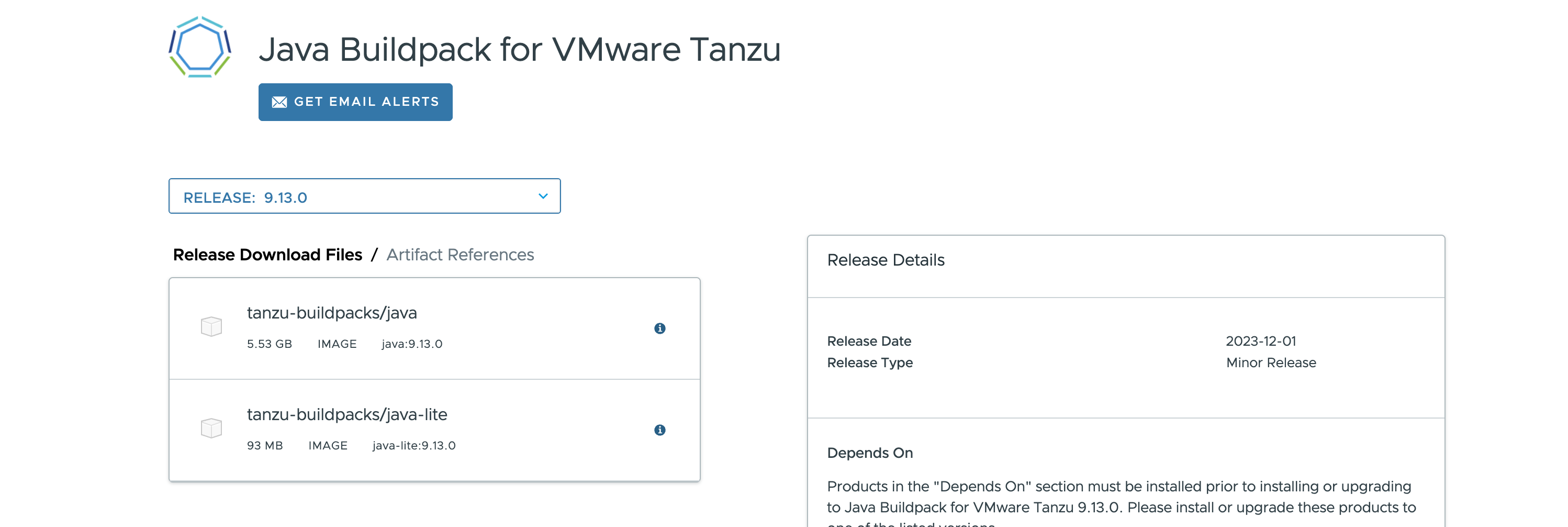 Therefore, I try to use this tanzu java buildpack 9.13.0 in TAP 1.7 to support Java 21.
In TAP 1.7.1, the following `ClusterBuildpack`s are installed. The version of the tanzu java buildpack is [9.11.0](https://docs.vmware.com/en/VMware-Tanzu-Buildpacks/services/tanzu-buildpacks/GUID-release-notes-tanzu-java-v9-11-0.html).
```
$ kubectl get clusterbuildpack
NAME READY
dotnet-core-2.8.2 True
go-2.2.2 True
java-9.11.0 True <====
java-native-image-7.9.0 True
nodejs-2.3.2 True
php-2.6.1 True
procfile-5.6.1 True
python-2.5.1 True
ruby-2.8.1 True
web-servers-0.15.4 True
```
You can check the individual buildpacks included in tanzu java buildpack 9.11.0 with the following command:
> ℹ️ The java buildpack is a meta buildpack that bundles the following group of buildpacks.
```
$ kubectl get clusterbuildpack java-9.11.0 -ojson | jq -r '.status.buildpacks[] | [.id, .version] | @tsv'
paketo-buildpacks/apache-skywalking 5.6.1
paketo-buildpacks/apache-tomcat 7.13.9
paketo-buildpacks/apache-tomee 1.7.4
paketo-buildpacks/appdynamics 5.14.0
paketo-buildpacks/aternity 5.4.2
paketo-buildpacks/azure-application-insights 5.15.4
paketo-buildpacks/ca-certificates 3.6.3
paketo-buildpacks/clojure-tools 2.8.8
paketo-buildpacks/datadog 4.0.0
paketo-buildpacks/dist-zip 5.6.4
paketo-buildpacks/dynatrace 5.5.0
paketo-buildpacks/elastic-apm 5.14.0
paketo-buildpacks/encrypt-at-rest 4.5.6
paketo-buildpacks/environment-variables 4.5.3
paketo-buildpacks/executable-jar 6.7.4
paketo-buildpacks/google-stackdriver 7.7.0
paketo-buildpacks/gradle 7.5.0
paketo-buildpacks/image-labels 4.5.2
paketo-buildpacks/jattach 1.4.4
paketo-buildpacks/java-memory-assistant 1.4.4
paketo-buildpacks/jprofiler 6.5.3
paketo-buildpacks/leiningen 4.6.4
paketo-buildpacks/liberty 3.8.4
paketo-buildpacks/maven 6.15.6
paketo-buildpacks/new-relic 7.8.0
paketo-buildpacks/procfile 5.6.4
paketo-buildpacks/sbt 6.12.4
paketo-buildpacks/spring-boot 5.27.1
paketo-buildpacks/syft 1.10.1
paketo-buildpacks/watchexec 2.8.3
paketo-buildpacks/yourkit 6.0.6
tanzu-buildpacks/aspectj 4.5.0
tanzu-buildpacks/checkmarx 4.6.0
tanzu-buildpacks/contrast-security 5.3.1
tanzu-buildpacks/deprecation-warnings 0.0.4
tanzu-buildpacks/jacoco 4.6.0
tanzu-buildpacks/java 9.11.0
tanzu-buildpacks/jrebel 4.12.0
tanzu-buildpacks/luna-security-provider 1.7.0
tanzu-buildpacks/node-engine 2.0.0
tanzu-buildpacks/overops 4.12.2
tanzu-buildpacks/snyk 4.6.0
tanzu-buildpacks/synopsys 4.6.1
tanzu-buildpacks/tanzu-bellsoft-liberica 9.12.1 <====
tanzu-buildpacks/yarn 1.1.11
```
The `tanzu-buildpacks/tanzu-bellsoft-liberica` is the actual JDK-carrying buildpack, and in version 9.12.1, it only supports 8, 11, 17, and 20.
You can check the buildpacks referenced by the `default` `ClusterBuilder` with the following command:
```
$ kubectl get clusterbuilder default -ojsonpath='{.status.order}' | jq -r '.[].group[0] | [.id, .version] | @tsv'
tanzu-buildpacks/ruby 2.8.1
tanzu-buildpacks/dotnet-core 2.8.2
tanzu-buildpacks/go 2.2.2
tanzu-buildpacks/python 2.5.1
tanzu-buildpacks/web-servers 0.15.4
tanzu-buildpacks/java-native-image 7.9.0
tanzu-buildpacks/java 9.11.0 <====
tanzu-buildpacks/nodejs 2.3.2
paketo-buildpacks/procfile 5.6.7
```
The version of the tanzu java buildpack (`tanzu-buildpacks/java`) being used is 9.11.0.
Now, I want to update this `ClusterBuilder` to use tanzu java buildpack version 9.13.0.
The update method is documented at:
https://docs.vmware.com/en/VMware-Tanzu-Application-Platform/1.7/tap/tanzu-build-service-dependencies.html#update-dependencies-7
First, relocate the buildpack's Docker image using the `imgpkg` command. The original image name can be found on Tanzu Net. Use the `-lite` suffix for lite dependencies, or without `-lite` for full dependencies.
Therefore, I try to use this tanzu java buildpack 9.13.0 in TAP 1.7 to support Java 21.
In TAP 1.7.1, the following `ClusterBuildpack`s are installed. The version of the tanzu java buildpack is [9.11.0](https://docs.vmware.com/en/VMware-Tanzu-Buildpacks/services/tanzu-buildpacks/GUID-release-notes-tanzu-java-v9-11-0.html).
```
$ kubectl get clusterbuildpack
NAME READY
dotnet-core-2.8.2 True
go-2.2.2 True
java-9.11.0 True <====
java-native-image-7.9.0 True
nodejs-2.3.2 True
php-2.6.1 True
procfile-5.6.1 True
python-2.5.1 True
ruby-2.8.1 True
web-servers-0.15.4 True
```
You can check the individual buildpacks included in tanzu java buildpack 9.11.0 with the following command:
> ℹ️ The java buildpack is a meta buildpack that bundles the following group of buildpacks.
```
$ kubectl get clusterbuildpack java-9.11.0 -ojson | jq -r '.status.buildpacks[] | [.id, .version] | @tsv'
paketo-buildpacks/apache-skywalking 5.6.1
paketo-buildpacks/apache-tomcat 7.13.9
paketo-buildpacks/apache-tomee 1.7.4
paketo-buildpacks/appdynamics 5.14.0
paketo-buildpacks/aternity 5.4.2
paketo-buildpacks/azure-application-insights 5.15.4
paketo-buildpacks/ca-certificates 3.6.3
paketo-buildpacks/clojure-tools 2.8.8
paketo-buildpacks/datadog 4.0.0
paketo-buildpacks/dist-zip 5.6.4
paketo-buildpacks/dynatrace 5.5.0
paketo-buildpacks/elastic-apm 5.14.0
paketo-buildpacks/encrypt-at-rest 4.5.6
paketo-buildpacks/environment-variables 4.5.3
paketo-buildpacks/executable-jar 6.7.4
paketo-buildpacks/google-stackdriver 7.7.0
paketo-buildpacks/gradle 7.5.0
paketo-buildpacks/image-labels 4.5.2
paketo-buildpacks/jattach 1.4.4
paketo-buildpacks/java-memory-assistant 1.4.4
paketo-buildpacks/jprofiler 6.5.3
paketo-buildpacks/leiningen 4.6.4
paketo-buildpacks/liberty 3.8.4
paketo-buildpacks/maven 6.15.6
paketo-buildpacks/new-relic 7.8.0
paketo-buildpacks/procfile 5.6.4
paketo-buildpacks/sbt 6.12.4
paketo-buildpacks/spring-boot 5.27.1
paketo-buildpacks/syft 1.10.1
paketo-buildpacks/watchexec 2.8.3
paketo-buildpacks/yourkit 6.0.6
tanzu-buildpacks/aspectj 4.5.0
tanzu-buildpacks/checkmarx 4.6.0
tanzu-buildpacks/contrast-security 5.3.1
tanzu-buildpacks/deprecation-warnings 0.0.4
tanzu-buildpacks/jacoco 4.6.0
tanzu-buildpacks/java 9.11.0
tanzu-buildpacks/jrebel 4.12.0
tanzu-buildpacks/luna-security-provider 1.7.0
tanzu-buildpacks/node-engine 2.0.0
tanzu-buildpacks/overops 4.12.2
tanzu-buildpacks/snyk 4.6.0
tanzu-buildpacks/synopsys 4.6.1
tanzu-buildpacks/tanzu-bellsoft-liberica 9.12.1 <====
tanzu-buildpacks/yarn 1.1.11
```
The `tanzu-buildpacks/tanzu-bellsoft-liberica` is the actual JDK-carrying buildpack, and in version 9.12.1, it only supports 8, 11, 17, and 20.
You can check the buildpacks referenced by the `default` `ClusterBuilder` with the following command:
```
$ kubectl get clusterbuilder default -ojsonpath='{.status.order}' | jq -r '.[].group[0] | [.id, .version] | @tsv'
tanzu-buildpacks/ruby 2.8.1
tanzu-buildpacks/dotnet-core 2.8.2
tanzu-buildpacks/go 2.2.2
tanzu-buildpacks/python 2.5.1
tanzu-buildpacks/web-servers 0.15.4
tanzu-buildpacks/java-native-image 7.9.0
tanzu-buildpacks/java 9.11.0 <====
tanzu-buildpacks/nodejs 2.3.2
paketo-buildpacks/procfile 5.6.7
```
The version of the tanzu java buildpack (`tanzu-buildpacks/java`) being used is 9.11.0.
Now, I want to update this `ClusterBuilder` to use tanzu java buildpack version 9.13.0.
The update method is documented at:
https://docs.vmware.com/en/VMware-Tanzu-Application-Platform/1.7/tap/tanzu-build-service-dependencies.html#update-dependencies-7
First, relocate the buildpack's Docker image using the `imgpkg` command. The original image name can be found on Tanzu Net. Use the `-lite` suffix for lite dependencies, or without `-lite` for full dependencies.
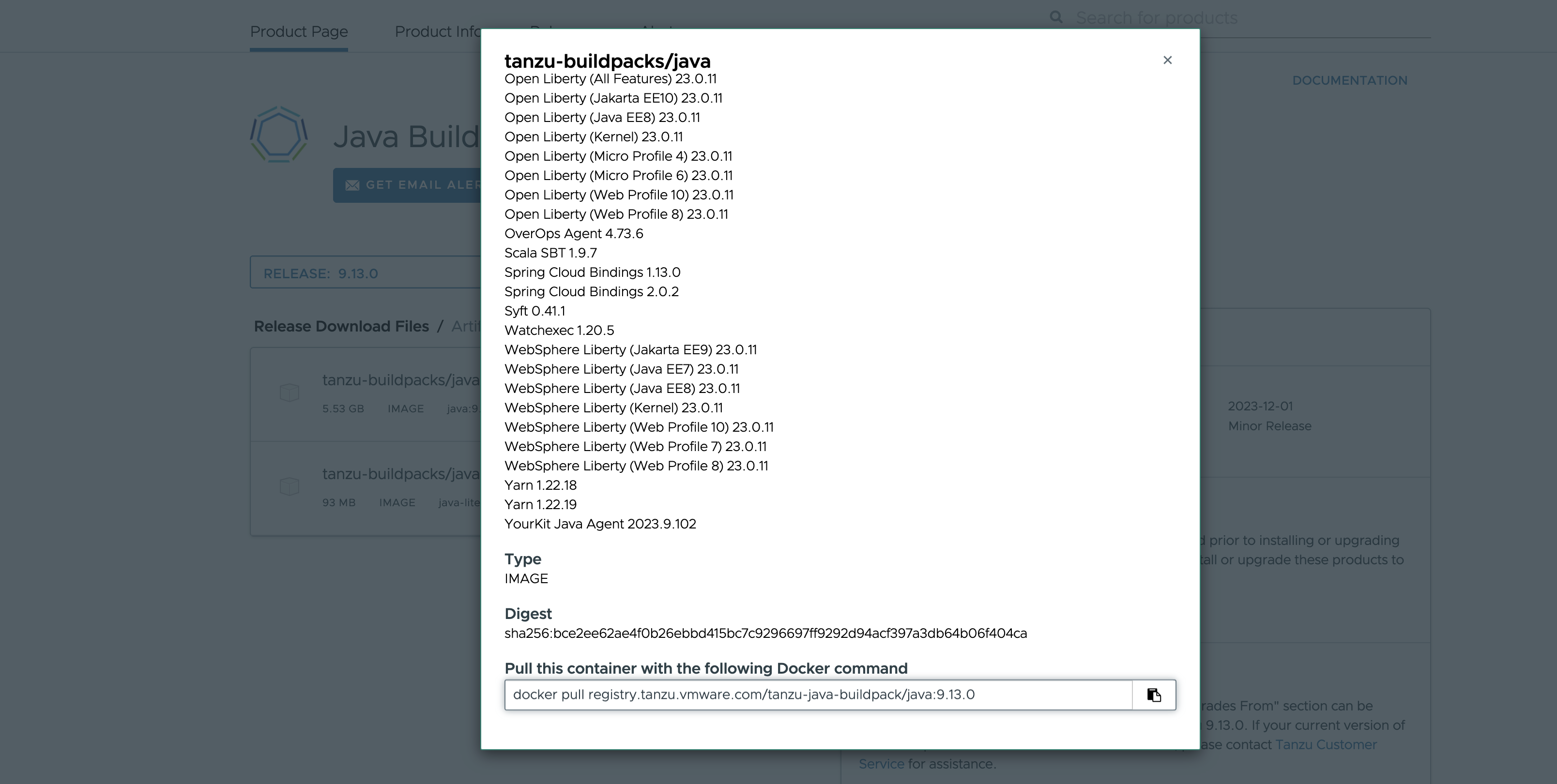 Here we relocate to `ghcr.io/making`:
```
imgpkg copy -i registry.tanzu.vmware.com/tanzu-java-buildpack/java:9.13.0 --to-repo ghcr.io/making/tanzu-java-buildpack/java
```
Specify the relocated image in `.spec.image` of `ClusterBuildpack`. The Service Account specified in `.spec.serviceAccountRef` needs `imagePullSecrets` to pull the relocated image.
If unsure, use `kubectl get clusterbuildpack -ojsonpath='{.items[0].spec.serviceAccountRef}'` to check the Service Account used by an existing `ClusterBuildpack`.
It's better to use a name format that doesn't overlap with those bundled in TAP. Here, as in the documentation, I'm using `out-of-band-` as a prefix.
```yaml
kubectl apply -f - << 'EOF'
---
apiVersion: kpack.io/v1alpha2
kind: ClusterBuildpack
metadata:
name: out-of-band-java-9.13.0
spec:
image: ghcr.io/making/tanzu-java-buildpack/java:9.13.0
serviceAccountRef:
name: dependencies-pull-serviceaccount
namespace: tbs-full-deps
---
EOF
```
Check the `ClusterBuildpack` list. `out-of-band-java-9.13.0` has been added.
```
$ kubectl get clusterbuildpack
NAME READY
dotnet-core-2.8.2 True
go-2.2.2 True
java-9.11.0 True
java-native-image-7.9.0 True
nodejs-2.3.2 True
out-of-band-java-9.13.0 True <====
php-2.6.1 True
procfile-5.6.1 True
python-2.5.1 True
ruby-2.8.1 True
web-servers-0.15.4 True
```
You can check the individual buildpacks included in `out-of-band-java-9.13.0` with the following command:
```
$ kubectl get clusterbuildpack out-of-band-java-9.13.0 -ojson | jq -r '.status.buildpacks[] | [.id, .version] | @tsv'
paketo-buildpacks/syft 1.10.1
tanzu-buildpacks/apache-skywalking 6.0.4
tanzu-buildpacks/apache-tomcat 7.14.1
tanzu-buildpacks/apache-tomee 1.7.9
tanzu-buildpacks/appdynamics 5.17.1
tanzu-buildpacks/aspectj 4.5.2
tanzu-buildpacks/aternity 5.4.6
tanzu-buildpacks/azure-application-insights 5.17.2
tanzu-buildpacks/bellsoft-liberica 9.13.0 <====
tanzu-buildpacks/ca-certificates 3.6.7
tanzu-buildpacks/checkmarx 4.6.2
tanzu-buildpacks/clojure-tools 2.8.13
tanzu-buildpacks/contrast-security 5.5.0
tanzu-buildpacks/datadog 4.5.1
tanzu-buildpacks/deprecation-warnings 0.0.4
tanzu-buildpacks/dist-zip 5.6.8
tanzu-buildpacks/dynatrace 5.6.1
tanzu-buildpacks/elastic-apm 6.2.1
tanzu-buildpacks/encrypt-at-rest 4.5.11
tanzu-buildpacks/environment-variables 4.5.7
tanzu-buildpacks/executable-jar 6.8.3
tanzu-buildpacks/google-stackdriver 8.0.4
tanzu-buildpacks/gradle 7.6.2
tanzu-buildpacks/image-labels 4.5.6
tanzu-buildpacks/jacoco 4.6.1
tanzu-buildpacks/jattach 1.4.9
tanzu-buildpacks/java-memory-assistant 1.4.9
tanzu-buildpacks/java 9.13.0
tanzu-buildpacks/jprofiler 6.5.7
tanzu-buildpacks/jrebel 4.14.0
tanzu-buildpacks/leiningen 4.6.9
tanzu-buildpacks/liberty 3.8.11
tanzu-buildpacks/luna-security-provider 1.7.2
tanzu-buildpacks/maven 6.15.12
tanzu-buildpacks/new-relic 8.4.1
tanzu-buildpacks/node-engine 2.0.0
tanzu-buildpacks/overops 4.12.4
tanzu-buildpacks/procfile 5.6.9
tanzu-buildpacks/sbt 6.12.10
tanzu-buildpacks/snyk 4.6.2
tanzu-buildpacks/spring-boot 5.27.6
tanzu-buildpacks/synopsys 4.6.3
tanzu-buildpacks/watchexec 2.8.7
tanzu-buildpacks/yarn 1.1.11
tanzu-buildpacks/yourkit 6.1.6
```
The version of `tanzu-buildpacks/tanzu-bellsoft-liberica` is now 9.13.0.
Check if the `ClusterBuilder` has changed by adding `ClusterBuildpack` with the following command:
```
$ kubectl get clusterbuilder default -ojsonpath='{.status.order}' | jq -r '.[].group[0] | [.id, .version] | @tsv'
tanzu-buildpacks/ruby 2.8.1
tanzu-buildpacks/dotnet-core 2.8.2
tanzu-buildpacks/go 2.2.2
tanzu-buildpacks/python 2.5.1
tanzu-buildpacks/web-servers 0.15.4
tanzu-buildpacks/java-native-image 7.9.0
tanzu-buildpacks/java 9.13.0 <====
tanzu-buildpacks/nodejs 2.3.2
paketo-buildpacks/procfile 5.6.7
```
The version of the tanzu java buildpack (`tanzu-buildpacks/java`) being used is now 9.13.0.
With this, a buildpack for Java 21 has been installed in the TAP 1.7 environment.
To use Java 21 in Workloads, just set the `BP_JVM_VERSION` environment variable to 21 during build.
For the `tanzu apps workload apply` command, use `--build-env BP_JVM_VERSION=21`, or for YAML, use the following setting:
```yaml
spec:
build:
env:
- name: BP_JVM_VERSION
value: "21"
```
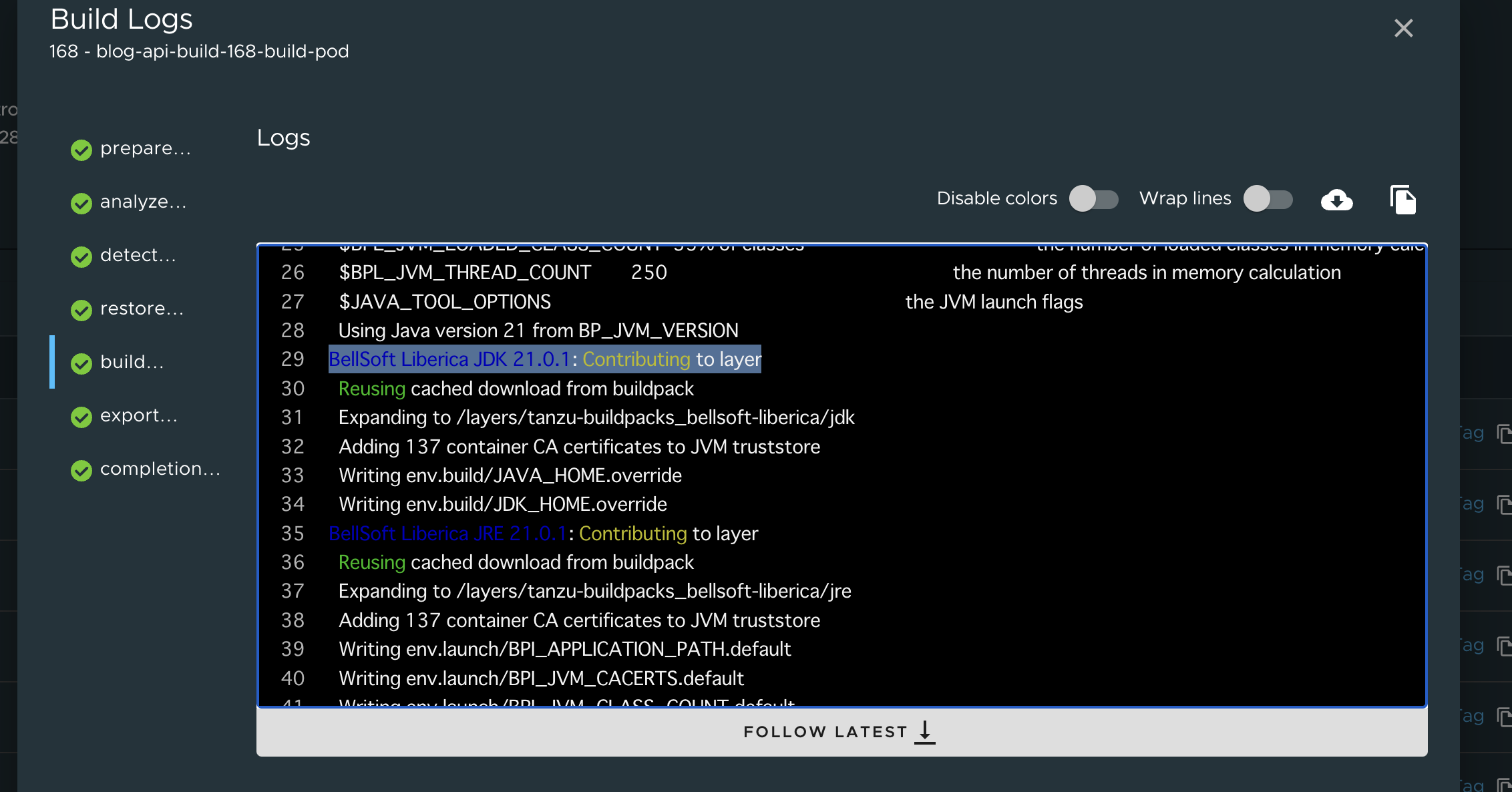
You can see in the Developer Portal's build logs that JDK 21 is being used.
Here we relocate to `ghcr.io/making`:
```
imgpkg copy -i registry.tanzu.vmware.com/tanzu-java-buildpack/java:9.13.0 --to-repo ghcr.io/making/tanzu-java-buildpack/java
```
Specify the relocated image in `.spec.image` of `ClusterBuildpack`. The Service Account specified in `.spec.serviceAccountRef` needs `imagePullSecrets` to pull the relocated image.
If unsure, use `kubectl get clusterbuildpack -ojsonpath='{.items[0].spec.serviceAccountRef}'` to check the Service Account used by an existing `ClusterBuildpack`.
It's better to use a name format that doesn't overlap with those bundled in TAP. Here, as in the documentation, I'm using `out-of-band-` as a prefix.
```yaml
kubectl apply -f - << 'EOF'
---
apiVersion: kpack.io/v1alpha2
kind: ClusterBuildpack
metadata:
name: out-of-band-java-9.13.0
spec:
image: ghcr.io/making/tanzu-java-buildpack/java:9.13.0
serviceAccountRef:
name: dependencies-pull-serviceaccount
namespace: tbs-full-deps
---
EOF
```
Check the `ClusterBuildpack` list. `out-of-band-java-9.13.0` has been added.
```
$ kubectl get clusterbuildpack
NAME READY
dotnet-core-2.8.2 True
go-2.2.2 True
java-9.11.0 True
java-native-image-7.9.0 True
nodejs-2.3.2 True
out-of-band-java-9.13.0 True <====
php-2.6.1 True
procfile-5.6.1 True
python-2.5.1 True
ruby-2.8.1 True
web-servers-0.15.4 True
```
You can check the individual buildpacks included in `out-of-band-java-9.13.0` with the following command:
```
$ kubectl get clusterbuildpack out-of-band-java-9.13.0 -ojson | jq -r '.status.buildpacks[] | [.id, .version] | @tsv'
paketo-buildpacks/syft 1.10.1
tanzu-buildpacks/apache-skywalking 6.0.4
tanzu-buildpacks/apache-tomcat 7.14.1
tanzu-buildpacks/apache-tomee 1.7.9
tanzu-buildpacks/appdynamics 5.17.1
tanzu-buildpacks/aspectj 4.5.2
tanzu-buildpacks/aternity 5.4.6
tanzu-buildpacks/azure-application-insights 5.17.2
tanzu-buildpacks/bellsoft-liberica 9.13.0 <====
tanzu-buildpacks/ca-certificates 3.6.7
tanzu-buildpacks/checkmarx 4.6.2
tanzu-buildpacks/clojure-tools 2.8.13
tanzu-buildpacks/contrast-security 5.5.0
tanzu-buildpacks/datadog 4.5.1
tanzu-buildpacks/deprecation-warnings 0.0.4
tanzu-buildpacks/dist-zip 5.6.8
tanzu-buildpacks/dynatrace 5.6.1
tanzu-buildpacks/elastic-apm 6.2.1
tanzu-buildpacks/encrypt-at-rest 4.5.11
tanzu-buildpacks/environment-variables 4.5.7
tanzu-buildpacks/executable-jar 6.8.3
tanzu-buildpacks/google-stackdriver 8.0.4
tanzu-buildpacks/gradle 7.6.2
tanzu-buildpacks/image-labels 4.5.6
tanzu-buildpacks/jacoco 4.6.1
tanzu-buildpacks/jattach 1.4.9
tanzu-buildpacks/java-memory-assistant 1.4.9
tanzu-buildpacks/java 9.13.0
tanzu-buildpacks/jprofiler 6.5.7
tanzu-buildpacks/jrebel 4.14.0
tanzu-buildpacks/leiningen 4.6.9
tanzu-buildpacks/liberty 3.8.11
tanzu-buildpacks/luna-security-provider 1.7.2
tanzu-buildpacks/maven 6.15.12
tanzu-buildpacks/new-relic 8.4.1
tanzu-buildpacks/node-engine 2.0.0
tanzu-buildpacks/overops 4.12.4
tanzu-buildpacks/procfile 5.6.9
tanzu-buildpacks/sbt 6.12.10
tanzu-buildpacks/snyk 4.6.2
tanzu-buildpacks/spring-boot 5.27.6
tanzu-buildpacks/synopsys 4.6.3
tanzu-buildpacks/watchexec 2.8.7
tanzu-buildpacks/yarn 1.1.11
tanzu-buildpacks/yourkit 6.1.6
```
The version of `tanzu-buildpacks/tanzu-bellsoft-liberica` is now 9.13.0.
Check if the `ClusterBuilder` has changed by adding `ClusterBuildpack` with the following command:
```
$ kubectl get clusterbuilder default -ojsonpath='{.status.order}' | jq -r '.[].group[0] | [.id, .version] | @tsv'
tanzu-buildpacks/ruby 2.8.1
tanzu-buildpacks/dotnet-core 2.8.2
tanzu-buildpacks/go 2.2.2
tanzu-buildpacks/python 2.5.1
tanzu-buildpacks/web-servers 0.15.4
tanzu-buildpacks/java-native-image 7.9.0
tanzu-buildpacks/java 9.13.0 <====
tanzu-buildpacks/nodejs 2.3.2
paketo-buildpacks/procfile 5.6.7
```
The version of the tanzu java buildpack (`tanzu-buildpacks/java`) being used is now 9.13.0.
With this, a buildpack for Java 21 has been installed in the TAP 1.7 environment.
To use Java 21 in Workloads, just set the `BP_JVM_VERSION` environment variable to 21 during build.
For the `tanzu apps workload apply` command, use `--build-env BP_JVM_VERSION=21`, or for YAML, use the following setting:
```yaml
spec:
build:
env:
- name: BP_JVM_VERSION
value: "21"
```
You can see in the Developer Portal's build logs that JDK 21 is being used.
 If your app uses Spring Boot 3.2, you can enable Virtual Threads by simply setting the property `spring.threads.virtual.enabled=true` (or setting the environment variable `SPRING_THREADS_VIRTUAL_ENABLED` to `true`).
I built the backend API of this blog using the method described in this article. You can check the Java version used by the backend API of this blog with the following command. It's using Java 21.
```
$ curl -s https://api.ik.am/info | jq .java
{
"version": "21.0.1",
"vendor": {
"name": "BellSoft"
},
"runtime": {
"name": "OpenJDK Runtime Environment",
"version": "21.0.1+12-LTS"
},
"jvm": {
"name": "OpenJDK 64-Bit Server VM",
"vendor": "BellSoft",
"version": "21.0.1+12-LTS"
}
}
```
If your app uses Spring Boot 3.2, you can enable Virtual Threads by simply setting the property `spring.threads.virtual.enabled=true` (or setting the environment variable `SPRING_THREADS_VIRTUAL_ENABLED` to `true`).
I built the backend API of this blog using the method described in this article. You can check the Java version used by the backend API of this blog with the following command. It's using Java 21.
```
$ curl -s https://api.ik.am/info | jq .java
{
"version": "21.0.1",
"vendor": {
"name": "BellSoft"
},
"runtime": {
"name": "OpenJDK Runtime Environment",
"version": "21.0.1+12-LTS"
},
"jvm": {
"name": "OpenJDK 64-Bit Server VM",
"vendor": "BellSoft",
"version": "21.0.1+12-LTS"
}
}
```