---
title: How to Access the Spring Enterprise Repository
summary: This article explains how Tanzu Spring purchasers can configure their Maven repositories and obtain access tokens for Spring Enterprise. It also notes that versions no longer supported in the OSS release are available.
tags: ["Spring Enterprise", "Tanzu", "Spring Boot", "Java"]
categories: ["Programming", "Java", "org", "springframework"]
date: 2025-07-11T06:27:15Z
updated: 2026-04-24T05:28:25.865Z
---
Customers who have purchased VMware Tanzu Spring or Tanzu Platform can access the private repository at [Spring Enterprise](https://enterprise.spring.io/).
Spring Enterprise is a product that provides long-term commercial support for Spring Framework, Spring Boot, and other components.
For example, as of this writing, Spring Boot 2.7 (with 2.7.18 being the final OSS release version) is no longer supported in the open-source version, but it has been released up to version 2.7.33 in Spring Enterprise.
For details on each project provided in Spring Enterprise, please refer to the following link:
https://enterprise.spring.io/projects
The following section explains how to configure Spring Enterprise repositories for use with Maven. Here, we introduce the method for accessing the repository directly.
For usage in air-gapped environments, you need to copy the artifacts to JFrog Artifactory, Sonatype Nexus, or a [mirror-only repository](https://github.com/making/kagami). Please refer to the [separate documentation](https://techdocs.broadcom.com/us/en/vmware-tanzu/spring/tanzu-spring/commercial/spring-tanzu/guide-artifact-repository-administrators.html).
### Obtaining a Spring Enterprise Access Token
Log in to [https://support.broadcom.com](https://support.broadcom.com), navigate to the "My Downloads" page, and click the "Registry Tokens" button.

Click the "Generate Registry Token" button, and then click the "Submit" button.
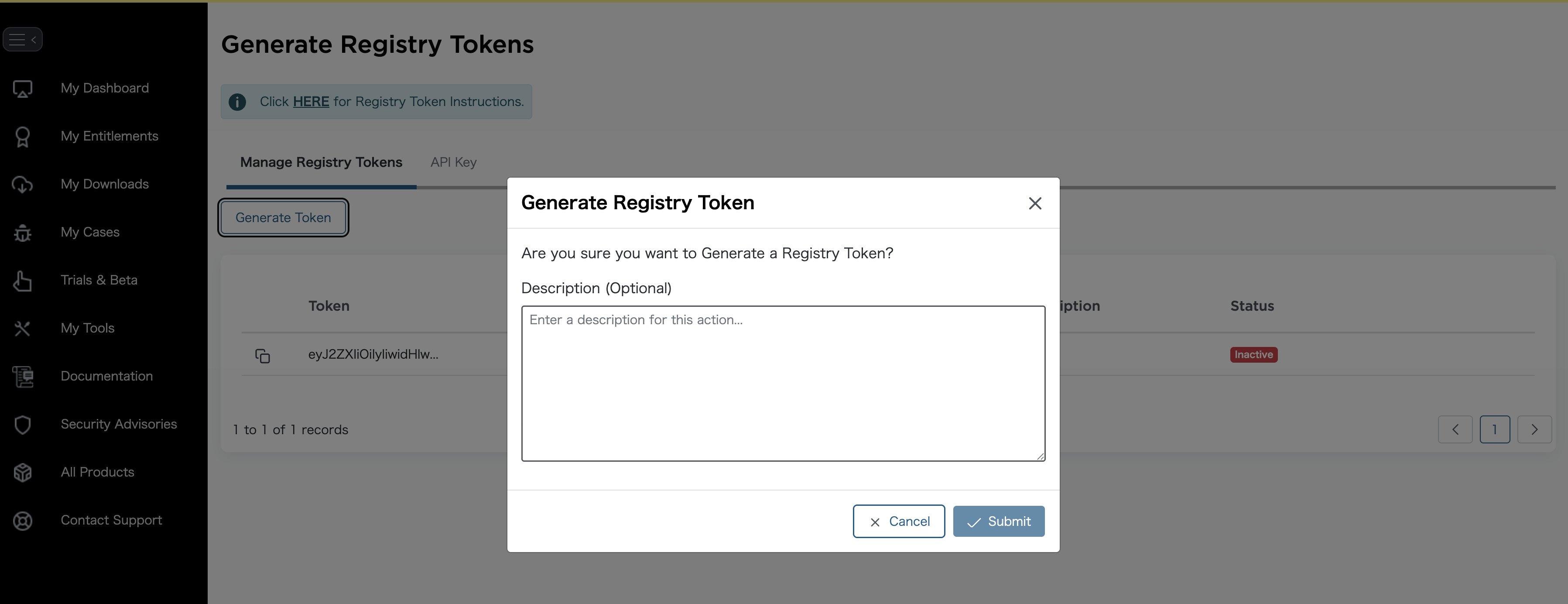
Click the "Copy Token" button for the generated token to copy it to your clipboard.

If you cannot access this page, your license may not be activated. Please contact your account team to request license activation.
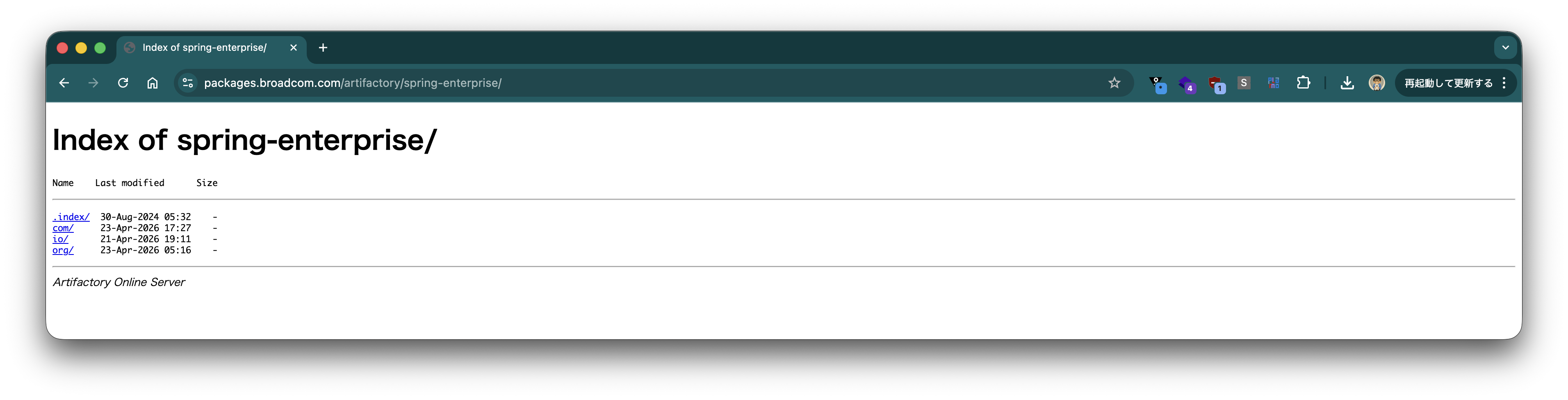
To verify that the token is available, visit [https://packages.broadcom.com/artifactory/spring-enterprise/](https://packages.broadcom.com/artifactory/spring-enterprise/) (note the trailing `/`). A Basic Authentication dialog will appear. Enter your Broadcom support account username (email address) as the username and paste the copied token as the password to log in. If you can browse the repository as shown below, you are good to go.
### Configuring Spring Enterprise Repository for Maven
Create a `settings.xml` file in the `.m2` directory under your home directory and write the following content.
Replace `BC_SUPPORT_USERNAME` and `BC_SUPPORT_ACCESS_TOKEN` with your Broadcom support account username (email address) and the token copied in the previous steps, respectively.
This will enable access to the Tanzu Spring Enterprise repository.
```xml
tanzu-spring-release
BC_SUPPORT_USERNAME
BC_SUPPORT_ACCESS_TOKEN
tanzu-spring-release
true
tanzu-spring-release
Spring Enterprise Supported Releases
https://packages.broadcom.com/artifactory/spring-enterprise
false
tanzu-spring-release
Spring Enterprise Supported Releases
https://packages.broadcom.com/artifactory/spring-enterprise
false
```
### Verification
Download a template project from [https://start.spring.io/#!type=maven-project&language=java&platformVersion=3.5.14&packaging=jar&jvmVersion=21&groupId=com.example&artifactId=demo&name=demo&description=Demo%20project%20for%20Spring%20Boot&packageName=com.example.demo&dependencies=web](https://start.spring.io/#!type=maven-project&language=java&platformVersion=3.5.14&packaging=jar&jvmVersion=21&groupId=com.example&artifactId=demo&name=demo&description=Demo%20project%20for%20Spring%20Boot&packageName=com.example.demo&dependencies=web).
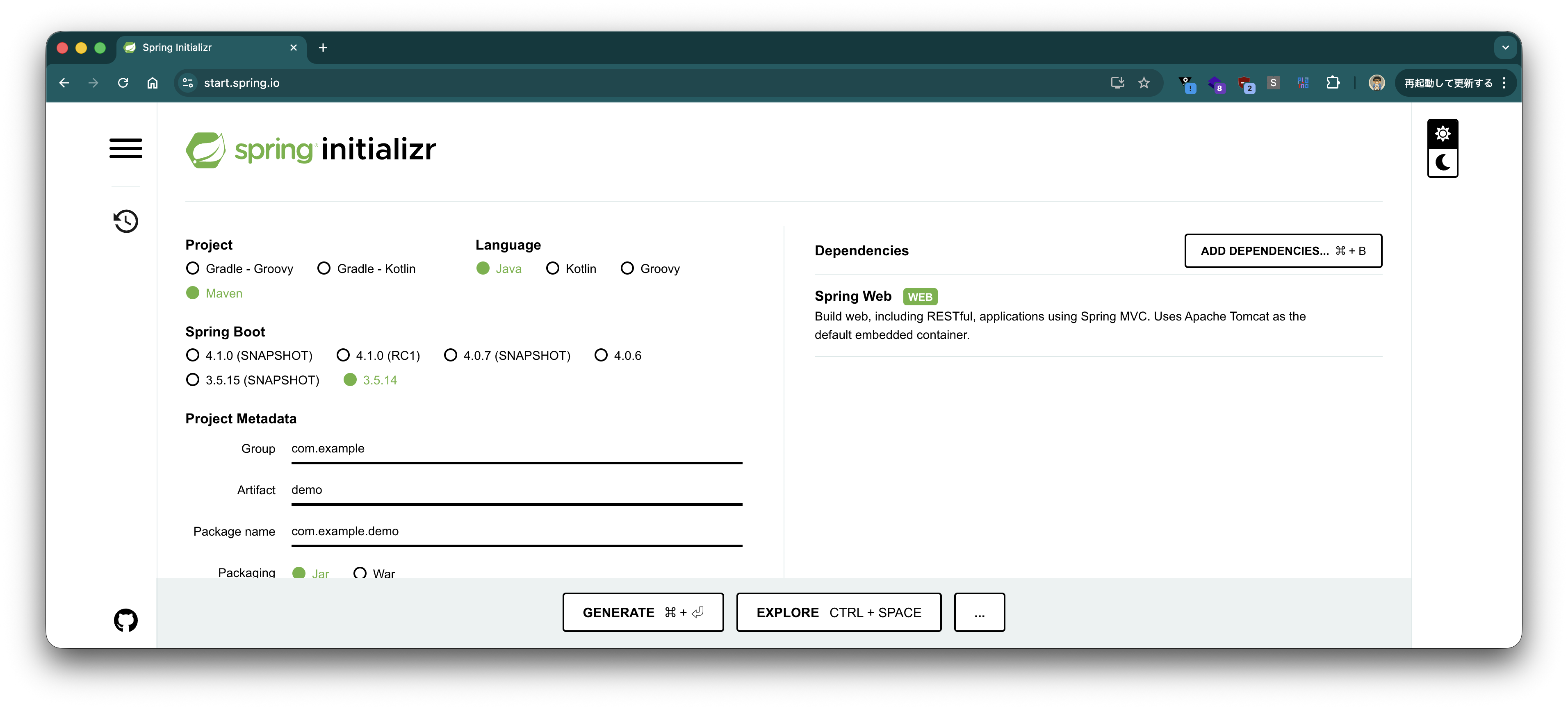
Click the "Generate" button to download the project.
Once `demo.zip` is downloaded, unzip it and navigate to the extracted directory in your terminal.
```bash
unzip demo.zip
cd demo
```
Open `pom.xml` and change the Spring Boot version to a Spring Enterprise version. In the following example, we change it from Spring Boot 3.4.7 to 2.7.33.
Before
```xml
org.springframework.boot
spring-boot-starter-parent
3.5.14
```
After
```xml
org.springframework.boot
spring-boot-starter-parent
2.7.33
```
For Mac/Linux, compile the Maven project using the following command:
```bash
./mvnw clean compile
```
For Windows, compile the Maven project using the following command:
```bash
mvnw.cmd clean compile
```
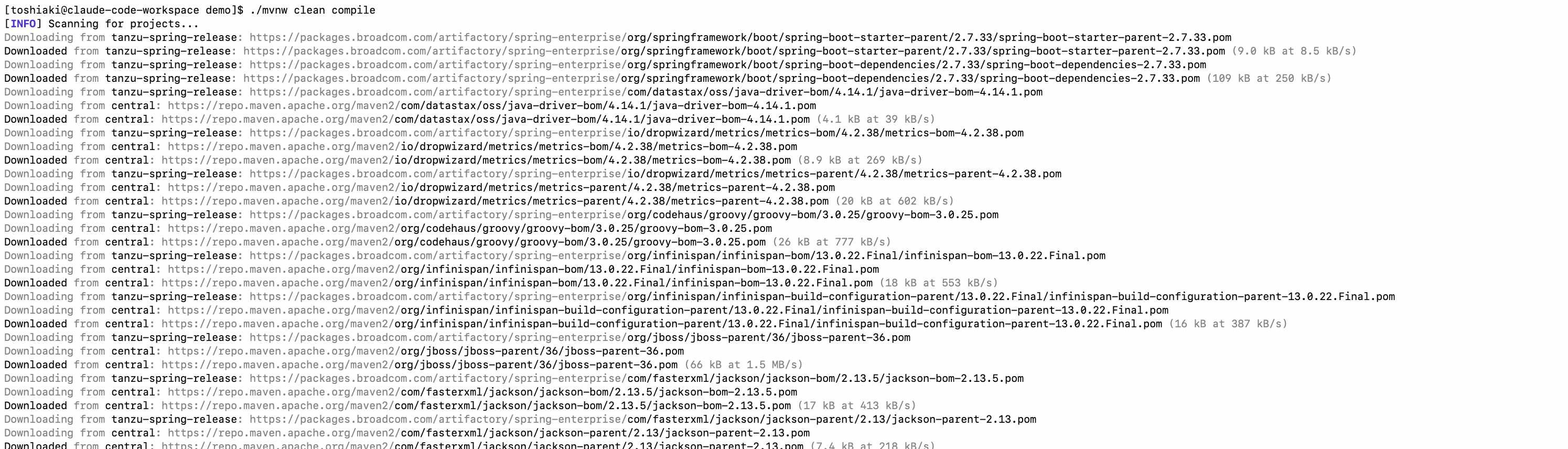
If files are downloaded from `https://packages.broadcom.com/artifactory/spring-enterprise` as shown below, the setup is successful.
If you want to check the Spring version used in the project, run the following command:
For Mac/Linux
```bash
./mvnw dependency:tree
```
For Windows
```bash
mvnw.cmd dependency:tree
```
In the example below, you can confirm that Spring Boot 2.7.33 and Spring Framework 5.3.48 are being used.
```
[INFO] Scanning for projects...
[INFO]
[INFO] --------------------------< com.example:demo >--------------------------
[INFO] Building 0.0.1-SNAPSHOT
[INFO] from pom.xml
[INFO] --------------------------------[ jar ]---------------------------------
[INFO]
[INFO] --- dependency:3.3.0:tree (default-cli) @ demo ---
[INFO] com.example:demo:jar:0.0.1-SNAPSHOT
[INFO] +- org.springframework.boot:spring-boot-starter-web:jar:2.7.33:compile
[INFO] | +- org.springframework.boot:spring-boot-starter:jar:2.7.33:compile
[INFO] | | +- org.springframework.boot:spring-boot:jar:2.7.33:compile
[INFO] | | +- org.springframework.boot:spring-boot-autoconfigure:jar:2.7.33:compile
[INFO] | | +- org.springframework.boot:spring-boot-starter-logging:jar:2.7.33:compile
[INFO] | | | +- ch.qos.logback:logback-classic:jar:1.2.13:compile
[INFO] | | | | \- ch.qos.logback:logback-core:jar:1.2.13:compile
[INFO] | | | +- org.apache.logging.log4j:log4j-to-slf4j:jar:2.17.2:compile
[INFO] | | | | \- org.apache.logging.log4j:log4j-api:jar:2.17.2:compile
[INFO] | | | \- org.slf4j:jul-to-slf4j:jar:1.7.36:compile
[INFO] | | +- jakarta.annotation:jakarta.annotation-api:jar:1.3.5:compile
[INFO] | | \- org.yaml:snakeyaml:jar:1.30:compile
[INFO] | +- org.springframework.boot:spring-boot-starter-json:jar:2.7.33:compile
[INFO] | | +- com.fasterxml.jackson.core:jackson-databind:jar:2.13.5:compile
[INFO] | | | +- com.fasterxml.jackson.core:jackson-annotations:jar:2.13.5:compile
[INFO] | | | \- com.fasterxml.jackson.core:jackson-core:jar:2.13.5:compile
[INFO] | | +- com.fasterxml.jackson.datatype:jackson-datatype-jdk8:jar:2.13.5:compile
[INFO] | | +- com.fasterxml.jackson.datatype:jackson-datatype-jsr310:jar:2.13.5:compile
[INFO] | | \- com.fasterxml.jackson.module:jackson-module-parameter-names:jar:2.13.5:compile
[INFO] | +- org.springframework.boot:spring-boot-starter-tomcat:jar:2.7.33:compile
[INFO] | | +- org.apache.tomcat.embed:tomcat-embed-core:jar:9.0.117:compile
[INFO] | | +- org.apache.tomcat.embed:tomcat-embed-el:jar:9.0.117:compile
[INFO] | | \- org.apache.tomcat.embed:tomcat-embed-websocket:jar:9.0.117:compile
[INFO] | +- org.springframework:spring-web:jar:5.3.48:compile
[INFO] | | \- org.springframework:spring-beans:jar:5.3.48:compile
[INFO] | \- org.springframework:spring-webmvc:jar:5.3.48:compile
[INFO] | +- org.springframework:spring-aop:jar:5.3.48:compile
[INFO] | +- org.springframework:spring-context:jar:5.3.48:compile
[INFO] | \- org.springframework:spring-expression:jar:5.3.48:compile
[INFO] \- org.springframework.boot:spring-boot-starter-test:jar:2.7.33:test
[INFO] +- org.springframework.boot:spring-boot-test:jar:2.7.33:test
[INFO] +- org.springframework.boot:spring-boot-test-autoconfigure:jar:2.7.33:test
[INFO] +- com.jayway.jsonpath:json-path:jar:2.7.0:test
[INFO] | +- net.minidev:json-smart:jar:2.4.11:test
[INFO] | | \- net.minidev:accessors-smart:jar:2.4.11:test
[INFO] | | \- org.ow2.asm:asm:jar:9.3:test
[INFO] | \- org.slf4j:slf4j-api:jar:1.7.36:compile
[INFO] +- jakarta.xml.bind:jakarta.xml.bind-api:jar:2.3.3:test
[INFO] | \- jakarta.activation:jakarta.activation-api:jar:1.2.2:test
[INFO] +- org.assertj:assertj-core:jar:3.22.0:test
[INFO] +- org.hamcrest:hamcrest:jar:2.2:test
[INFO] +- org.junit.jupiter:junit-jupiter:jar:5.8.2:test
[INFO] | +- org.junit.jupiter:junit-jupiter-api:jar:5.8.2:test
[INFO] | | +- org.opentest4j:opentest4j:jar:1.2.0:test
[INFO] | | +- org.junit.platform:junit-platform-commons:jar:1.8.2:test
[INFO] | | \- org.apiguardian:apiguardian-api:jar:1.1.2:test
[INFO] | +- org.junit.jupiter:junit-jupiter-params:jar:5.8.2:test
[INFO] | \- org.junit.jupiter:junit-jupiter-engine:jar:5.8.2:test
[INFO] | \- org.junit.platform:junit-platform-engine:jar:1.8.2:test
[INFO] +- org.mockito:mockito-core:jar:4.5.1:test
[INFO] | +- net.bytebuddy:byte-buddy:jar:1.12.23:test
[INFO] | +- net.bytebuddy:byte-buddy-agent:jar:1.12.23:test
[INFO] | \- org.objenesis:objenesis:jar:3.2:test
[INFO] +- org.mockito:mockito-junit-jupiter:jar:4.5.1:test
[INFO] +- org.skyscreamer:jsonassert:jar:1.5.3:test
[INFO] | \- com.vaadin.external.google:android-json:jar:0.0.20131108.vaadin1:test
[INFO] +- org.springframework:spring-core:jar:5.3.48:compile
[INFO] | \- org.springframework:spring-jcl:jar:5.3.48:compile
[INFO] +- org.springframework:spring-test:jar:5.3.48:test
[INFO] \- org.xmlunit:xmlunit-core:jar:2.9.1:test
[INFO] ------------------------------------------------------------------------
[INFO] BUILD SUCCESS
[INFO] ------------------------------------------------------------------------
[INFO] Total time: 0.417 s
[INFO] Finished at: 2026-04-24T14:26:46+09:00
[INFO] ------------------------------------------------------------------------
```