Notes on Installing and Setting Up Gitea Act Runner as a Service on Ubuntu
⚠️ This article was automatically translated by OpenAI API (unsloth/Qwen3.5-122B-A10B-GGUF:MXFP4_MOE). It may be edited eventually, but please be aware that it may contain incorrect information at this time.
Notes on installing Gitea's Act Runner on Ubuntu.
This guide assumes that Docker is already installed.
First, download and place the Act Runner binary.
wget https://gitea.com/gitea/act_runner/releases/download/v0.2.13/act_runner-0.2.13-linux-amd64
sudo mv act_runner-0.2.13-linux-amd64 /usr/local/bin/act_runner
sudo chmod +x /usr/local/bin/act_runner
If installing on an ARM server, change the amd64 at the end to arm64.
Verify that the binary was installed correctly.
$ act_runner --version
act_runner version v0.2.13
Create a dedicated user for Act Runner and add it to the Docker group. This allows the Runner to operate Docker containers.
sudo useradd -r -m -d /var/lib/act_runner -s /bin/bash act_runner
sudo usermod -aG docker act_runner
Create the directory where the Act Runner configuration file will be placed.
sudo mkdir -p /etc/act_runner
sudo chown -R act_runner:act_runner /etc/act_runner
Automatically generate the configuration file. This command creates the default configuration content.
act_runner generate-config | sudo -u act_runner tee /etc/act_runner/config.yaml
Tip
If installing on an ARM server, edit the following part of /etc/act_runner/config.yaml. Refer to the GitHub Actions documentation to match the label names.
runner:
  # ...
  labels:
    - "ubuntu-22.04-arm:docker://docker.gitea.com/runner-images:ubuntu-22.04"
    - "ubuntu-20.04-arm:docker://docker.gitea.com/runner-images:ubuntu-20.04"
Next, register the Runner with your Gitea instance. Registration requires a token obtained from the Gitea administration screen. (If you want to register globally, obtain the token from Admin Settings.)
act_runner -c /etc/act_runner/config.yaml register --no-interactive --instance https://gitea.example.com/ --token xxxxxxxxxxxxxxxx
If registration is successful, output similar to the following will be displayed.
INFO Registering runner, arch=amd64, os=linux, version=v0.2.13.
WARN Runner in user-mode.
INFO Runner name is empty, use hostname 'cherry'.
DEBU Successfully pinged the Gitea instance server
INFO Runner registered successfully.
Move the .runner file created during the registration process to the appropriate location and set permissions.
sudo mv .runner /var/lib/act_runner/
sudo chown act_runner:act_runner /var/lib/act_runner/.runner
Create a systemd service file to configure Act Runner to run as a service.
cat <<'EOF' | sudo tee /etc/systemd/system/act_runner.service
[Unit]
Description=Gitea Actions runner
Documentation=https://gitea.com/gitea/act_runner
After=docker.service

[Service]
ExecStart=/usr/local/bin/act_runner daemon --config /etc/act_runner/config.yaml
ExecReload=/bin/kill -s HUP $MAINPID
WorkingDirectory=/var/lib/act_runner
TimeoutSec=0
RestartSec=10
Restart=always
User=act_runner
Environment=HOME=/var/lib/act_runner

[Install]
WantedBy=multi-user.target
EOF
Reload the systemd configuration, enable the Act Runner service, and start it.
sudo systemctl daemon-reload
sudo systemctl enable act_runner
sudo systemctl start act_runner
Verify that the service started successfully.
$ sudo systemctl status act_runner
● act_runner.service - Gitea Actions runner
     Loaded: loaded (/etc/systemd/system/act_runner.service; enabled; preset: enabled)
     Active: active (running) since Wed 2025-12-17 10:35:31 UTC; 23s ago
       Docs: https://gitea.com/gitea/act_runner
   Main PID: 1472777 (act_runner)
      Tasks: 12 (limit: 76726)
     Memory: 7.5M (peak: 8.7M)
        CPU: 50ms
     CGroup: /system.slice/act_runner.service
             └─1472777 /usr/local/bin/act_runner daemon --config /etc/act_runner/config.yaml

Dec 17 10:35:31 cherry systemd[1]: Started act_runner.service - Gitea Actions runner.
Dec 17 10:35:31 cherry act_runner[1472777]: time="2025-12-17T10:35:31Z" level=info msg="Starting runner daemon"
Dec 17 10:35:31 cherry act_runner[1472777]: time="2025-12-17T10:35:31Z" level=info msg="runner: cherry, with version: v0.2.13, with labels: [ubuntu-latest ubuntu-22.04 ubuntu-20.04], declare successfully"
To check logs in real-time, use the journalctl command.
sudo journalctl -u act_runner -f
Verify that the Runner is registered on the Gitea administration screen. Access with administrator privileges and open the following URL:
https://<gitea url>/-/admin/actions/runners
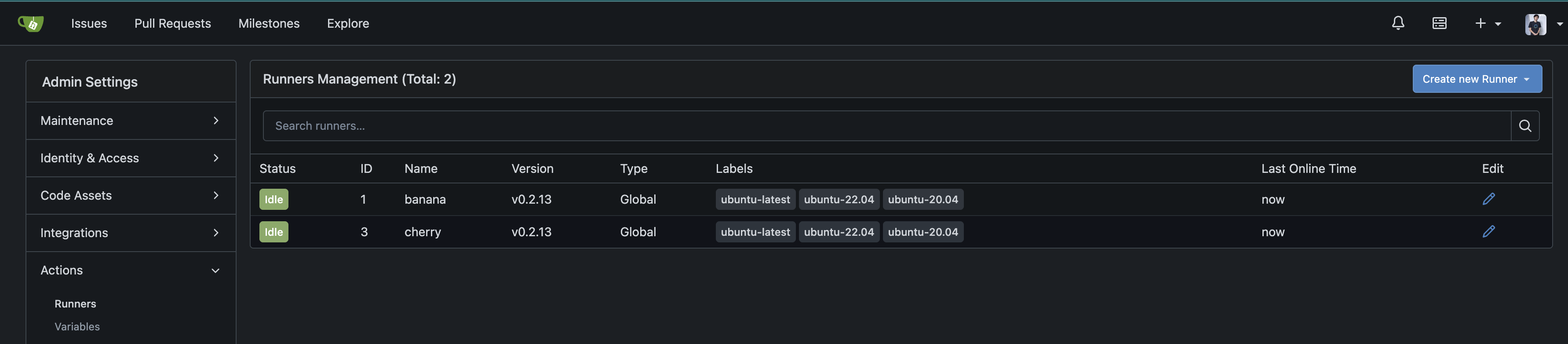
If the registered Runner is displayed in the "Idle" state, it is operating correctly.
We have installed Gitea Act Runner on Ubuntu and configured it to run as a systemd service. This allows Gitea Actions workflows to be executed on this Runner.
For information on how to create workflows, refer to the following documentation: