Spring gRPCは、SpringアプリケーションでgRPCを使用するためのSpring公式プロジェクトです。
Spring gRPCを使用すると、gRPCサービスをSpring Bootアプリケーションに統合できます。
記事執筆時点ではSpring gRPCのバージョンは0.8.0です。Spring Boot 3.4.5と合わせて使います。
Spring gRPCのAuto Configuration群は1.0のタイミングでSpring Boot 4.0に組み込まれる予定です。
Hello Worldアプリを作成し、Spring gRPCの基本的な使い方を紹介します。
目次
- Spring gRCPでgRPC Serverを作成
- Spring gRPCでgRPC Clientを作成
- MicrometerによるObservability連携
- ReactorによるReactiveプログラミングの導入
- Native Imageビルド
Spring gRCPでgRPC Serverを作成
まずはHello Worldを実装するgRPC Serverを作成します。
Spring gRPCではNettyベースのスタンドアローンサーバーとGrpcServletを使ったServletベースのサーバーを選択できます。
Servletベースのサーバーは通常のSpring MVCと同じポートでサービスを提供できます。
なお、現状、Spring WebFluxを使用する場合は、gRPCとHTTPを同じポートで提供することはできません(spring-grpc#19)。
今回はServletベースのサーバーを作成します。Spring Initializrを使う場合は、"Spring Web"と"Spring gRPC"を同時選択した場合は、自動でServletベースの設定が依存関係が追加されます。
次のコマンドでSpring Initializrを使って新しいプロジェクトを作成します。
curl -s https://start.spring.io/starter.tgz \
       -d artifactId=demo-grpc-server \
       -d name=demo-grpc-server \
       -d baseDir=demo-grpc-server  \
       -d packageName=com.example \
       -d dependencies=spring-grpc,web,actuator,configuration-processor,prometheus,native \
       -d type=maven-project \
       -d applicationName=DemoGrpcServerApplication | tar -xzvf -
cd demo-grpc-server
次に、Protocol Buffersのスキーマファイルを作成します。ここではgRCPのドキュメントのサンプルを使います。
ただし、本記事ではクライアントからサーバーへのストリーミング(LotsOfGreetings)と双方向ストリーミング(BidiHello)は実装しません。
cat <<EOF > src/main/proto/hello.proto
syntax = "proto3";

package com.example;

option java_package = "com.example.proto";
option java_outer_classname = "HelloServiceProto";
option java_multiple_files = true;

service HelloService {
  rpc SayHello (HelloRequest) returns (HelloResponse);
  rpc LotsOfReplies (HelloRequest) returns (stream HelloResponse);
  rpc LotsOfGreetings(stream HelloRequest) returns (HelloResponse);
  rpc BidiHello(stream HelloRequest) returns (stream HelloResponse);
}

message HelloRequest {
  string greeting = 1;
}

message HelloResponse {
  string reply = 1;
}
EOF
まずはprotoファイルからJavaコードを生成するために、コンパイルを行います。Protocol BuffersのJavaコードを生成するための、protobuf-maven-pluginはSpring Initializrからプロジェクトを作成した際に自動で追加されています。
./mvnw compile
次のコマンドで、生成されたファイルを確認します。
$ find target/generated-sources/protobuf -type f
target/generated-sources/protobuf/grpc-java/com/example/proto/HelloServiceGrpc.java
target/generated-sources/protobuf/java/com/example/proto/HelloServiceProto.java
target/generated-sources/protobuf/java/com/example/proto/HelloRequest.java
target/generated-sources/protobuf/java/com/example/proto/HelloResponseOrBuilder.java
target/generated-sources/protobuf/java/com/example/proto/HelloRequestOrBuilder.java
target/generated-sources/protobuf/java/com/example/proto/HelloResponse.java
次にgRPCサービスを実装します。HelloServiceGrpc.HelloServiceImplBaseを継承したクラスを作成し、gRPCメソッドをオーバーライドします。@Serviceアノテーションを付与することで、SpringのDIコンテナに登録され、gRPCサーバーに自動で登録されます。
cat<<EOF>src/main/java/com/example/HelloService.java
package com.example;

import com.example.proto.HelloRequest;
import com.example.proto.HelloResponse;
import com.example.proto.HelloServiceGrpc;
import io.grpc.stub.StreamObserver;
import org.slf4j.Logger;
import org.slf4j.LoggerFactory;
import org.springframework.stereotype.Service;

@Service
public class HelloService extends HelloServiceGrpc.HelloServiceImplBase {

    private final Logger log = LoggerFactory.getLogger(HelloService.class);

    @Override
    public void sayHello(HelloRequest request, StreamObserver<HelloResponse> responseObserver) {
        log.info("sayHello");
        HelloResponse response = HelloResponse.newBuilder()
            .setReply(String.format("Hello %s!", request.getGreeting()))
            .build();
        responseObserver.onNext(response);
        responseObserver.onCompleted();
    }

    @Override
    public void lotsOfReplies(HelloRequest request, StreamObserver<HelloResponse> responseObserver) {
        log.info("lotsOfReplies");
        for (int i = 0; i < 10; i++) {
            HelloResponse response = HelloResponse.newBuilder()
                .setReply(String.format("[%05d] Hello %s!", i, request.getGreeting()))
                .build();
            responseObserver.onNext(response);
        }
        responseObserver.onCompleted();
    }

}
EOF
アプリケーションを起動します。今回はServletベースのサーバーを使用するため、デフォルトの8080ポートでgRPCサービスにアクセスできます。
./mvnw spring-boot:run
gRPCサービスにコマンドラインでアクセスするために、grpcurlをインストールします。
brew install grpcurl
まずはgRPCリフレクションサービスを使用して、gRPCサービス一覧を取得します。リフレクションサービスは、Spring Initializrからプロジェクトを作成した場合は自動で登録されます。
$ grpcurl --plaintext localhost:8080 list

demo.HelloService
grpc.health.v1.Health
grpc.reflection.v1.ServerReflection
Healthチェックサービスが登録されていることを確認します。Spring gRPCでは、gRPC Health Checkの実装がデフォルトで組み込まれています。
Healthチェックサービスのメソッド一覧を確認します。
$ grpcurl --plaintext localhost:8080 describe grpc.health.v1.Health

grpc.health.v1.Health is a service:
service Health {
  rpc Check ( .grpc.health.v1.HealthCheckRequest ) returns ( .grpc.health.v1.HealthCheckResponse );
  rpc Watch ( .grpc.health.v1.HealthCheckRequest ) returns ( stream .grpc.health.v1.HealthCheckResponse );
}
Checkメソッドを実行して、gRPCサービスの状態を確認します。
$ grpcurl --plaintext localhost:8080 grpc.health.v1.Health/Check
{
  "status": "SERVING"
}
さて、今度は実装したcom.example.HelloServiceサービスのメソッドを確認します。
$ grpcurl --plaintext localhost:8080 describe com.example.HelloService

com.example.HelloService is a service:
service HelloService {
  rpc BidiHello ( stream .com.example.HelloRequest ) returns ( stream .com.example.HelloResponse );
  rpc LotsOfGreetings ( stream .com.example.HelloRequest ) returns ( .com.example.HelloResponse );
  rpc LotsOfReplies ( .com.example.HelloRequest ) returns ( stream .com.example.HelloResponse );
  rpc SayHello ( .com.example.HelloRequest ) returns ( .com.example.HelloResponse );
}
SayHelloメソッドを実行してみます。リクエストはJSON形式で指定します。--plaintextオプションは、TLSを使用しない場合に指定します。
$ grpcurl -d '{"greeting":"John Doe"}' --plaintext localhost:8080 com.example.HelloService/SayHello
{
  "reply": "Hello John Doe!"
}
次に、LotsOfRepliesメソッドを実行します。サーバーストリーミングのメソッドです。
$ grpcurl -d '{"greeting":"John Doe"}' --plaintext localhost:8080 com.example.HelloService/LotsOfReplies
{
  "reply": "[00000] Hello John Doe!"
}
{
  "reply": "[00001] Hello John Doe!"
}
{
  "reply": "[00002] Hello John Doe!"
}
{
  "reply": "[00003] Hello John Doe!"
}
{
  "reply": "[00004] Hello John Doe!"
}
{
  "reply": "[00005] Hello John Doe!"
}
{
  "reply": "[00006] Hello John Doe!"
}
{
  "reply": "[00007] Hello John Doe!"
}
{
  "reply": "[00008] Hello John Doe!"
}
{
  "reply": "[00009] Hello John Doe!"
}
grpcurlでサービスの動作を確認できたので、次は、gRPCサービスのテストを行います。
Spring gRPCでは、gRPCサービスのクライアントスタブも自動登録されるので、テストクラスに@Autowiredして使用します。
以下のように、Spring Bootのテスト機能を使って、gRPCサービスのメソッドのIntegration Testを簡単に実装できます。
なお、クライアントスタブが自動登録されるのはdefault-channelという名前のチャンネルを使用する場合のみで、かつBlockingStubのみです。
BlockingStub以外を登録したい場合は、@ImportGrpcClientsアノテーションを使用することで、gRPCクライアントの登録を行うことができます。
cat<<'EOF'> src/test/java/com/example/HelloServiceTest.java
package com.example;

import com.example.proto.HelloRequest;
import com.example.proto.HelloResponse;
import com.example.proto.HelloServiceGrpc;
import com.google.common.collect.Streams;
import java.util.Iterator;
import java.util.List;
import org.junit.jupiter.api.Test;
import org.springframework.beans.factory.annotation.Autowired;
import org.springframework.boot.test.context.SpringBootTest;

import static org.assertj.core.api.Assertions.assertThat;

@SpringBootTest(webEnvironment = SpringBootTest.WebEnvironment.RANDOM_PORT,
        properties = "spring.grpc.client.default-channel.address=0.0.0.0:${local.server.port}")
class HelloServiceTest {

    @Autowired
    HelloServiceGrpc.HelloServiceBlockingStub stub;

    @Test
    void sayHello() {
        HelloResponse response = this.stub.sayHello(HelloRequest.newBuilder().setGreeting("John Doe").build());
        assertThat(response.getReply()).isEqualTo("Hello John Doe!");
    }

    @Test
    void lotsOfReplies() {
        Iterator<HelloResponse> response = this.stub
            .lotsOfReplies(HelloRequest.newBuilder().setGreeting("John Doe").build());
        List<String> replies = Streams.stream(response).map(HelloResponse::getReply).toList();
        assertThat(replies).containsExactly("[00000] Hello John Doe!", "[00001] Hello John Doe!",
                "[00002] Hello John Doe!", "[00003] Hello John Doe!", "[00004] Hello John Doe!",
                "[00005] Hello John Doe!", "[00006] Hello John Doe!", "[00007] Hello John Doe!",
                "[00008] Hello John Doe!", "[00009] Hello John Doe!");
    }

}
EOF
テストを実行して、全てが成功するのを確認します。
./mvnw test
Spring gRPCでgRPC Clientを作成
次に、gRPCクライアントアプリケーションを作成してサーバーと連携させます。
まず、先ほどと同様にSpring Initializrを使って新しいプロジェクトを作成し、クライアント側アプリケーションの構築を行います。
cd ..
curl -s https://start.spring.io/starter.tgz \
       -d artifactId=demo-grpc-client \
       -d name=demo-grpc-client \
       -d baseDir=demo-grpc-client  \
       -d packageName=com.example \
       -d dependencies=spring-grpc,web,actuator,configuration-processor,prometheus,native \
       -d type=maven-project \
       -d applicationName=DemoGrpcClientApplication | tar -xzvf -
cd demo-grpc-client
次に、サーバー側と同じProtocol Buffersのスキーマファイルを作成します。
cat <<EOF > src/main/proto/hello.proto
syntax = "proto3";

package com.example;

option java_package = "com.example.proto";
option java_outer_classname = "HelloServiceProto";
option java_multiple_files = true;

service HelloService {
  rpc SayHello (HelloRequest) returns (HelloResponse);
  rpc LotsOfReplies (HelloRequest) returns (stream HelloResponse);
  rpc LotsOfGreetings(stream HelloRequest) returns (HelloResponse);
  rpc BidiHello(stream HelloRequest) returns (stream HelloResponse);
}

message HelloRequest {
  string greeting = 1;
}

message HelloResponse {
  string reply = 1;
}
EOF
コンパイルして、スタブコードを生成します。
./mvnw compile
次にgRPCのスタブを使用して、Spring MVCのコントローラーを実装します。サーバー側のテスト同様にdefault-channelチャネルでBlockingStubを使用する場合は、
自動でクライアントスタブがDIコンテナに登録され、インジェクション可能になります。
cat <<EOF > src/main/java/com/example/HelloController.java
package com.example;

import com.example.proto.HelloRequest;
import com.example.proto.HelloResponse;
import com.example.proto.HelloServiceGrpc;
import com.google.common.collect.Streams;
import java.util.Iterator;
import java.util.List;
import org.springframework.web.bind.annotation.GetMapping;
import org.springframework.web.bind.annotation.RequestParam;
import org.springframework.web.bind.annotation.RestController;

@RestController
public class HelloController {

    private final HelloServiceGrpc.HelloServiceBlockingStub helloServiceStub;

    public HelloController(HelloServiceGrpc.HelloServiceBlockingStub helloServiceStub) {
        this.helloServiceStub = helloServiceStub;
    }

    @GetMapping(path = "/")
    public Reply sayHello(@RequestParam String greeting) {
        HelloResponse response = helloServiceStub.sayHello(HelloRequest.newBuilder().setGreeting(greeting).build());
        return new Reply(response.getReply());
    }

    @GetMapping(path = "/lots-of-replies")
    public List<Reply> lotsOfReplies(@RequestParam String greeting) {
        Iterator<HelloResponse> replies = helloServiceStub
            .lotsOfReplies(HelloRequest.newBuilder().setGreeting(greeting).build());
        return Streams.stream(replies).map(r -> new Reply(r.getReply())).toList();
    }

    public record Reply(String reply) {
    }

}
EOF
次のプロパティを追加します。
cat <<EOF >> src/main/resources/application.properties
server.port=8082
spring.grpc.client.default-channel.address=localhost:8080
EOF
クライアントアプリケーションを起動します。
./mvnw spring-boot:run
8082ポートで起動したクライアントアプリケーションにcurlでリクエストを投げてみます。
$ curl -s "http://localhost:8082?greeting=John%20Doe" | jq .
{
  "reply": "Hello John Doe!"
}
$ curl -s "http://localhost:8082/lots-of-replies?greeting=John%20Doe" | jq .
[
  {
    "reply": "[00000] Hello John Doe!"
  },
  {
    "reply": "[00001] Hello John Doe!"
  },
  {
    "reply": "[00002] Hello John Doe!"
  },
  {
    "reply": "[00003] Hello John Doe!"
  },
  {
    "reply": "[00004] Hello John Doe!"
  },
  {
    "reply": "[00005] Hello John Doe!"
  },
  {
    "reply": "[00006] Hello John Doe!"
  },
  {
    "reply": "[00007] Hello John Doe!"
  },
  {
    "reply": "[00008] Hello John Doe!"
  },
  {
    "reply": "[00009] Hello John Doe!"
  }
]
gRPCサービスのレスポンスがクライアント経由で返ってきたことがわかります。
MicrometerによるObservability連携
Spring gRPCはMicrometerによるObservabilityもOut of the Boxでサポートしています。
本記事ではTracingにはOpenTelemetryを使用し、MetricsはPrometheusでエクスポートします。
server、clientともにpom.xmlに次のdependenciesを追加します。PrometheusのMetricsエクスポートのためのmicrometer-registry-prometheusはSpring Initializrで追加済みです。
    <dependency>
      <groupId>io.micrometer</groupId>
      <artifactId>micrometer-tracing-bridge-otel</artifactId>
    </dependency>
    <dependency>
      <groupId>io.opentelemetry</groupId>
      <artifactId>opentelemetry-exporter-otlp</artifactId>
      <exclusions>
        <exclusion>
          <groupId>io.opentelemetry</groupId>
          <artifactId>opentelemetry-exporter-sender-okhttp</artifactId>
        </exclusion>
      </exclusions>
    </dependency>
    <dependency>
      <groupId>io.opentelemetry</groupId>
      <artifactId>opentelemetry-exporter-sender-jdk</artifactId>
    </dependency>
OTLPのTracing Receiverとして、Zipkinを次のコマンドで起動します。
docker run --name zipkin -d -p 9411:9411 -e UI_ENABLED=true ghcr.io/openzipkin-contrib/zipkin-otel
次に、server、clientともにapplication.propertiesに次のプロパティを追加します。
cat <<EOF >> src/main/resources/application.properties
management.endpoints.web.exposure.include=health,info,prometheus
management.tracing.sampling.probability=1.0
management.otlp.tracing.endpoint=http://localhost:9411/v1/traces
management.otlp.tracing.compression=gzip
EOF
server、clientそれぞれを再起動して、次のリクエストを送ります。
curl -s "http://localhost:8082?greeting=John%20Doe"
curl -s "http://localhost:8082/lots-of-replies?greeting=John%20Doe" | jq .
http://localhost:9411 にアクセスして、ZipkinのUIを開きます。次のトレースを確認できます。
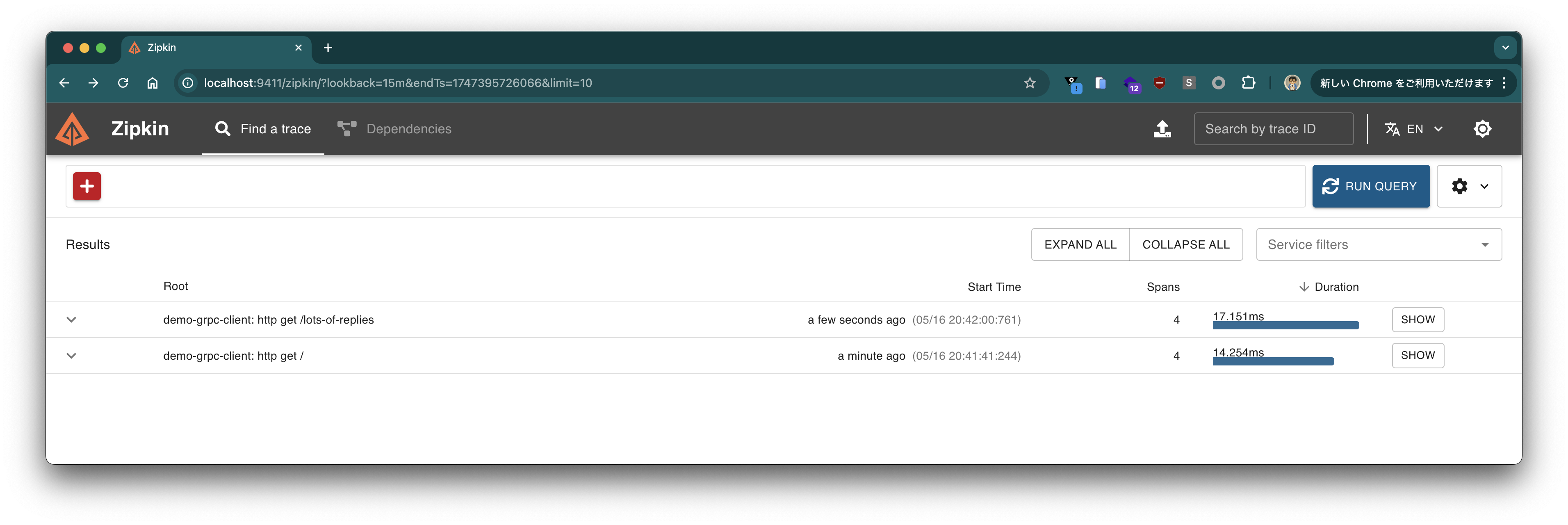
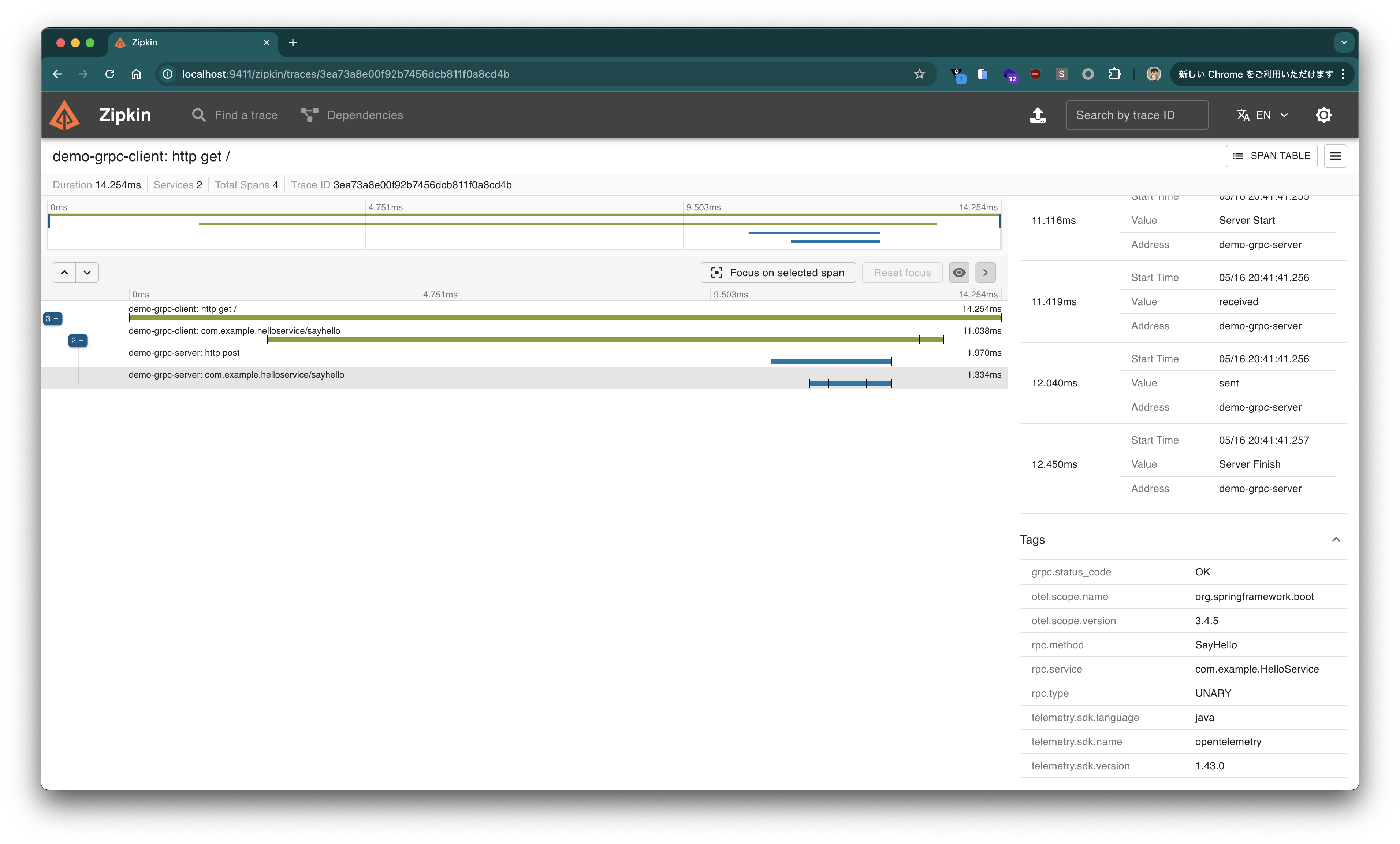

server, clientともにgRPCメソッドのトレースが確認できることがわかります。
次にPrometheusのMetricsエンドポイントを確認します。
$ curl -s http://localhost:8080/actuator/prometheus | grep grpc | grep -v '^disk'
# HELP grpc_server_active_seconds
# TYPE grpc_server_active_seconds summary
grpc_server_active_seconds_count{grpc_status_code="UNKNOWN",rpc_method="LotsOfReplies",rpc_service="com.example.HelloService",rpc_type="SERVER_STREAMING"} 0
grpc_server_active_seconds_sum{grpc_status_code="UNKNOWN",rpc_method="LotsOfReplies",rpc_service="com.example.HelloService",rpc_type="SERVER_STREAMING"} 0.0
grpc_server_active_seconds_count{grpc_status_code="UNKNOWN",rpc_method="SayHello",rpc_service="com.example.HelloService",rpc_type="UNARY"} 0
grpc_server_active_seconds_sum{grpc_status_code="UNKNOWN",rpc_method="SayHello",rpc_service="com.example.HelloService",rpc_type="UNARY"} 0.0
# HELP grpc_server_active_seconds_max
# TYPE grpc_server_active_seconds_max gauge
grpc_server_active_seconds_max{grpc_status_code="UNKNOWN",rpc_method="LotsOfReplies",rpc_service="com.example.HelloService",rpc_type="SERVER_STREAMING"} 0.0
grpc_server_active_seconds_max{grpc_status_code="UNKNOWN",rpc_method="SayHello",rpc_service="com.example.HelloService",rpc_type="UNARY"} 0.0
# HELP grpc_server_received_total
# TYPE grpc_server_received_total counter
grpc_server_received_total{grpc_status_code="UNKNOWN",rpc_method="LotsOfReplies",rpc_service="com.example.HelloService",rpc_type="SERVER_STREAMING"} 1.0
grpc_server_received_total{grpc_status_code="UNKNOWN",rpc_method="SayHello",rpc_service="com.example.HelloService",rpc_type="UNARY"} 1.0
# HELP grpc_server_seconds
# TYPE grpc_server_seconds summary
grpc_server_seconds_count{error="none",grpc_status_code="OK",rpc_method="LotsOfReplies",rpc_service="com.example.HelloService",rpc_type="SERVER_STREAMING"} 1
grpc_server_seconds_sum{error="none",grpc_status_code="OK",rpc_method="LotsOfReplies",rpc_service="com.example.HelloService",rpc_type="SERVER_STREAMING"} 0.003178875
grpc_server_seconds_count{error="none",grpc_status_code="OK",rpc_method="SayHello",rpc_service="com.example.HelloService",rpc_type="UNARY"} 1
grpc_server_seconds_sum{error="none",grpc_status_code="OK",rpc_method="SayHello",rpc_service="com.example.HelloService",rpc_type="UNARY"} 0.009552291
# HELP grpc_server_seconds_max
# TYPE grpc_server_seconds_max gauge
grpc_server_seconds_max{error="none",grpc_status_code="OK",rpc_method="LotsOfReplies",rpc_service="com.example.HelloService",rpc_type="SERVER_STREAMING"} 0.003178875
grpc_server_seconds_max{error="none",grpc_status_code="OK",rpc_method="SayHello",rpc_service="com.example.HelloService",rpc_type="UNARY"} 0.009552291
# HELP grpc_server_sent_total
# TYPE grpc_server_sent_total counter
grpc_server_sent_total{grpc_status_code="UNKNOWN",rpc_method="LotsOfReplies",rpc_service="com.example.HelloService",rpc_type="SERVER_STREAMING"} 10.0
grpc_server_sent_total{grpc_status_code="UNKNOWN",rpc_method="SayHello",rpc_service="com.example.HelloService",rpc_type="UNARY"} 1.0
$ curl -s http://localhost:8082/actuator/prometheus | grep grpc | grep -v '^disk'
# HELP grpc_client_active_seconds
# TYPE grpc_client_active_seconds summary
grpc_client_active_seconds_count{grpc_status_code="UNKNOWN",rpc_method="LotsOfReplies",rpc_service="com.example.HelloService",rpc_type="SERVER_STREAMING"} 0
grpc_client_active_seconds_sum{grpc_status_code="UNKNOWN",rpc_method="LotsOfReplies",rpc_service="com.example.HelloService",rpc_type="SERVER_STREAMING"} 0.0
grpc_client_active_seconds_count{grpc_status_code="UNKNOWN",rpc_method="SayHello",rpc_service="com.example.HelloService",rpc_type="UNARY"} 0
grpc_client_active_seconds_sum{grpc_status_code="UNKNOWN",rpc_method="SayHello",rpc_service="com.example.HelloService",rpc_type="UNARY"} 0.0
# HELP grpc_client_active_seconds_max
# TYPE grpc_client_active_seconds_max gauge
grpc_client_active_seconds_max{grpc_status_code="UNKNOWN",rpc_method="LotsOfReplies",rpc_service="com.example.HelloService",rpc_type="SERVER_STREAMING"} 0.0
grpc_client_active_seconds_max{grpc_status_code="UNKNOWN",rpc_method="SayHello",rpc_service="com.example.HelloService",rpc_type="UNARY"} 0.0
# HELP grpc_client_received_total
# TYPE grpc_client_received_total counter
grpc_client_received_total{grpc_status_code="UNKNOWN",rpc_method="LotsOfReplies",rpc_service="com.example.HelloService",rpc_type="SERVER_STREAMING"} 10.0
grpc_client_received_total{grpc_status_code="UNKNOWN",rpc_method="SayHello",rpc_service="com.example.HelloService",rpc_type="UNARY"} 1.0
# HELP grpc_client_seconds
# TYPE grpc_client_seconds summary
grpc_client_seconds_count{error="none",grpc_status_code="OK",rpc_method="LotsOfReplies",rpc_service="com.example.HelloService",rpc_type="SERVER_STREAMING"} 1
grpc_client_seconds_sum{error="none",grpc_status_code="OK",rpc_method="LotsOfReplies",rpc_service="com.example.HelloService",rpc_type="SERVER_STREAMING"} 0.00535025
grpc_client_seconds_count{error="none",grpc_status_code="OK",rpc_method="SayHello",rpc_service="com.example.HelloService",rpc_type="UNARY"} 1
grpc_client_seconds_sum{error="none",grpc_status_code="OK",rpc_method="SayHello",rpc_service="com.example.HelloService",rpc_type="UNARY"} 0.104690708
# HELP grpc_client_seconds_max
# TYPE grpc_client_seconds_max gauge
grpc_client_seconds_max{error="none",grpc_status_code="OK",rpc_method="LotsOfReplies",rpc_service="com.example.HelloService",rpc_type="SERVER_STREAMING"} 0.00535025
grpc_client_seconds_max{error="none",grpc_status_code="OK",rpc_method="SayHello",rpc_service="com.example.HelloService",rpc_type="UNARY"} 0.104690708
# HELP grpc_client_sent_total
# TYPE grpc_client_sent_total counter
grpc_client_sent_total{grpc_status_code="UNKNOWN",rpc_method="LotsOfReplies",rpc_service="com.example.HelloService",rpc_type="SERVER_STREAMING"} 1.0
grpc_client_sent_total{grpc_status_code="UNKNOWN",rpc_method="SayHello",rpc_service="com.example.HelloService",rpc_type="UNARY"} 1.0
grpc_server_*、grpc_client_*で始まるメトリクスが確認できることがわかります。
ReactorによるReactiveプログラミングの導入
標準的なgRPC Java APIでは、コールバックベースのStreamObserverを使用してストリーミング処理を行いますが、これは複雑なストリーム操作を行う場合に冗長なコードになりがちです。Spring gRPCではReactorとの統合が利用可能であり、ReactiveなAPIを使ってgRPCサービスをより宣言的かつ簡潔に実装できます。
Reactorを使用するには、以下の依存関係とプラグイン設定を追加します。Salesforceが開発したreactive-grpcを利用することで、ReactorベースのgRPCスタブが自動生成されます。
    <dependency>
      <groupId>io.projectreactor</groupId>
      <artifactId>reactor-core</artifactId>
    </dependency>
    <dependency>
      <groupId>com.salesforce.servicelibs</groupId>
      <artifactId>reactor-grpc-stub</artifactId>
    </dependency>
    <dependency>
        <groupId>io.projectreactor</groupId>
        <artifactId>reactor-test</artifactId>
        <scope>test</scope>
    </dependency>
      <plugin>
        <groupId>org.xolstice.maven.plugins</groupId>
        <artifactId>protobuf-maven-plugin</artifactId>
        <version>0.6.1</version>
        <configuration>
          <protocArtifact>
            com.google.protobuf:protoc:${protobuf-java.version}:exe:${os.detected.classifier}
          </protocArtifact>
          <pluginId>grpc-java</pluginId>
          <pluginArtifact>
            io.grpc:protoc-gen-grpc-java:${grpc.version}:exe:${os.detected.classifier}
          </pluginArtifact>
        </configuration>
        <executions>
          <execution>
            <id>compile</id>
            <goals>
              <goal>compile</goal>
              <goal>compile-custom</goal>
            </goals>
            <configuration>
              <pluginParameter>jakarta_omit,@generated=omit</pluginParameter>
              <!-- !!!! -->
              <protocPlugins>
                <protocPlugin>
                  <id>reactor-grpc</id>
                  <groupId>com.salesforce.servicelibs</groupId>
                  <artifactId>reactor-grpc</artifactId>
                  <version>1.2.4</version>
                  <mainClass>com.salesforce.reactorgrpc.ReactorGrpcGenerator</mainClass>
                </protocPlugin>
              </protocPlugins>
              <!-- !!!! -->
            </configuration>
          </execution>
        </executions>
      </plugin>
server、clientともに再コンパイルして、Reactorベースのコードを生成します。
./mvnw clean compile
生成されたコードを確認すると、ReactorHelloServiceGrpcというクラスが生成されていることがわかります。
$ find target/generated-sources/protobuf -type f
target/generated-sources/protobuf/grpc-java/com/example/proto/HelloServiceGrpc.java
target/generated-sources/protobuf/java/com/example/proto/HelloServiceProto.java
target/generated-sources/protobuf/java/com/example/proto/ReactorHelloServiceGrpc.java
target/generated-sources/protobuf/java/com/example/proto/HelloRequest.java
target/generated-sources/protobuf/java/com/example/proto/HelloResponseOrBuilder.java
target/generated-sources/protobuf/java/com/example/proto/HelloRequestOrBuilder.java
target/generated-sources/protobuf/java/com/example/proto/HelloResponse.java
クライアント側でこのReactorベースのgRPCスタブを使用することで、非同期かつリアクティブなAPIを利用できます。ServletベースのSpring MVCでも利用できます。
cat <<EOF > src/main/java/com/example/HelloController.java
package com.example;

import com.example.proto.HelloRequest;
import com.example.proto.ReactorHelloServiceGrpc;
import org.springframework.web.bind.annotation.GetMapping;
import org.springframework.web.bind.annotation.RequestParam;
import org.springframework.web.bind.annotation.RestController;
import reactor.core.publisher.Flux;
import reactor.core.publisher.Mono;

@RestController
public class HelloController {

    private final ReactorHelloServiceGrpc.ReactorHelloServiceStub helloServiceStub;

    public HelloController(ReactorHelloServiceGrpc.ReactorHelloServiceStub helloServiceStub) {
        this.helloServiceStub = helloServiceStub;
    }

    @GetMapping(path = "/")
    public Mono<Reply> sayHello(@RequestParam String greeting) {
        return helloServiceStub.sayHello(HelloRequest.newBuilder().setGreeting(greeting).build())
            .map(r -> new Reply(r.getReply()));
    }

    @GetMapping(path = "/lots-of-replies")
    public Flux<Reply> lotsOfReplies(@RequestParam String greeting) {
        return helloServiceStub.lotsOfReplies(HelloRequest.newBuilder().setGreeting(greeting).build())
            .map(r -> new Reply(r.getReply()));
    }

    public record Reply(String reply) {
    }

}
EOF
ReactorベースのgRPCスタブを使用する場合、@ImportGrpcClientsアノテーションを使用して、DIコンテナに登録する必要があるので、次のようにGrpcConfigクラスを作成します。
cat <<EOF > src/main/java/com/example/GrpcConfig.java
package com.example;

import com.example.proto.ReactorHelloServiceGrpc;
import org.springframework.context.annotation.Configuration;
import org.springframework.grpc.client.ImportGrpcClients;

@Configuration(proxyBeanMethods = false)
@ImportGrpcClients(types = ReactorHelloServiceGrpc.ReactorHelloServiceStub.class)
public class GrpcConfig {

}
EOF
clientを再起動して、次のリクエストを投げてみます。
$ curl -s "http://localhost:8082?greeting=John%20Doe" | jq .
{
  "reply": "Hello John Doe!"
}
$ curl -s "http://localhost:8082/lots-of-replies?greeting=John%20Doe" | jq .
[
  {
    "reply": "[00000] Hello John Doe!"
  },
  {
    "reply": "[00001] Hello John Doe!"
  },
  {
    "reply": "[00002] Hello John Doe!"
  },
  {
    "reply": "[00003] Hello John Doe!"
  },
  {
    "reply": "[00004] Hello John Doe!"
  },
  {
    "reply": "[00005] Hello John Doe!"
  },
  {
    "reply": "[00006] Hello John Doe!"
  },
  {
    "reply": "[00007] Hello John Doe!"
  },
  {
    "reply": "[00008] Hello John Doe!"
  },
  {
    "reply": "[00009] Hello John Doe!"
  }
]
Flux型で返した場合は、改行区切りJSON形式やServer-Sent Events形式など、より"Streaming"に適した形式でのレスポンスを返すことができます。
$ curl "http://localhost:8082/lots-of-replies?greeting=John%20Doe" -H "Accept: application/x-ndjson"
{"reply":"[00000] Hello John Doe!"}
{"reply":"[00001] Hello John Doe!"}
{"reply":"[00002] Hello John Doe!"}
{"reply":"[00003] Hello John Doe!"}
{"reply":"[00004] Hello John Doe!"}
{"reply":"[00005] Hello John Doe!"}
{"reply":"[00006] Hello John Doe!"}
{"reply":"[00007] Hello John Doe!"}
{"reply":"[00008] Hello John Doe!"}
{"reply":"[00009] Hello John Doe!"}
$ curl "http://localhost:8082/lots-of-replies?greeting=hello" -H "Accept: text/event-stream"
data:{"reply":"[00000] Hello John Doe!"}

data:{"reply":"[00001] Hello John Doe!"}

data:{"reply":"[00002] Hello John Doe!"}

data:{"reply":"[00003] Hello John Doe!"}

data:{"reply":"[00004] Hello John Doe!"}

data:{"reply":"[00005] Hello John Doe!"}

data:{"reply":"[00006] Hello John Doe!"}

data:{"reply":"[00007] Hello John Doe!"}

data:{"reply":"[00008] Hello John Doe!"}

data:{"reply":"[00009] Hello John Doe!"}
サーバー側もReactorベースのAPIを実装してみましょう。
cat<<EOF >src/main/java/com/example/HelloService.java
package com.example;

import com.example.proto.HelloRequest;
import com.example.proto.HelloResponse;
import com.example.proto.ReactorHelloServiceGrpc;
import org.slf4j.Logger;
import org.slf4j.LoggerFactory;
import org.springframework.stereotype.Service;
import reactor.core.publisher.Flux;
import reactor.core.publisher.Mono;

@Service
public class HelloService extends ReactorHelloServiceGrpc.HelloServiceImplBase {

    private final Logger log = LoggerFactory.getLogger(HelloService.class);

    @Override
    public Mono<HelloResponse> sayHello(Mono<HelloRequest> request) {
        log.info("sayHello");
        return request
            .map(req -> HelloResponse.newBuilder().setReply(String.format("Hello %s!", req.getGreeting())).build());
    }

    // 以下でも可
    //@Override
    //public Mono<HelloResponse> sayHello(HelloRequest request) {
    //	log.info("sayHello");
    //	return Mono
    //		.just(HelloResponse.newBuilder().setReply(String.format("Hello %s!", request.getGreeting())).build());
    //}

    @Override
    public Flux<HelloResponse> lotsOfReplies(Mono<HelloRequest> request) {
        log.info("lotsOfReplies");
        return request.flatMapMany(req -> Flux.range(0, 10)
            .map(i -> HelloResponse.newBuilder()
                .setReply(String.format("[%05d] Hello %s!", i, req.getGreeting()))
                .build()));
    }

}
EOF
今回の例は本格的なStreaming処理が行われていないので、差を実感しづらいですが、複雑なStreaming処理を実装する場合にはReactorを使用した方が処理を記述しやすいと思います。
このままでも既存のテストは成功するでしょう。
./mvnw test
テストコードもReactorベースのAPIを使用するように書き換えます。@ImportGrpcClientsの設定が必要です。
cat<<'EOF' >src/test/java/com/example/HelloServiceTest.java
package com.example;

import com.example.proto.HelloRequest;
import com.example.proto.HelloResponse;
import com.example.proto.ReactorHelloServiceGrpc;
import org.junit.jupiter.api.Test;
import org.springframework.beans.factory.annotation.Autowired;
import org.springframework.boot.test.context.SpringBootTest;
import org.springframework.grpc.client.ImportGrpcClients;
import reactor.core.publisher.Flux;
import reactor.core.publisher.Mono;
import reactor.test.StepVerifier;

import static org.assertj.core.api.Assertions.assertThat;

@SpringBootTest(webEnvironment = SpringBootTest.WebEnvironment.RANDOM_PORT,
        properties = "spring.grpc.client.default-channel.address=0.0.0.0:${local.server.port}")
@ImportGrpcClients(types = ReactorHelloServiceGrpc.ReactorHelloServiceStub.class)
class HelloServiceTest {

    @Autowired
    ReactorHelloServiceGrpc.ReactorHelloServiceStub stub;

    @Test
    void sayHello() {
        Mono<HelloResponse> response = this.stub.sayHello(HelloRequest.newBuilder().setGreeting("John Doe").build());
        StepVerifier.create(response)
            .assertNext(r -> assertThat(r.getReply()).isEqualTo("Hello John Doe!"))
            .verifyComplete();
    }

    @Test
    void lotsOfReplies() {
        Flux<HelloResponse> response = this.stub
            .lotsOfReplies(HelloRequest.newBuilder().setGreeting("John Doe").build());
        StepVerifier.create(response)
            .assertNext(r -> assertThat(r.getReply()).isEqualTo("[00000] Hello John Doe!"))
            .assertNext(r -> assertThat(r.getReply()).isEqualTo("[00001] Hello John Doe!"))
            .assertNext(r -> assertThat(r.getReply()).isEqualTo("[00002] Hello John Doe!"))
            .assertNext(r -> assertThat(r.getReply()).isEqualTo("[00003] Hello John Doe!"))
            .assertNext(r -> assertThat(r.getReply()).isEqualTo("[00004] Hello John Doe!"))
            .assertNext(r -> assertThat(r.getReply()).isEqualTo("[00005] Hello John Doe!"))
            .assertNext(r -> assertThat(r.getReply()).isEqualTo("[00006] Hello John Doe!"))
            .assertNext(r -> assertThat(r.getReply()).isEqualTo("[00007] Hello John Doe!"))
            .assertNext(r -> assertThat(r.getReply()).isEqualTo("[00008] Hello John Doe!"))
            .assertNext(r -> assertThat(r.getReply()).isEqualTo("[00009] Hello John Doe!"))
            .verifyComplete();
    }

}
EOF
こちらでもテストは成功することを確認してください。
./mvnw test
gRPCのテストを行うためのクライアントスタブはBlockingのものでもReactorのものでも構いません。
Native Imageビルド
Spring gRPCはGraalVMによるネイティブイメージビルドをサポートしています。ネイティブイメージビルドにより、起動時間が大幅に短縮され、メモリ使用量も削減されます。
server、clientともにGraalVMを使用して、以下のコマンドでネイティブイメージをビルドします:
./mvnw native:compile -Pnative
ネイティブイメージビルドが成功したら、次のコマンドでserverとclientを起動します。
$ ./target/demo-grpc-server

  .   ____          _            __ _ _
 /\\ / ___'_ __ _ _(_)_ __  __ _ \ \ \ \
( ( )\___ | '_ | '_| | '_ \/ _` | \ \ \ \
 \\/  ___)| |_)| | | | | || (_| |  ) ) ) )
  '  |____| .__|_| |_|_| |_\__, | / / / /
 =========|_|==============|___/=/_/_/_/

 :: Spring Boot ::                (v3.4.5)

2025-05-18T10:16:30.110+09:00  INFO 46360 --- [demo-grpc-server] [           main] [                                                 ] com.example.DemoGrpcServerApplication    : Starting AOT-processed DemoGrpcServerApplication using Java 21.0.6 with PID 46360 (/private/tmp/demo-grpc-server/target/demo-grpc-server started by toshiaki in /private/tmp/demo-grpc-server)
2025-05-18T10:16:30.110+09:00  INFO 46360 --- [demo-grpc-server] [           main] [                                                 ] com.example.DemoGrpcServerApplication    : No active profile set, falling back to 1 default profile: "default"
2025-05-18T10:16:30.121+09:00  INFO 46360 --- [demo-grpc-server] [           main] [                                                 ] o.s.b.w.embedded.tomcat.TomcatWebServer  : Tomcat initialized with port 8080 (http)
2025-05-18T10:16:30.122+09:00  INFO 46360 --- [demo-grpc-server] [           main] [                                                 ] o.apache.catalina.core.StandardService   : Starting service [Tomcat]
2025-05-18T10:16:30.122+09:00  INFO 46360 --- [demo-grpc-server] [           main] [                                                 ] o.apache.catalina.core.StandardEngine    : Starting Servlet engine: [Apache Tomcat/10.1.40]
2025-05-18T10:16:30.127+09:00  INFO 46360 --- [demo-grpc-server] [           main] [                                                 ] o.a.c.c.C.[Tomcat].[localhost].[/]       : Initializing Spring embedded WebApplicationContext
2025-05-18T10:16:30.127+09:00  INFO 46360 --- [demo-grpc-server] [           main] [                                                 ] w.s.c.ServletWebServerApplicationContext : Root WebApplicationContext: initialization completed in 16 ms
2025-05-18T10:16:30.137+09:00  INFO 46360 --- [demo-grpc-server] [           main] [                                                 ] toConfiguration$GrpcServletConfiguration : Registering gRPC service: com.example.HelloService
2025-05-18T10:16:30.137+09:00  INFO 46360 --- [demo-grpc-server] [           main] [                                                 ] toConfiguration$GrpcServletConfiguration : Registering gRPC service: grpc.reflection.v1.ServerReflection
2025-05-18T10:16:30.137+09:00  INFO 46360 --- [demo-grpc-server] [           main] [                                                 ] toConfiguration$GrpcServletConfiguration : Registering gRPC service: grpc.health.v1.Health
2025-05-18T10:16:30.150+09:00  WARN 46360 --- [demo-grpc-server] [           main] [                                                 ] i.m.c.i.binder.jvm.JvmGcMetrics          : GC notifications will not be available because no GarbageCollectorMXBean of the JVM provides any. GCs=[young generation scavenger, complete scavenger]
2025-05-18T10:16:30.152+09:00  INFO 46360 --- [demo-grpc-server] [           main] [                                                 ] o.s.b.a.e.web.EndpointLinksResolver      : Exposing 3 endpoints beneath base path '/actuator'
2025-05-18T10:16:30.154+09:00  INFO 46360 --- [demo-grpc-server] [           main] [                                                 ] o.s.b.w.embedded.tomcat.TomcatWebServer  : Tomcat started on port 8080 (http) with context path '/'
2025-05-18T10:16:30.155+09:00  INFO 46360 --- [demo-grpc-server] [           main] [                                                 ] com.example.DemoGrpcServerApplication    : Started DemoGrpcServerApplication in 0.055 seconds (process running for 0.065)
$ ./target/demo-grpc-client

  .   ____          _            __ _ _
 /\\ / ___'_ __ _ _(_)_ __  __ _ \ \ \ \
( ( )\___ | '_ | '_| | '_ \/ _` | \ \ \ \
 \\/  ___)| |_)| | | | | || (_| |  ) ) ) )
  '  |____| .__|_| |_|_| |_\__, | / / / /
 =========|_|==============|___/=/_/_/_/

 :: Spring Boot ::                (v3.4.5)

2025-05-18T10:18:14.001+09:00  INFO 46573 --- [demo-grpc-client] [           main] [                                                 ] com.example.DemoGrpcClientApplication    : Starting AOT-processed DemoGrpcClientApplication using Java 21.0.6 with PID 46573 (/private/tmp/demo-grpc-client/target/demo-grpc-client started by toshiaki in /private/tmp/demo-grpc-client)
2025-05-18T10:18:14.001+09:00  INFO 46573 --- [demo-grpc-client] [           main] [                                                 ] com.example.DemoGrpcClientApplication    : No active profile set, falling back to 1 default profile: "default"
2025-05-18T10:18:14.017+09:00  INFO 46573 --- [demo-grpc-client] [           main] [                                                 ] o.s.b.w.embedded.tomcat.TomcatWebServer  : Tomcat initialized with port 8082 (http)
2025-05-18T10:18:14.018+09:00  INFO 46573 --- [demo-grpc-client] [           main] [                                                 ] o.apache.catalina.core.StandardService   : Starting service [Tomcat]
2025-05-18T10:18:14.018+09:00  INFO 46573 --- [demo-grpc-client] [           main] [                                                 ] o.apache.catalina.core.StandardEngine    : Starting Servlet engine: [Apache Tomcat/10.1.40]
2025-05-18T10:18:14.024+09:00  INFO 46573 --- [demo-grpc-client] [           main] [                                                 ] o.a.c.c.C.[Tomcat].[localhost].[/]       : Initializing Spring embedded WebApplicationContext
2025-05-18T10:18:14.024+09:00  INFO 46573 --- [demo-grpc-client] [           main] [                                                 ] w.s.c.ServletWebServerApplicationContext : Root WebApplicationContext: initialization completed in 23 ms
2025-05-18T10:18:14.036+09:00  INFO 46573 --- [demo-grpc-client] [           main] [                                                 ] toConfiguration$GrpcServletConfiguration : Registering gRPC service: grpc.reflection.v1.ServerReflection
2025-05-18T10:18:14.036+09:00  INFO 46573 --- [demo-grpc-client] [           main] [                                                 ] toConfiguration$GrpcServletConfiguration : Registering gRPC service: grpc.health.v1.Health
2025-05-18T10:18:14.052+09:00  WARN 46573 --- [demo-grpc-client] [           main] [                                                 ] i.m.c.i.binder.jvm.JvmGcMetrics          : GC notifications will not be available because no GarbageCollectorMXBean of the JVM provides any. GCs=[young generation scavenger, complete scavenger]
2025-05-18T10:18:14.054+09:00  INFO 46573 --- [demo-grpc-client] [           main] [                                                 ] o.s.b.a.e.web.EndpointLinksResolver      : Exposing 3 endpoints beneath base path '/actuator'
2025-05-18T10:18:14.056+09:00  INFO 46573 --- [demo-grpc-client] [           main] [                                                 ] o.s.b.w.embedded.tomcat.TomcatWebServer  : Tomcat started on port 8082 (http) with context path '/'
2025-05-18T10:18:14.057+09:00  INFO 46573 --- [demo-grpc-client] [           main] [                                                 ] com.example.DemoGrpcClientApplication    : Started DemoGrpcClientApplication in 0.074 seconds (process running for 0.094
起動時間が大幅に短縮されます。
Spring gRPCの簡単な機能を試しました。gRPCをSpringと統合するのが簡単になりました。
Spring gRPCはSpring Securityもサポートしています。次はSpring Securityを使った認証も試したいと思います。